
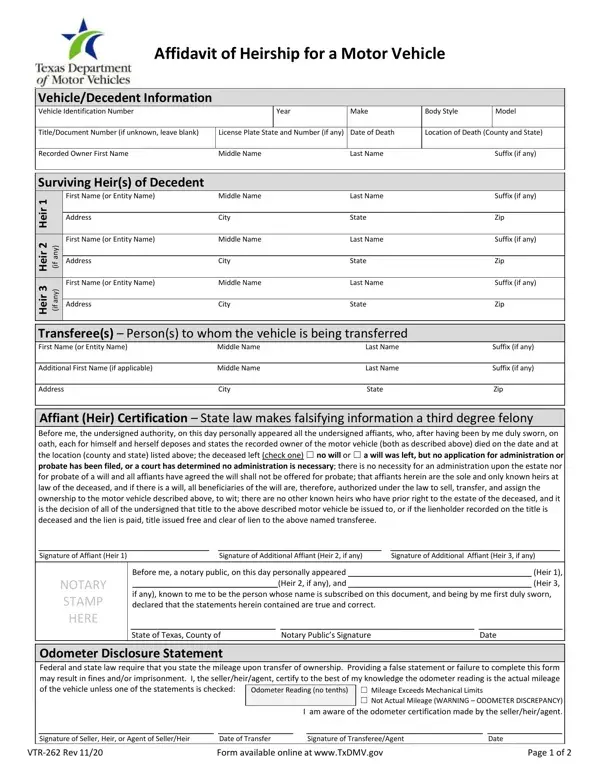
When someone passes away in Texas, transferring their motor vehicle to the surviving heirs can be a complex process, especially if the estate doesn't go through probate. This is where the Texas VTR-262 form, known as the Affidavit of Heirship for a Motor Vehicle, comes into play. It provides a streamlined way to transfer ownership of a vehicle when the original owner has died, addressing situations where there's no will, where a will isn't being probated, or when the probate court has ruled that no administration is necessary. The form requires detailed information about the deceased, the vehicle, and the heirs. This includes the vehicle identification number, make, model, and the heirs' details. It's crucial for all heirs up to three to sign the form in the presence of a notary, and it accommodates scenarios where a notary might not be able to witness all signatures at once. If more than three heirs exist, additional forms must be filled out. The document also covers the odometer disclosure requirement, which is necessary for the title transfer. Any discrepancy or change in the form must be clearly stated to avoid the need for completing a new form. The Texas VTR-262 is designed to make the transfer process as smooth as possible while ensuring that all legal requirements are met, making it a critical document for heirs to understand and complete correctly.
| Question | Answer |
|---|---|
| Form Name | Texas Form Vtr 262 |
| Form Length | 2 pages |
| Fillable? | No |
| Fillable fields | 0 |
| Avg. time to fill out | 30 sec |
| Other names | form vtr 262 texas, vtr 262 form texas, texas affidavit heirship motor vehicle, tx dot form vtr |
Texas Form Vtr 262 isn’t the one you’re looking for?