
Tk 21A Form PDF Details

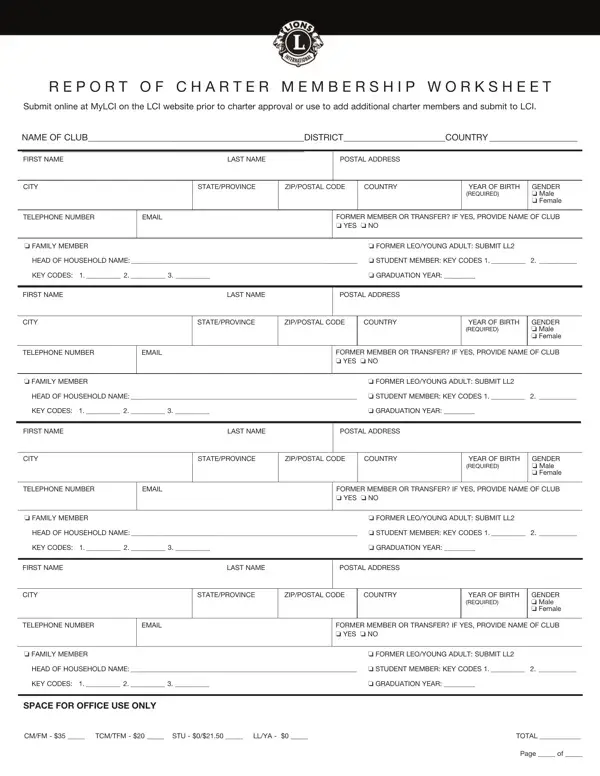
When it comes to fostering community engagement and facilitating membership in service-oriented clubs, structured yet flexible processes are crucial. The TK 21A form stands as a testament to this philosophy, serving a vital role in the charter membership registration within the Lions Clubs International (LCI). This form, available for submission online via the MyLCI platform or through direct submission to LCI, ensures that the foundational steps to establishing or expanding a club are both systematic and personalized. It collects essential information about each charter member, ranging from basic identification details to specific categorizations such as family and student memberships, thereby tailoring the membership to meet individual circumstances. The form takes into account various membership types, including transfer and family members, offering different dues arrangements and acknowledging the special status of former Leos and young adults through dues discounts or waivers. Additionally, it provides space for key codes that relate to verifying familial relationships and student status, which is indicative of LCI's commitment to a detailed and inclusive approach to membership categorization. This framework not only streamlines the process of adding new charter members but also highlights LCI's adaptive methodologies in growing its global community through tailored membership criteria, ensuring each member’s unique situation is recognized and accommodated.

QuestionAnswer
Form NameTk 21A Form
Form Length2 pages
Fillable?No
Fillable fields0
Avg. time to fill out30 sec
Other nameslions charter, charter lions codes, lions report members, report charter membership

How to Edit Tk 21A Form Online for Free

In case you desire to fill out tk21a, you won't need to download and install any software - just make use of our PDF editor. To retain our editor on the leading edge of practicality, we work to put into practice user-oriented capabilities and enhancements regularly. We are routinely thankful for any suggestions - play a pivotal role in revampimg how you work with PDF documents. With some easy steps, you may begin your PDF journey:

Step 1: Access the PDF file in our tool by hitting the "Get Form Button" above on this webpage.

Step 2: When you launch the tool, you'll notice the form all set to be filled in. In addition to filling in different fields, it's also possible to perform various other actions with the Document, including writing any text, modifying the initial text, inserting illustrations or photos, affixing your signature to the PDF, and a lot more.

As for the fields of this particular PDF, here's what you should know:

1. You'll want to fill out the tk21a properly, so pay close attention while filling in the segments containing all these fields:

charter application lions writing process explained (part 1)

2. Right after performing the last section, head on to the subsequent step and fill in the essential details in all these blanks - o FAMILY MEMBER, o FORMER LEOYOUNG ADULT SUBMIT LL, HEAD OF HOUSEHOLD NAME o STUDENT, KEY CODES, o GRADUATION YEAR, FIRST NAME LAST NAME POSTAL ADDRESS, CITY STATEPROVINCE ZIPPOSTAL CODE, REQUIRED, GENDER o Male o Female, TELEPHONE NUMBER, EMAIL, FORMER MEMBER OR TRANSFER IF YES, o FAMILY MEMBER, o FORMER LEOYOUNG ADULT SUBMIT LL, and HEAD OF HOUSEHOLD NAME o STUDENT.

charter application lions conclusion process detailed (step 2)

3. Through this part, look at FORMER MEMBER OR TRANSFER IF YES, o FAMILY MEMBER, o FORMER LEOYOUNG ADULT SUBMIT LL, HEAD OF HOUSEHOLD NAME o STUDENT, KEY CODES, o GRADUATION YEAR, SPACE FOR OFFICE USE ONLY, CMFM TCMTFM STU LLYA, TOTAL, and Page of. Each of these should be taken care of with utmost precision.

Filling out part 3 in charter application lions

In terms of TOTAL and FORMER MEMBER OR TRANSFER IF YES, make sure that you get them right in this current part. Both of these are surely the key ones in this document.

Step 3: Immediately after double-checking your entries, press "Done" and you are done and dusted! Join FormsPal right now and easily gain access to tk21a, all set for download. Each and every edit you make is handily saved , so that you can change the form at a later point if required. FormsPal guarantees safe document tools with no personal data record-keeping or distributing. Rest assured that your data is safe with us!