
TR-29 Form PDF Details

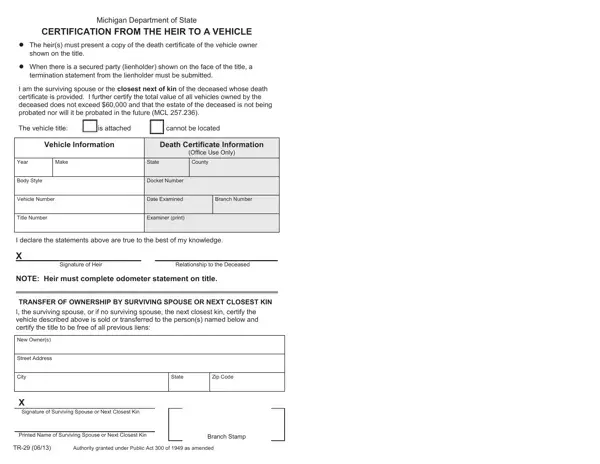
Navigating the aftermath of a loved one's death can be a challenging process, especially when it comes to legal and financial matters. Among these tasks is the transfer of vehicle ownership, which in Michigan, is facilitated by the TR-29 form. This document, a product of the Michigan Department of State, plays a crucial role for heirs seeking to change the title of vehicles left by the deceased. It necessitates presenting a copy of the death certificate of the vehicle's owner and, if there's a lienholder listed on the title, a termination statement from them must be provided too. The form is designed with specificity, allowing a surviving spouse or the closest next of kin to declare ownership under certain conditions, including an attestation that the total value of all vehicles owned by the deceased does not surpass $60,000, and that the deceased's estate will not undergo probate. Additionally, the TR-29 form serves as a vow by the heir that all information provided is accurate and that the vehicle is being transferred to a new owner, free of previous liens. This streamlined procedure is empowered by Public Act 300 of 1949, as amended, signifying the state's effort to simplify the transfer of ownership and help grieving families during difficult times.

QuestionAnswer
Form Name TR-29 Form
Form Length 1 pages
Fillable? No
Fillable fields 0
Avg. time to fill out 15 sec
Other names michigan department of state certification from the heir to a vehicle, tr 29, tr 29 michigan, tr 29 certification heir vehicle, certification from the heir to a vehicle

How to Edit TR-29 Form Online for Free

form tr 29 can be filled out online without any problem. Simply make use of FormsPal PDF tool to get it done in a timely fashion. FormsPal development team is constantly working to enhance the tool and enable it to be even easier for clients with its extensive functions. Capitalize on today's innovative prospects, and find a trove of emerging experiences! In case you are looking to start, here is what it takes:

Step 1: Click on the "Get Form" button above. It's going to open our editor so you can start completing your form.

Step 2: Using this handy PDF file editor, you may do more than simply complete blank form fields. Edit away and make your docs seem great with customized textual content added, or adjust the original input to excellence - all that supported by the capability to insert just about any images and sign the file off.

So as to finalize this PDF document, be sure to enter the required details in each blank:

1. First of all, once filling in the form tr 29, start out with the part containing following blanks:

Best ways to complete tr 29 stage 1

2. Your next step would be to complete all of the following blank fields: TRANSFER OF OWNERSHIP BY SURVIVING, Street Address, City, State, Zip Code, X Signature of Surviving Spouse or, Printed Name of Surviving Spouse, Authority granted under Public Act, and Branch Stamp.

tr 29 completion process detailed (portion 2)

Be really attentive while completing State and X Signature of Surviving Spouse or, as this is where most people make a few mistakes.

Step 3: Before finishing this document, check that all blank fields are filled out right. When you’re satisfied with it, click on “Done." Grab your form tr 29 after you register at FormsPal for a 7-day free trial. Conveniently gain access to the pdf file from your FormsPal account, along with any modifications and adjustments all saved! FormsPal is focused on the privacy of all our users; we always make sure that all personal data used in our editor remains confidential.