
Tr0100 Form PDF Details

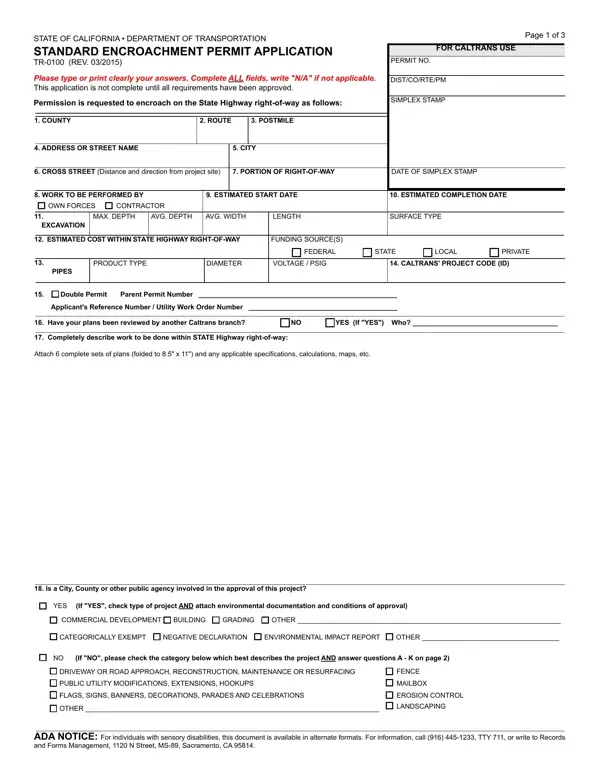
The Standard Encroachment Permit Application, denoted as TR-0100 and revised in March 2015 by the State of California Department of Transportation, is essential for anyone seeking permission to undertake work that would encroach upon State Highway rights-of-way. This detailed form is a crucial first step for projects encompassing a variety of improvements or constructions such as fence installation, mailbox placement, erosion control measures, landscaping, and more on or near state-managed roads. With clear instructions to type or print information clearly and complete all fields (marking those not applicable with "N/A"), the form underlines the necessity of a comprehensive application process. It requires applicants to provide specific information about the location of the proposed encroachment, nature and duration of the work, estimated costs, funding sources, and detailed descriptions of the work to be performed, alongside potential environmental impacts and compliance with the Americans with Disabilities Act (ADA). Furthermore, it encapsulates provisions regarding indemnification, compliance with stormwater and non-storm water discharge regulations under the National Pollutant Discharge Elimination System (NPDES), and the need for a permit as a non-transferrable right which emphasizes the gravity and responsibility entailed in applying for such permissions.

QuestionAnswer
Form NameTr0100 Form
Form Length3 pages
Fillable?No
Fillable fields0
Avg. time to fill out45 sec
Other namesenroachment permit application, tr 0100, enroachment permit, permit encroachment applicant

How to Edit Tr0100 Form Online for Free

Working with PDF files online is definitely a breeze with our PDF tool. Anyone can fill out enroachment application online here and use several other options we provide. FormsPal is aimed at giving you the absolute best experience with our editor by consistently introducing new capabilities and enhancements. Our tool is now even more useful as the result of the latest updates! Currently, working with PDF forms is a lot easier and faster than ever before. If you're seeking to get started, this is what you will need to do:

Step 1: Hit the "Get Form" button in the top part of this webpage to access our tool.

Step 2: Using this online PDF editing tool, you may do more than just fill in forms. Edit away and make your documents look great with customized text added, or optimize the file's original content to perfection - all comes with an ability to add your personal photos and sign it off.

This document will need some specific details; in order to guarantee correctness, make sure you adhere to the suggestions down below:

1. Start filling out the enroachment application online with a group of essential fields. Collect all of the required information and be sure absolutely nothing is missed!

Step no. 1 of filling out tr 0100

2. The third stage is usually to fill out the following blank fields: Is a City County or other public, YES, If YES check type of project AND, COMMERCIAL DEVELOPMENT, BUILDING, GRADING, OTHER, CATEGORICALLY EXEMPT, NEGATIVE DECLARATION, ENVIRONMENTAL IMPACT REPORT, OTHER, If NO please check the category, DRIVEWAY OR ROAD APPROACH, FENCE MAILBOX, and EROSION CONTROL LANDSCAPING.

A way to fill out tr 0100 part 2

As to If YES check type of project AND and CATEGORICALLY EXEMPT, ensure you do everything properly in this current part. These two are surely the most important ones in the form.

3. This subsequent part is pretty straightforward, STATE OF CALIFORNIA DEPARTMENT OF, PERMIT NO, The following questions must be, Your answers to these questions, It is the applicants, and A Will any existing vegetation - every one of these blanks has to be filled out here.

Guidelines on how to fill in tr 0100 stage 3

4. To move ahead, your next stage involves filling in several empty form fields. Included in these are A Will any existing vegetation, Will this project cause a, YES NO, Is this project on an existing, Is work being done on the, Will the proposed project require, YES NO, If YES attach complete sets of, and YES, which are crucial to continuing with this process.

Learn how to fill out tr 0100 portion 4

5. Because you get close to the last parts of the file, there are actually just a few extra points to complete. Notably, Will the proposed project require, YES, If YES estimate the area within, Will the proposed project require, If YES estimate total gallons AND, NONSTORM WATER, YES, STORM WATER, How will any storm water or, Storm Drain System Other explain, Combined Sewer Storm System, and Storm Water Retention Basin must all be filled out.

NONSTORM WATER, Will the proposed project require, and If YES estimate the area within inside tr 0100

Step 3: After going through your entries, press "Done" and you're done and dusted! Get hold of your enroachment application online when you register at FormsPal for a free trial. Conveniently gain access to the document within your FormsPal account page, with any modifications and adjustments automatically synced! FormsPal guarantees secure form completion without data record-keeping or any kind of sharing. Feel at ease knowing that your details are secure here!