Please rate Trustmark Benefit Claim Form Wellness Rider Claim Form (Rider) V06.2022S

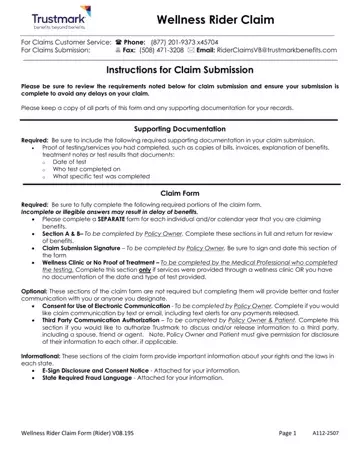
Filing a claim with Trustmark for wellness benefits requires attention to detail and adherence to specific instructions to ensure a smooth and efficient process. The Trustmark Benefit Claim form serves as a crucial document for policy owners seeking to claim benefits under their wellness rider. This comprehensive form mandates the inclusion of certain required sections and supporting documentation to prevent potential delays. Policy owners are asked to complete separate forms for each individual or calendar year for which they are claiming benefits, with sections A & B being specifically designed for policy owner information and claim details. Additionally, the form necessitates a signature to authenticate the claim submission. For situations where services were obtained through a wellness clinic or if there is no proof of treatment, a section is dedicated for completion by the medical professional who administered the testing. Trustmark also offers options for electronic communication consent and third-party communication authorization, allowing for a more tailored communication experience between the policy owner, Trustmark, and authorized third parties. Furthermore, the inclusion of an E-Sign Disclosure and Consent Notice ensures that policy owners are informed about electronic communications, whereas state-specific fraud warnings emphasize the legal implications of submitting false claims, ensuring policy owners are aware of the importance of accuracy in their submission.
| Question | Answer |
|---|---|
| Form Name | Trustmark Benefit Claim Form |
| Form Length | 8 pages |
| Fillable? | Yes |
| Fillable fields | 92 |
| Avg. time to fill out | 1 min 45 sec |
| Other names | trustmark wellness claim form, trustmark claims, trustmark voluntary benefit solutions wellness claim form, trustmark accident claim form |
Trustmark Benefit Claim Form isn’t the one you’re looking for?
Please rate Trustmark Benefit Claim Form Wellness Rider Claim Form (Rider) V06.2022S
