
Tt Form PDF Details

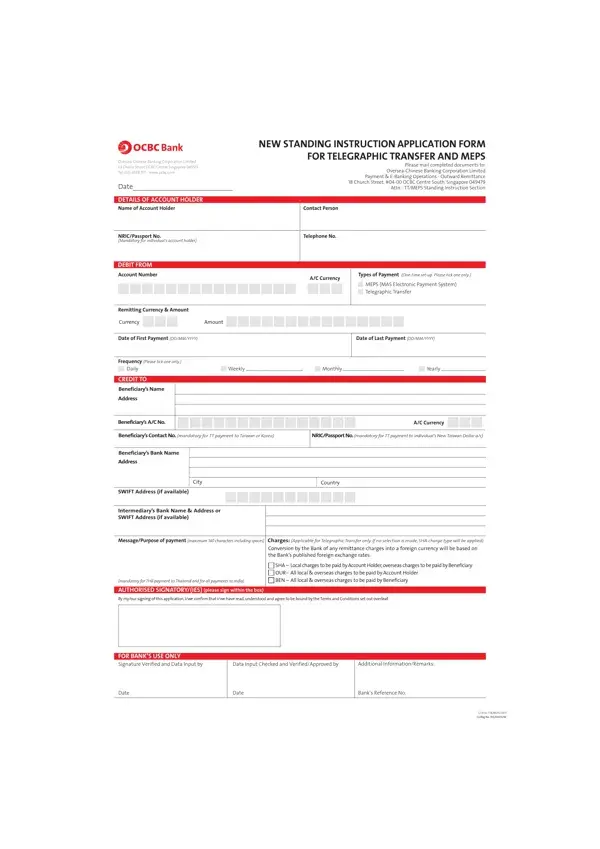
When it comes to managing finances across borders, paper trails and precise instructions become crucial for smooth transactions. Enter the Tt form, a comprehensive piece of documentation designed specifically for telegraphic transfers and MEPS (MAS Electronic Payment System) under the umbrella of the Oversea-Chinese Banking Corporation Limited (OCBC). This form serves as a new standing instruction application, clearly outlining the sender's intent, destination of funds, and specifics regarding the transaction frequency, amounts, and charges involved. It meticulously requires details of both the account holder and beneficiary, making sure every transaction is transparent and traceable. The form covers all bases from the type of payment, currency involved, dates of payment, to the method of handling transfer charges, ensuring that users are fully informed of their options and responsibilities. In addition, it provides a section for the authorised signatories, embedding a layer of security and consent into the process. This level of detail, structured into clear sections, not only streamlines the process for those involved but aligns with OCBC's adherence to regulations such as MAS Notice 626, aimed at thwarting money laundering and terrorist financing. With this form, OCBC assures that every telegraphic transfer or MEPS transaction is executed with precision, backed by informed consent of its clients.

QuestionAnswer
Form NameTt Form
Form Length2 pages
Fillable?No
Fillable fields0
Avg. time to fill out30 sec
Other namest t form, tt form rto pune, tt copy sample, tt form online

How to Edit Tt Form Online for Free

With the help of the online PDF editor by FormsPal, you are able to fill in or modify tt from here and now. Our development team is continuously working to enhance the editor and insure that it is much easier for people with its many functions. Take your experience to a higher level with continually growing and unique options we provide! By taking some easy steps, you can start your PDF journey:

Step 1: Press the "Get Form" button at the top of this webpage to get into our PDF tool.

Step 2: This tool provides you with the capability to work with your PDF document in many different ways. Modify it by writing customized text, correct what is originally in the PDF, and put in a signature - all close at hand!

To be able to fill out this document, be sure you enter the necessary details in every area:

1. You need to fill out the tt from correctly, thus pay close attention when filling in the areas that contain these particular blank fields:

Step # 1 in submitting tt form

2. Once your current task is complete, take the next step – fill out all of these fields - Frequency Please tick one only, Daily, CREDIT TO, Beneficiarys Name, Address, Beneficiarys AC No, Weekly, Monthly, Yearly, AC Currency, Beneficiarys Contact No mandatory, NRICPassport No mandatory for TT, Beneficiarys Bank Name, Address, and City with their corresponding information. Make sure to double check that everything has been entered correctly before continuing!

Part # 2 in filling in tt form

3. Completing mandatory for THB payment to, AUTHORISED SIGNATORYIES please, SHA Local charges to be paid by, By myour signing of this, FOR BANKS USE ONLY Signature, Data Input Checked and, Additional InformationRemarks, Date, Date, Banks Reference No, and GTBSITTMEPS CoRegNo W is essential for the next step, make sure to fill them out in their entirety. Don't miss any details!

Step no. 3 for submitting tt form

Always be very mindful while filling in SHA Local charges to be paid by and GTBSITTMEPS CoRegNo W, since this is the section where a lot of people make some mistakes.

Step 3: After looking through the fields, click "Done" and you're good to go! Sign up with FormsPal today and easily access tt from, all set for download. All alterations you make are saved , which means you can customize the file later on if needed. Here at FormsPal, we do our utmost to make sure that all of your details are kept private.