
Ttb F 5000 8 Form PDF Details

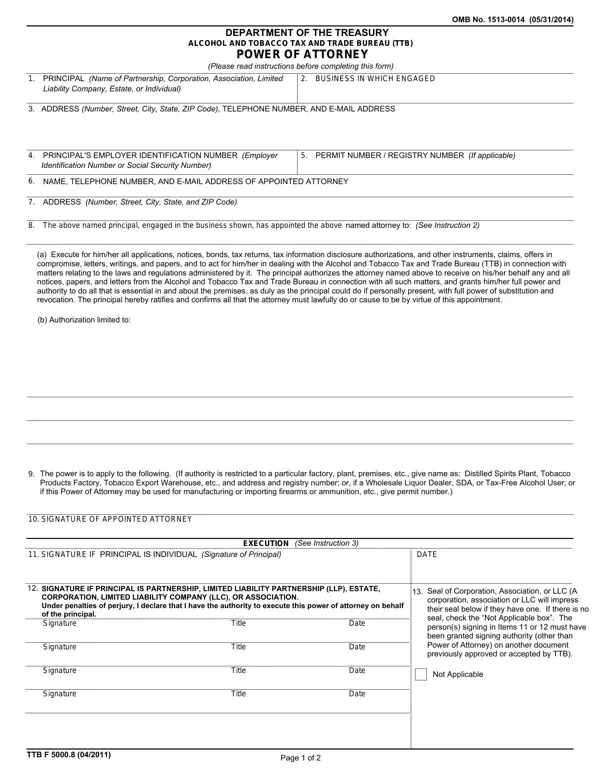
In the complex world of regulatory compliance, understanding the specific requirements and procedures for granting authority to another party is crucial, especially for businesses involved in industries regulated by the Alcohol and Tobacco Tax and Trade Bureau (TTB). One such procedural requisite is encapsulated in the TTB F 5000.8 form, also known as the Power of Attorney form. This form serves as a legal document through which a principal—whether an individual or an entity like a partnership, corporation, association, limited liability company, or estate—can appoint an attorney to act on their behalf in matters related to the TTB. The form outlines key details such as the principal’s information, the nature of the business, and the scope of authority granted to the appointed attorney, including but not limited to executing applications, tax returns, and other important documents, or acting in dealings with the TTB. Furthermore, the form requires information about the attorney’s qualifications and acknowledgments of their ability to act, ensuring that the appointed representatives are duly authorized and capable. Completion and submission of this document are critical steps for entities seeking to ensure their affairs are managed efficiently and in compliance with TTB regulations, highlighting the importance of understanding the TTB F 5000.8 form’s provisions, execution, and filing procedures.

QuestionAnswer
Form NameTtb F 5000 8 Form
Form Length2 pages
Fillable?No
Fillable fields0
Avg. time to fill out30 sec
Other nameshow to f power attorney, ttb application, dot form ttb f 5000 8, form 5000 8

How to Edit Ttb F 5000 8 Form Online for Free

Using PDF documents online is easy with our PDF editor. Anyone can fill out ttb applicable here painlessly. Our tool is constantly evolving to give the best user experience possible, and that's due to our dedication to continual enhancement and listening closely to customer opinions. To start your journey, consider these basic steps:

Step 1: Click the orange "Get Form" button above. It'll open our pdf editor so you can start filling in your form.

Step 2: As you launch the editor, you'll notice the document ready to be completed. Apart from filling out various blanks, it's also possible to do various other things with the PDF, that is writing any textual content, editing the original text, inserting images, signing the form, and more.

This document requires some specific details; to ensure consistency, don't hesitate to adhere to the subsequent tips:

1. The ttb applicable will require specific information to be typed in. Make sure the following fields are filled out:

Completing segment 1 of ttb 5000 8

2. After this part is completed, it is time to insert the essential specifics in The power is to apply to the, SIGNATURE OF APPOINTED ATTORNEY, SIGNATURE IF PRINCIPAL IS, DATE, EXECUTION See Instruction, SIGNATURE IF PRINCIPAL IS, Date, Title, Signature, Title, Date, and Seal of Corporation Association or so you can progress further.

The power is to apply to the, SIGNATURE OF APPOINTED ATTORNEY, and Seal of Corporation Association or inside ttb 5000 8

As for The power is to apply to the and SIGNATURE OF APPOINTED ATTORNEY, make certain you take a second look in this current part. These are viewed as the key ones in this page.

3. Completing Signature, Signature, Signature, Title, Title, Title, Date, Date, Date, TTB F, Page of, Seal of Corporation Association or, and Not Applicable is essential for the next step, make sure to fill them out in their entirety. Don't miss any details!

A way to prepare ttb 5000 8 part 3

4. This specific subsection arrives with the next few blanks to consider: The abovenamed persons signing as, Signature of Notary or Other, Signature of Witness, NOTARIAL SEAL, If required, Date, Title, Signature of Witness, Date, Date, c DECLARATION by attorney or, I declare that I am aware of the, A member in good standing of the, Qualified to practice as a, and Insert Name of State Possession or.

ttb 5000 8 writing process described (part 4)

Step 3: Glance through all the details you've typed into the form fields and click on the "Done" button. Sign up with us today and easily get ttb applicable, set for download. All changes you make are saved , which means you can change the form at a later time when required. FormsPal guarantees protected form tools without data recording or sharing. Be assured that your information is in good hands with us!