
UPS Store Application For Employment Form PDF Details

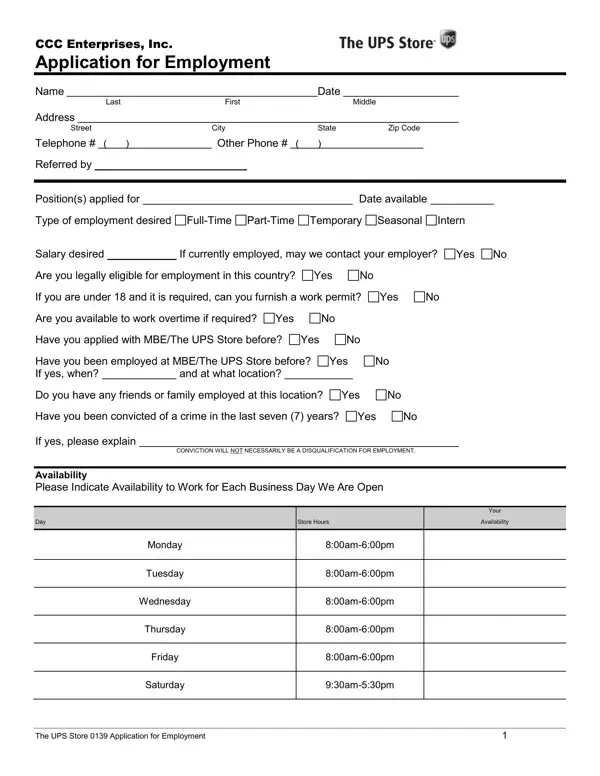
Filling out an employment application for CCC Enterprises, Inc., particularly for a position at The UPS Store, signifies a crucial first step towards securing employment within the company—a step replete with various elements aspiring applicants must navigate. The application comprehensively requests personal information, ranging from basic contact details to legal eligibility for employment in the country. It inquires whether the applicant has previously sought or held employment with MBE/The UPS Store, thereby understanding the applicant's history and affinity with the company. Furthermore, the form touches on crucial points such as the availability to work overtime, the type of employment sought (full-time, part-time, temporary, seasonal, intern), and salary expectations—elements that align the candidate’s desires with organizational needs. Legal questions concerning the applicant’s ability to furnish a work permit if under 18 and whether they have been convicted of a crime in the past seven years are also asked, ensuring compliance with labor regulations. Educational background and employment history sections seek detailed information about the applicant's qualifications, experiences, and professional journey, while a section for references ensures that the employer has the means to verify the applicant's character and work ethic. The form concludes with a certification by the applicant that all information provided is accurate, alongside a clause about the at-will nature of any resulting employment. This application not only serves as a gateway to potential employment but also embodies a meticulous process by which CCC Enterprises, Inc. vets candidates, emphasizing the importance of truthfulness, qualifications, and legal eligibility in their hiring process.

QuestionAnswer
Form Name UPS Store Application For Employment Form
Form Length 3 pages
Fillable? No
Fillable fields 0
Avg. time to fill out 45 sec
Other names ups application form online, ups application form pdf, ups store employment, ups store jobs

How to Edit UPS Store Application For Employment Form Online for Free

Dealing with PDF files online is always super easy with this PDF tool. Anyone can fill in ups store application here without trouble. To make our editor better and easier to work with, we continuously implement new features, considering suggestions from our users. All it requires is just a few basic steps:

Step 1: Firstly, open the pdf tool by clicking the "Get Form Button" at the top of this page.

Step 2: With our advanced PDF file editor, you can actually accomplish more than just fill out blanks. Express yourself and make your docs seem great with custom textual content incorporated, or optimize the file's original content to excellence - all comes along with the capability to insert your personal images and sign it off.

This PDF doc will require you to provide some specific details; to ensure consistency, please consider the recommendations just below:

1. Complete the ups store application with a group of necessary blanks. Collect all of the required information and make certain not a single thing missed!

Find out how to complete ups store application online stage 1

2. Just after completing the previous step, head on to the next step and fill out the necessary details in all these fields - Positions applied for Type of, CONVICTION WILL NOT NECESSARILY BE, Store Hours, Your, Availability, Monday, Tuesday, ampm, ampm, Wednesday, ampm, Thursday, Friday, ampm, and ampm.

Tips on how to fill out ups store application online stage 2

A lot of people frequently get some things wrong while filling out ampm in this section. Remember to revise everything you type in here.

3. Completing SCHOOL, CITY STATE, GRADUATED, EARNED, Yes No, Yes No, Yes No, EMPLOYMENT BACKGROUND Provide the, TELEPHONE, DATES EMPLOYED, SUMMARIZE THE TYPE OF WORK, FROM, PERFORMED AND JOB RESPONSIBILITIES, EMPLOYER, and ADDRESS is essential for the next step, make sure to fill them out in their entirety. Don't miss any details!

Writing section 3 of ups store application online

4. Filling in EMPLOYER, ADDRESS, JOB TITLE, IMMEDIATE SUPERVISOR AND TITLE, REASON FOR LEAVING, MAY WE CONTACT FOR REFERENCE, Yes No, Later, TELEPHONE, DATES EMPLOYED, FROM, HOURLY RATESALARY, STARTING, per, and HOURLY RATESALARY is paramount in this stage - be sure to take the time and be mindful with each empty field!

Filling out section 4 of ups store application online

5. This pdf must be finalized by filling in this part. Here there is an extensive set of fields that have to be filled in with appropriate information for your form submission to be faultless: NAME, RELATIONSHIP, ACQUAINTED, NUMBER, OTHER QUALIFICATIONS List any, Languages Spoken Computer, and Other.

How to fill in ups store application online part 5

Step 3: As soon as you've reread the information entered, click on "Done" to finalize your form at FormsPal. Sign up with us right now and easily get ups store application, ready for downloading. Every last edit made is conveniently preserved , making it possible to customize the pdf at a later stage when necessary. FormsPal ensures your information confidentiality by using a protected method that in no way saves or shares any kind of personal information involved in the process. You can relax knowing your paperwork are kept protected every time you work with our editor!