
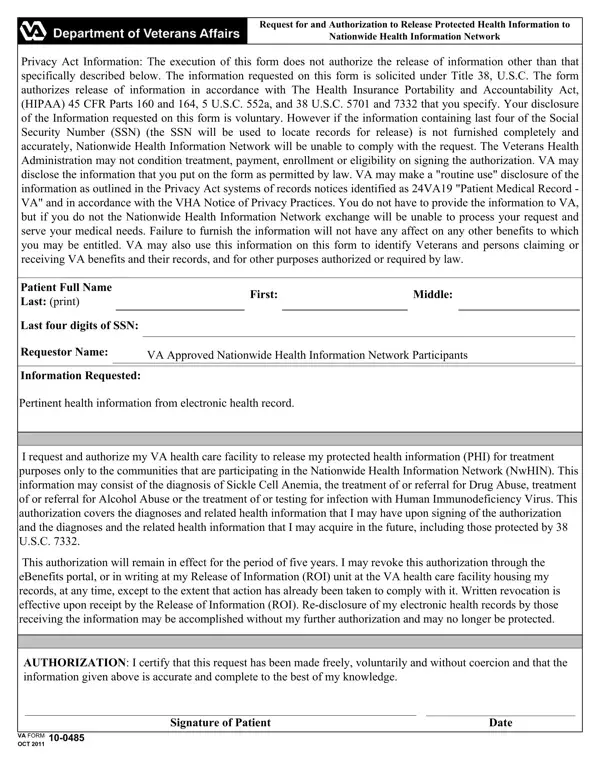
The VA Form 10-0485 is a crucial document for veterans seeking to authorize the release of their Protected Health Information (PHI) through the Nationwide Health Information Network (NwHIN). This form plays a pivotal role in specifying the type of health information that can be shared, ensuring that the release complies with both the Health Insurance Portability and Accountability Act (HIPAA) and relevant sections of the United States Code. It collects essential details such as the patient's name, the last four digits of their Social Security Number, and the specific health information requested for release. The form also outlines the rights of veterans in the process, emphasizing that providing information is voluntary but necessary for the NwHIN to process requests effectively. Furthermore, it reassures veterans that their decision to provide information will not affect their eligibility for other benefits and highlights the conditions under which the VA may disclose the information. The authorization is valid for five years, with provisions for revocation by the veteran at any time through specified channels. This document ensures veterans' informed participation in the Nationwide Health Information Network, fostering a smoother exchange of vital health information for treatment purposes while safeguarding their privacy rights.
| Question | Answer |
|---|---|
| Form Name | Va Form 10 0485 |
| Form Length | 1 pages |
| Fillable? | No |
| Fillable fields | 0 |
| Avg. time to fill out | 15 sec |
| Other names | 24VA19, HIPAA, va form 10 0485, Requestor |
Va Form 10 0485 isn’t the one you’re looking for?