
VA Form 10-0539 PDF Details

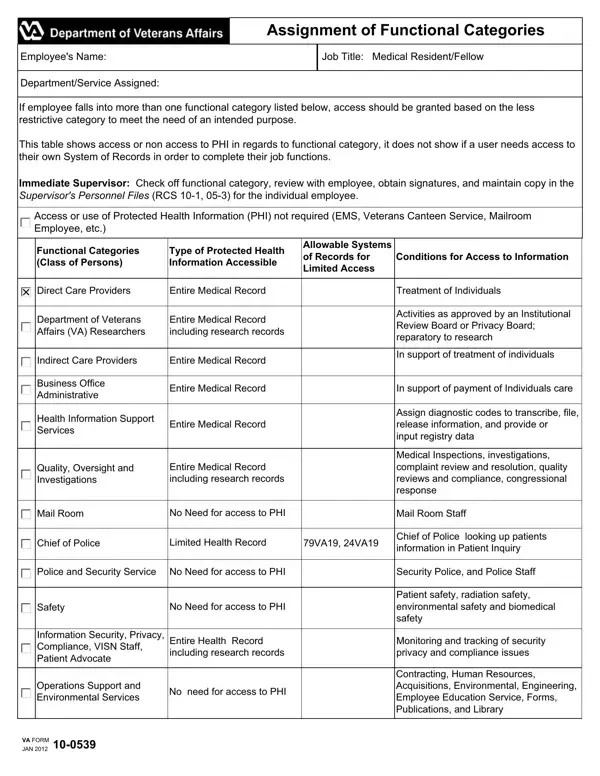
The VA Form 10-0539, integral to the administration of medical and supportive roles within the Department of Veterans Affairs (VA), delineates the assignment of functional categories for employees, underscoring the governance of access or non-access to Protected Health Information (PHI). Tailored primarily for Medical Residents/Fellows, the form meticulously outlines the procedures for determining the level of information accessibility based on the employee's role, ranging from direct care providers with entire medical record access for treatment purposes to non-health roles like the Veterans Canteen Service with no need for PHI access. It acts as a compliance tool to ensure that information access is strictly aligned with the operational needs and privacy regulations. By categorizing employees and specifying allowable systems of records, it provides a structured approach to PHI access, thereby preventing unauthorized viewing or handling. Supervisors play a crucial role, tasked with reviewing, obtaining signatures, and maintaining these records, ensuring that access rights are appropriately assigned and documented, further emphasizing the VA's commitment to safeguarding veterans' health information while facilitating care and administrative functions. The form's significance extends beyond mere documentation; it embodies a conscious effort to balance the need for information in providing care and support with the imperative of preserving confidentiality and privacy.

QuestionAnswer
Form NameVA Form 10-0539
Form Length2 pages
Fillable?Yes
Fillable fields1
Avg. time to fill out42 sec
Other namesva form 10 0539 fillable, assignment of functional categories form oct 2018, va form 10 0359, va 10 539

How to Edit VA Form 10-0539 Online for Free

You'll be able to fill out assignment of functional categories form oct 2018 effectively with the help of our PDFinity® online PDF tool. The editor is consistently upgraded by us, acquiring new functions and becoming better. Here is what you'd want to do to start:

Step 1: First of all, open the editor by clicking the "Get Form Button" at the top of this page.

Step 2: The tool will let you customize PDF forms in a range of ways. Transform it with customized text, adjust original content, and put in a signature - all at your disposal!

This form will require specific details to be entered, hence you must take the time to enter what is required:

1. The assignment of functional categories form oct 2018 usually requires specific details to be entered. Be sure that the next blanks are filled out:

Step no. 1 in filling in electronic va form 10 0539

2. When this section is done, you're ready insert the essential details in Indirect Care Providers, Entire Medical Record, In support of treatment of, Business Office Administrative, Entire Medical Record, In support of payment of, Health Information Support Services, Entire Medical Record, Quality Oversight and, Entire Medical Record including, Assign diagnostic codes to, Medical Inspections investigations, Mail Room, No Need for access to PHI, and Mail Room Staff so you're able to proceed to the third stage.

electronic va form 10 0539 conclusion process described (part 2)

3. This third part is generally hassle-free - complete all the form fields in Operations Support and, No need for access to PHI, VA FORM, JAN, and Contracting Human Resources in order to complete this process.

Find out how to complete electronic va form 10 0539 portion 3

4. To go forward, this next stage requires completing a couple of blank fields. Examples of these are Leadership and Management, Limited access where necessary to, VA VA VA and any other system of, Operation and management executive, Non Health Information, Limited Health Record where, Administrative Support medical, Eligibility and Enrollment Staff, Information Technology, Limited Health Record where, VA VA VA and any other system of, For enrollment eligibility income, Computer Systems Maintenance and, Veterans Canteen Service, and No need for access to PHI, which are integral to continuing with this document.

Filling in part 4 in electronic va form 10 0539

People frequently make mistakes while completing Limited Health Record where in this part. Remember to re-examine what you enter right here.

5. Finally, the following final subsection is what you have to finish before closing the PDF. The fields at issue include the following: By signing this document I, Employees Signature, Supervisors Signature, Date, Date, Interim Review for Position Change, Interim Review for Job Assignment, The following changes have been, No changes made functional, Employees Signature, Supervisors Signature, Date, and Date.

electronic va form 10 0539 completion process shown (part 5)

Step 3: After going through your form fields, press "Done" and you are all set! Join FormsPal right now and easily obtain assignment of functional categories form oct 2018, all set for download. All changes made by you are preserved , making it possible to modify the document later when necessary. FormsPal provides secure form tools without personal data recording or sharing. Be assured that your details are secure with us!