

VA Form 21-22 at a glance
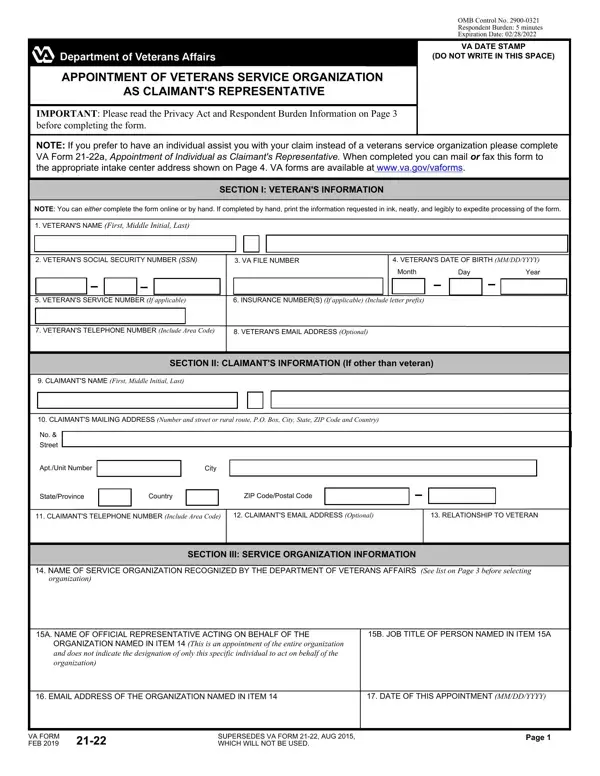
What it is: VA Form 21-22 is the Appointment of Veterans Service Organization as Claimant's Representative.
Who signs: This power of attorney does not require execution before a notary public.
The claimant named in Items 1 or 10 appoints the service organization named in Item 15 as representative to prepare, present and prosecute claims for any and all benefits from the Department of Veterans Affairs (VA) based on the service of the veteran named in Item 1.
A filled-in VA Form 21-22 example: a veteran appoints a service organization
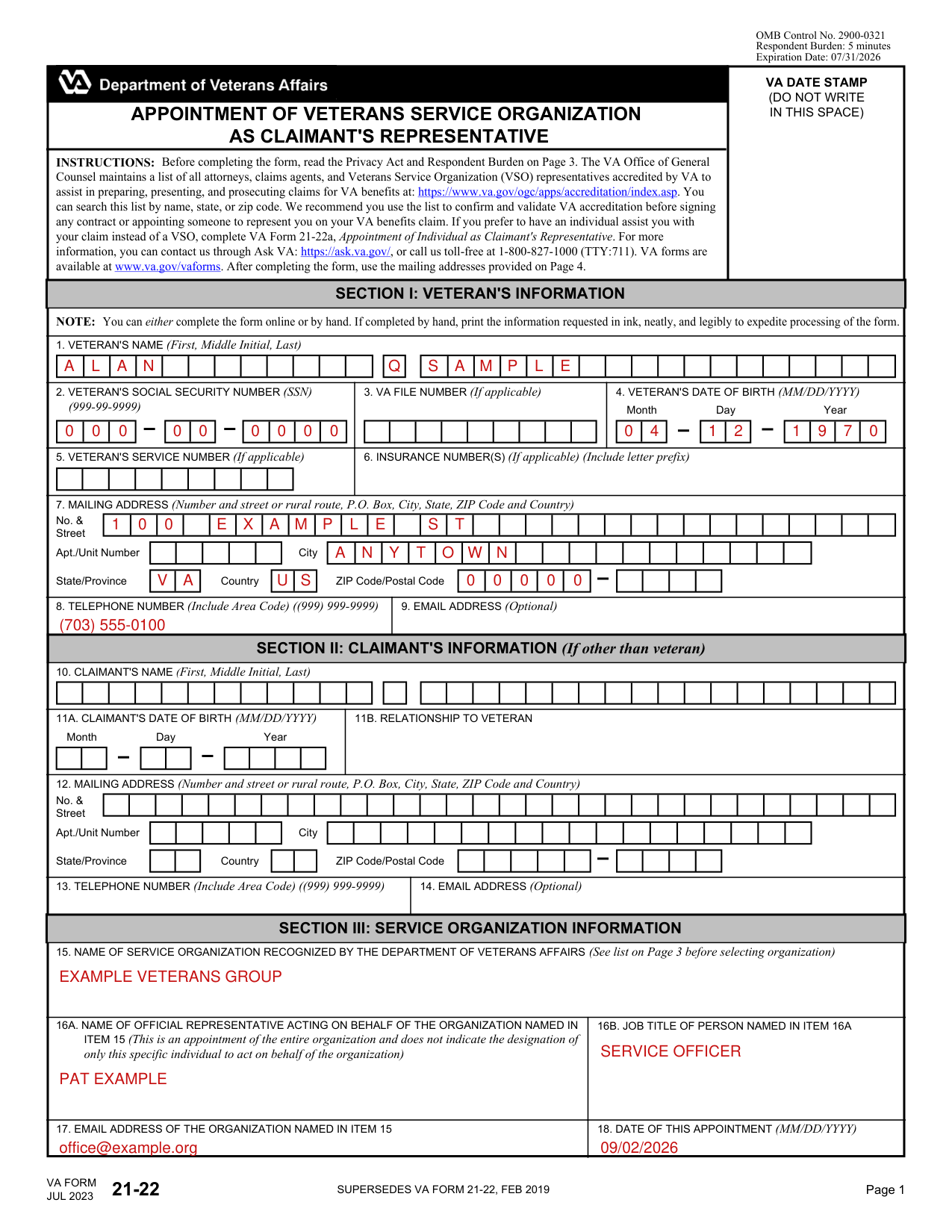
How to fill out VA Form 21-22, box by box
Section I: The veteran, Boxes 1 to 9
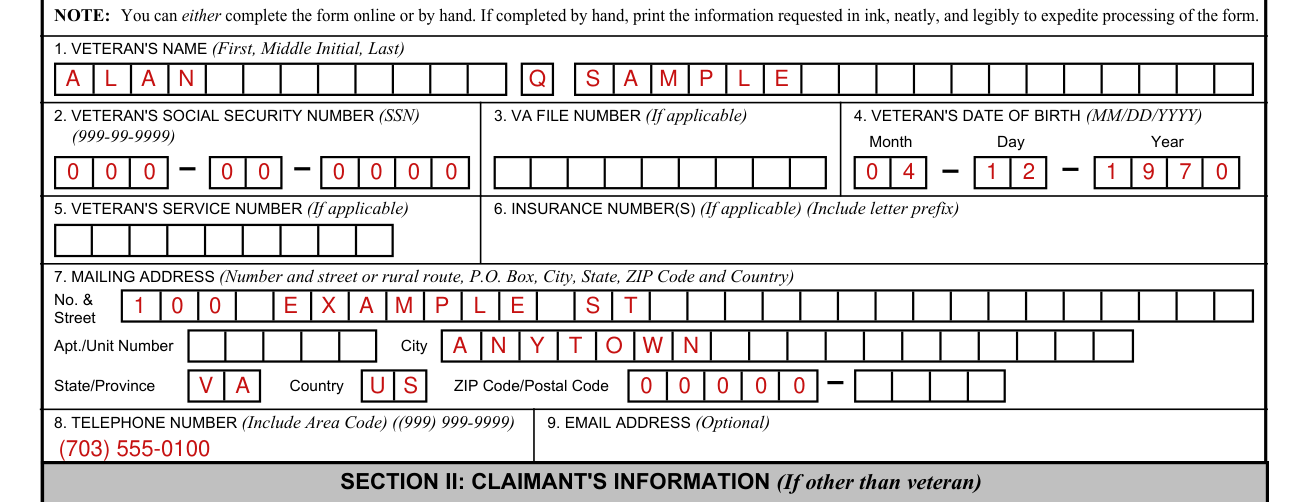
Enter the veteran's name (First, Middle Initial, Last) in Box 1.
In Box 2, enter the veteran's social security number (SSN) (999-99-9999).
In Box 3, enter the VA file number (If applicable). In Box 4, enter the veteran's date of birth (MM/DD/YYYY).
In Box 5, enter the veteran's service number (If applicable). In Box 6, enter the insurance number(s) (If applicable) (Include letter prefix).
In Box 7, enter the mailing address (Number and street or rural route, P.O. Box, City, State, ZIP Code and Country).
In Box 8, enter the telephone number (Include Area Code) ((999) 999-9999). In Box 9, enter the email address (Optional).
Section II: The claimant (If other than veteran), Boxes 10 to 14
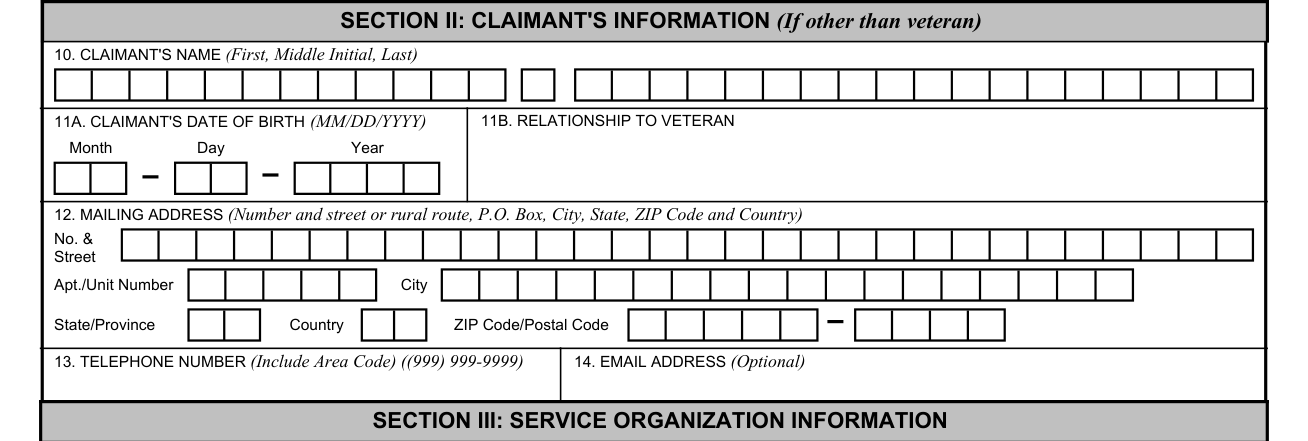
In Section II, Claimant's Information (If other than veteran), enter the claimant's name (First, Middle Initial, Last) in Box 10.
In Section II (If other than veteran), enter the claimant's date of birth (MM/DD/YYYY) in Box 11A and the claimant's relationship to the veteran in Box 11B.
In Section II (If other than veteran), enter the claimant's mailing address in Box 12 (Number and street or rural route, P.O. Box, City, State, ZIP Code and Country).
In Section II (If other than veteran), enter the claimant's telephone number in Box 13 (Include Area Code) ((999) 999-9999) and the claimant's email address in Box 14 (Optional).
Section III: Service organization, Boxes 15 to 18
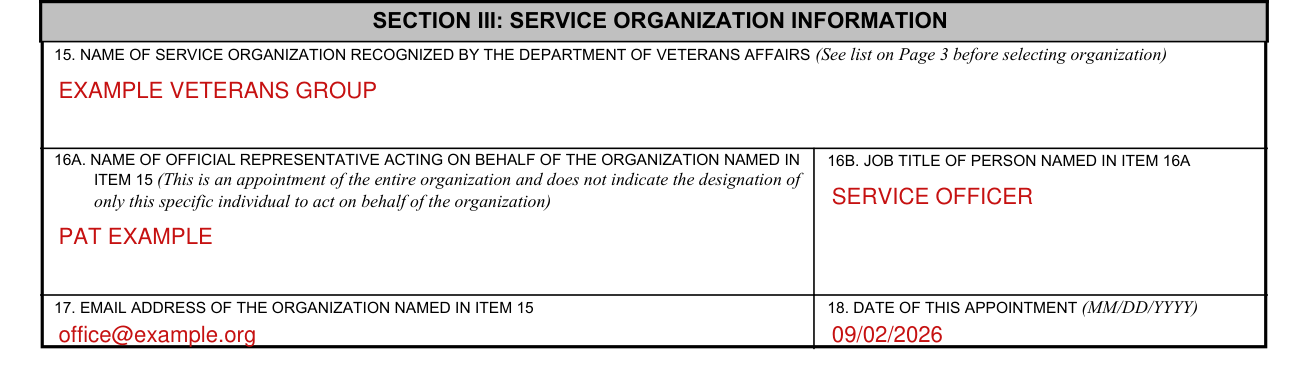
Before completing the form, read the Privacy Act and Respondent Burden on Page 3. The VA Office of General Counsel maintains a list of all attorneys, claims agents, and Veterans Service Organization (VSO) representatives accredited by VA to assist in preparing, presenting, and prosecuting claims for VA benefits. You can search this list by name, state, or zip code. VA recommends you use the list to confirm and validate VA accreditation before signing any contract or appointing someone to represent you on your VA benefits claim. If you prefer to have an individual assist you with your claim instead of a VSO, complete VA Form 21-22a, Appointment of Individual as Claimant's Representative. For more information, you can contact VA through Ask VA, or call VA toll-free at 1-800-827-1000 (TTY:711). VA forms are available at www.va.gov/vaforms. After completing the form, use the mailing addresses provided on Page 4.
In Box 15, enter the name of the service organization recognized by the Department of Veterans Affairs (See list on Page 3 before selecting organization).
Membership in an organization is not a prerequisite to appointment of the organization as claimant's representative.
In Box 16A, enter the name of the official representative acting on behalf of the organization named in Item 15. This is an appointment of the entire organization and does not indicate the designation of only this specific individual to act on behalf of the organization.
In Box 16B, enter the job title of the person named in Item 16A.
In Box 17, enter the email address of the organization named in Item 15. In Box 18, enter the date of this appointment (MM/DD/YYYY).
Section IV: Authorization, Boxes 19 to 21
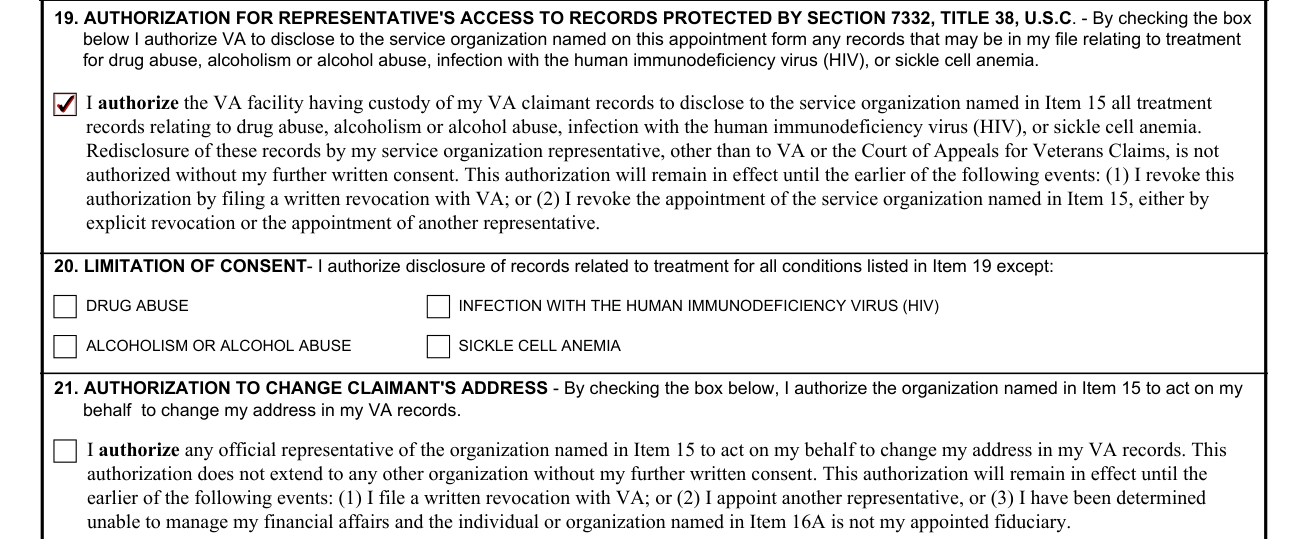
Box 19 is the AUTHORIZATION FOR REPRESENTATIVE'S ACCESS TO RECORDS PROTECTED BY SECTION 7332, TITLE 38, U.S.C. By checking the box, you authorize VA to disclose to the service organization named on this appointment form any records that may be in your file relating to treatment for drug abuse, alcoholism or alcohol abuse, infection with the human immunodeficiency virus (HIV), or sickle cell anemia. You authorize the VA facility having custody of your VA claimant records to disclose all treatment records relating to drug abuse, alcoholism or alcohol abuse, infection with the human immunodeficiency virus (HIV), or sickle cell anemia to the service organization named in Item 15.
Redisclosure of these records by your service organization representative, other than to VA or the Court of Appeals for Veterans Claims, is not authorized without your further written consent.
In Item 20, LIMITATION OF CONSENT, you authorize disclosure of records related to treatment for all conditions listed in Item 19 except those you check: drug abuse, infection with the human immunodeficiency virus (HIV), alcoholism or alcohol abuse, or sickle cell anemia.
Box 21, AUTHORIZATION TO CHANGE CLAIMANT'S ADDRESS: by checking the box, you authorize the organization named in Item 15 to act on your behalf to change your address in your VA records.
The Box 21 authorization does not extend to any other organization without your further written consent.
Section V: Signatures, Boxes 22 and 23
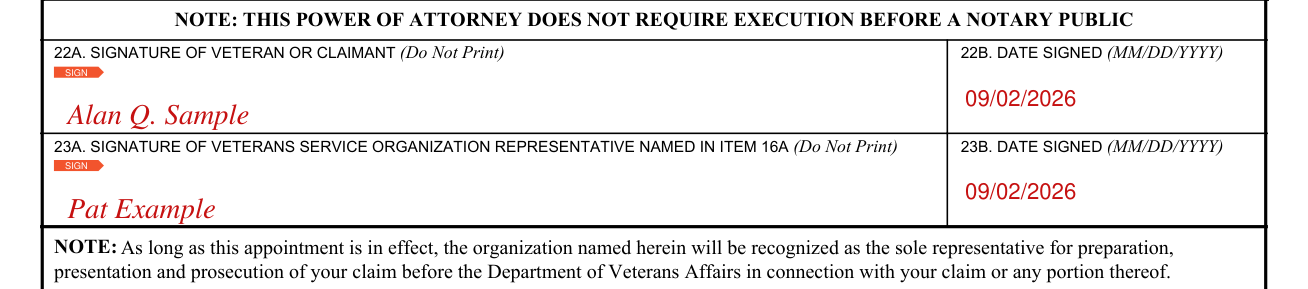
Box 22A is the SIGNATURE OF VETERAN OR CLAIMANT (Do Not Print): the veteran or claimant signs there. In Box 22B, enter the date signed (MM/DD/YYYY).
Box 23A is the SIGNATURE OF VETERANS SERVICE ORGANIZATION REPRESENTATIVE NAMED IN ITEM 16A (Do Not Print): that representative signs there. In Box 23B, enter the date signed (MM/DD/YYYY).
In signing, you authorize VA to release any and all of your records, to include disclosure of your Federal tax information (other than as provided in Items 19 and 20), to your appointed service organization.
Signed and accepted subject to the conditions in Section IV.
In some cases a veteran's income is developed because a match with the Internal Revenue Service necessitated income verification. In such cases, the assignment of the service organization as the veteran's representative is valid for only five years from the date the claimant signs this form for purposes restricted to the verification match.
As long as this appointment is in effect, the organization named in the appointment will be recognized as the sole representative for preparation, presentation and prosecution of your claim before the Department of Veterans Affairs in connection with your claim or any portion thereof.
More rules for VA Form 21-22
You can either complete the form online or by hand. If completed by hand, print the information requested in ink, neatly, and legibly to expedite processing of the form.
Common questions about VA Form 21-22
What does VA form 21/22 do?
VA needs this information to recognize the service organization you name to act on your behalf in the preparation, presentation, and prosecution of claims for VA benefits (38 U.S.C. 5902).
Does it need a notary?
This power of attorney does not require execution before a notary public.
Where do I file it?
Documents may be submitted by mail, in person at a VA regional office or electronically. VA recommends submitting correspondence electronically as this is the fastest method of receipt. If you prefer to mail your correspondence, please use the related mailing address. For compensation claims, use Department of Veterans Affairs Evidence Intake Center, PO Box 4444, Janesville, WI 53547-4444. For pension & survivors benefit claims, use Department of Veterans Affairs Pension Intake Center, PO Box 5365, Janesville, WI 53547-5365. For fiduciary, use Department of Veterans Affairs Fiduciary Intake, PO Box 95211, Lakeland, FL 33804-5211. For Board of Veterans' Appeals, use Department of Veterans Affairs Board of Veterans' Appeals, PO Box 27063, Washington, DC 20038. These addresses serve all United States and foreign locations.
Are there fees?
Your appointed representative will not charge any fee or compensation for service rendered pursuant to this appointment.
Is there a penalty?
The law provides severe penalties which include fine or imprisonment, or both, for the willful submission of any statement of a material fact, knowing it to be false or for the fraudulent acceptance of any payment to which you are not entitled.
Sources
[1] VA Form 21-22 (JUL 2023), Appointment of Veterans Service Organization as Claimant's Representative, U.S. Department of Veterans Affairs (the Official source link on this page).