
Va Form 21 601 PDF Details

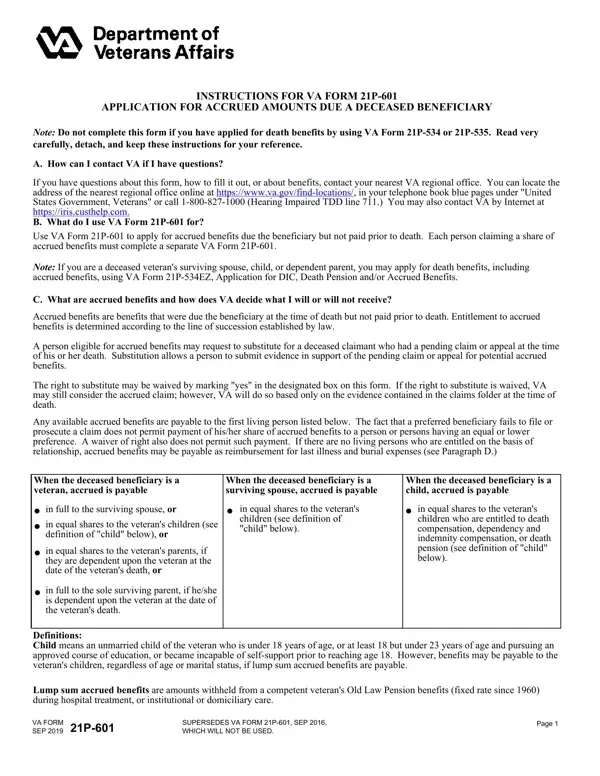
When a beneficiary of the Department of Veterans Affairs (VA) benefits passes away before their benefits are fully disbursed, the VA Form 21P-601, also known as the Application for Accrued Amounts Due a Deceased Beneficiary, serves as a critical tool for families and dependents to apply for these accrued benefits. This form guides applicants through the process of claiming benefits that were owed but not paid out before the beneficiary's death. It is important for each claimant seeking a share of these accrued benefits to complete a separate VA Form 21P-601, ensuring that the VA can accurately determine eligibility and distribute benefits in accordance with the law. The form also offers a pathway for substitution, allowing an eligible person to continue a pending claim or appeal on behalf of the deceased, which can significantly impact the benefits received. Furthermore, in situations where no eligible relatives are alive, the form provides means to apply for reimbursement for expenses related to the last illness and burial of the beneficiary. This introduction to the form highlights the necessity of familiarizing oneself with its sections, from contact information and basic instructions to details on submitting a claim and supporting evidence. The urgency in filing, coupled with an understanding of the eligibility conditions and required documentation, can help claimants navigate this process more smoothly, ensuring that they receive the benefits to which they are entitled without unnecessary delay.

QuestionAnswer
Form NameVa Form 21 601
Form Length5 pages
Fillable?No
Fillable fields0
Avg. time to fill out1 min 15 sec
Other namesva form 21 601, 21p 601 form, i use 601 form, you 601 fillable form

How to Edit Va Form 21 601 Online for Free

You are able to prepare 21 601 effortlessly by using our PDFinity® PDF editor. To maintain our editor on the forefront of convenience, we aim to put into practice user-driven capabilities and enhancements regularly. We are routinely grateful for any feedback - play a pivotal role in reshaping the way you work with PDF docs. By taking a few easy steps, you are able to begin your PDF editing:

Step 1: Click on the "Get Form" button in the top area of this webpage to open our PDF editor.

Step 2: As soon as you open the PDF editor, you will get the document made ready to be filled in. In addition to filling out various fields, you could also do several other actions with the file, namely adding any text, modifying the initial text, adding images, putting your signature on the PDF, and much more.

Filling out this PDF will require focus on details. Make sure all necessary blanks are filled in properly.

1. First, when completing the 21 601, start in the form section that contains the next blank fields:

The best way to complete gov do accrued step 1

2. Immediately after this section is filled out, proceed to type in the relevant information in these - CLAIMANTS TELEPHONE NUMBER, CLAIMANTS RELATIONSHIP TO, WHO ARE THE DECEASED BENEFICIARYS, SPOUSE, CHILD OR CHILDREN See instructions, PARENT, NONE If NONE Skip to Question, SECTION II DECEASED BENEFICIARYS, RELATIVES SURVIVING BENEFICIARY, A NAME, First Middle Initial Last, B RELATIONSHIP TO, C DATE OF BIRTH, BENEFICIARY, and MMDDYYYY.

gov do accrued writing process detailed (portion 2)

3. In this specific part, review WOULD YOU LIKE TO WAIVE, YES, NO If YES see Paragraph C of the, VA FORM SEP, SUPERSEDES VA FORM P SEP WHICH, and Page. All these should be taken care of with highest precision.

Learn how to complete gov do accrued stage 3

4. This specific subsection comes with these blank fields to complete: PAID, UNPAID, HAVE YOU BEEN RIMBURSED FROM ANY, YES, If YES specify the amount and, DID THE BENEFICIARY LEAVE ANY, YES, If YES go to Item If NO skip to, LIST THE OTHER DEBTS IN ITEMS A, A NATURE OF DEBT, and B AMOUNT.

Learn how to fill out gov do accrued part 4

Always be extremely mindful when filling out If YES go to Item If NO skip to and YES, because this is where a lot of people make some mistakes.

5. The very last notch to finish this document is integral. Make certain to fill in the displayed blank fields, and this includes HAS OR WILL THE BENEFICIARYS, YES, If YES attach a copy of the, SECTION IV WAIVER OF REIMBURSEMENT, NOTE If any of the expenses listed, A NAME OF UNPAID CREDITOR OR FIRM, B ADDRESS OF CREDITOR OR FIRM, C SIGNATURE OF CREDITOR OR PERSON, D TITLE, E DATE SIGNED MMDDYYYY, VA FORM P SEP, and Page, before submitting. Failing to accomplish that may contribute to an unfinished and probably incorrect form!

Completing segment 5 in gov do accrued

Step 3: Prior to submitting this document, it's a good idea to ensure that all blanks are filled out the proper way. As soon as you think it's all fine, press “Done." Join us right now and instantly get 21 601, all set for download. All modifications you make are preserved , letting you modify the pdf at a later time if necessary. At FormsPal, we endeavor to make sure that all your information is kept private.