
Va Form 26 6807 PDF Details

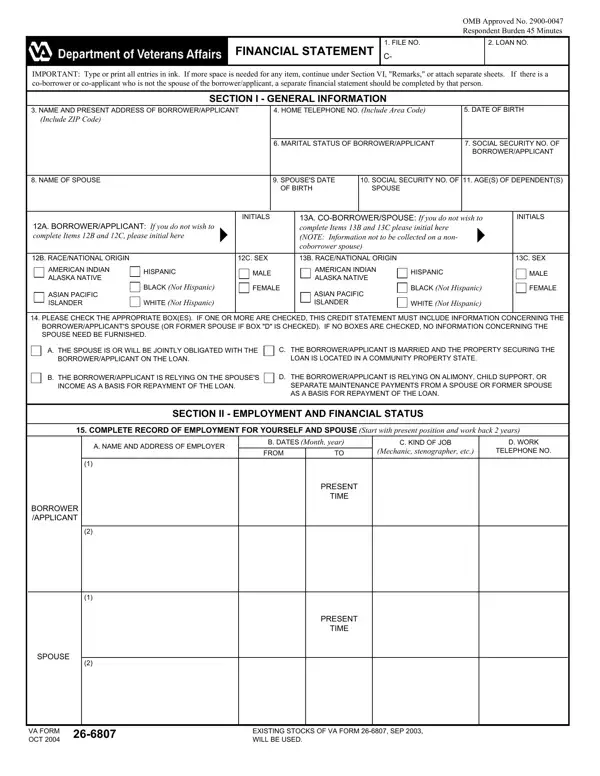
For those venturing into the home buying or refinancing process, understanding the necessary paperwork can seem like a daunting task. Among these critical documents is the VA Form 26-6807, also known as the Financial Statement. This form plays a key role for veterans and active military personnel who are considering a loan guaranteed by the Department of Veterans Affairs (VA). It requires applicants to comprehensively detail their financial status, including employment history, monthly income, assets, debts, and real estate owned. This detailed snapshot of one's financial health aids the VA in determining loan eligibility and the ability to bear the financial responsibility of a new mortgage or refinancing arrangement. Additionally, the form touches on sensitive information, such as social security numbers and the racial/ethnic background of the applicants, underlining the importance of confidentiality and accurate reporting. Given the legal penalties for willfully submitting false information, understanding each section and accurately completing the form is paramount. Furthermore, the form’s notice regarding the Right to Financial Privacy Act of 1978 highlights the balance between applicant privacy and the necessity of accessing financial records to process and administer VA loan benefits. Designed with both the administrative and legal aspects in mind, the VA 26 6807 form serves as a crucial step in securing VA loan benefits, making its thorough completion and understanding essential for potential borrowers.

QuestionAnswer
Form NameVa Form 26 6807
Form Length4 pages
Fillable?No
Fillable fields0
Avg. time to fill out1 min
Other namesprintable va forms 26 6807, STATEMENT, 22B, va form 26 6807

How to Edit Va Form 26 6807 Online for Free

With the help of the online tool for PDF editing by FormsPal, you are able to fill in or alter va form 26 6807 right here and now. Our editor is continually developing to provide the very best user experience attainable, and that is thanks to our commitment to continuous enhancement and listening closely to comments from customers. With some simple steps, you'll be able to start your PDF journey:

Step 1: Click on the "Get Form" button in the top part of this page to get into our tool.

Step 2: After you start the online editor, you will find the document prepared to be filled in. Other than filling out various blanks, it's also possible to perform some other actions with the form, that is adding any words, modifying the initial textual content, adding illustrations or photos, signing the document, and a lot more.

It will be an easy task to finish the document using this helpful guide! Here's what you need to do:

1. The va form 26 6807 necessitates particular details to be entered. Ensure that the subsequent blanks are filled out:

Tips to prepare 13C stage 1

2. Once your current task is complete, take the next step – fill out all of these fields - THE SPOUSE IS OR WILL BE JOINTLY, THE BORROWERAPPLICANT IS MARRIED, THE BORROWERAPPLICANT IS RELYING, THE BORROWERAPPLICANT IS RELYING, SECTION II EMPLOYMENT AND, COMPLETE RECORD OF EMPLOYMENT FOR, A NAME AND ADDRESS OF EMPLOYER, B DATES Month year, FROM, C KIND OF JOB, Mechanic stenographer etc, D WORK, TELEPHONE NO, BORROWER APPLICANT, and PRESENT with their corresponding information. Make sure to double check that everything has been entered correctly before continuing!

Completing section 2 in 13C

3. The following section focuses on SPOUSE, TIME, VA FORM, OCT, and EXISTING STOCKS OF VA FORM SEP - complete all these fields.

Stage # 3 for completing 13C

4. This next section requires some additional information. Ensure you complete all the necessary fields - MONTHLY INCOME Include income, A GROSS SALARY, Before payroll, deductions, B PENSION OR COMPENSATION, BORROWER APPLICANT, SPOUSE, C OTHER Specify, BORROWER APPLICANT, SPOUSE, ASSETS, D TOTAL MONTHLY, INCOME, A CASH IN BANK Checking and, and F SAVING BONDS Current value - to proceed further in your process!

13C writing process clarified (stage 4)

In terms of A CASH IN BANK Checking and and deductions, be certain you review things in this current part. These two are the most important ones in the PDF.

5. The final section to complete this form is integral. Ensure you fill in the displayed fields, such as Include ZIP Code, if available, DEBT, MONTHLY, If any, TOTAL, SECTION III CREDIT REFERENCES AND, NAME AND ADDRESS OF FIRMS OR, A MONTHLY RENTAL, B UTILITIES INCLUDED, C NAME AND ADDRESS OF PERSON OR, and IF YOU ARE RENTING PREMISES YOU, before submitting. In any other case, it might end up in a flawed and potentially unacceptable document!

13C completion process described (stage 5)

Step 3: Right after double-checking the form fields, press "Done" and you're all set! Right after registering afree trial account at FormsPal, it will be possible to download va form 26 6807 or email it immediately. The PDF file will also be easily accessible via your personal account with your every edit. FormsPal ensures your information privacy by having a secure system that never records or distributes any type of personal data involved in the process. Rest assured knowing your files are kept confidential every time you use our tools!