
Vat7 Form PDF Details

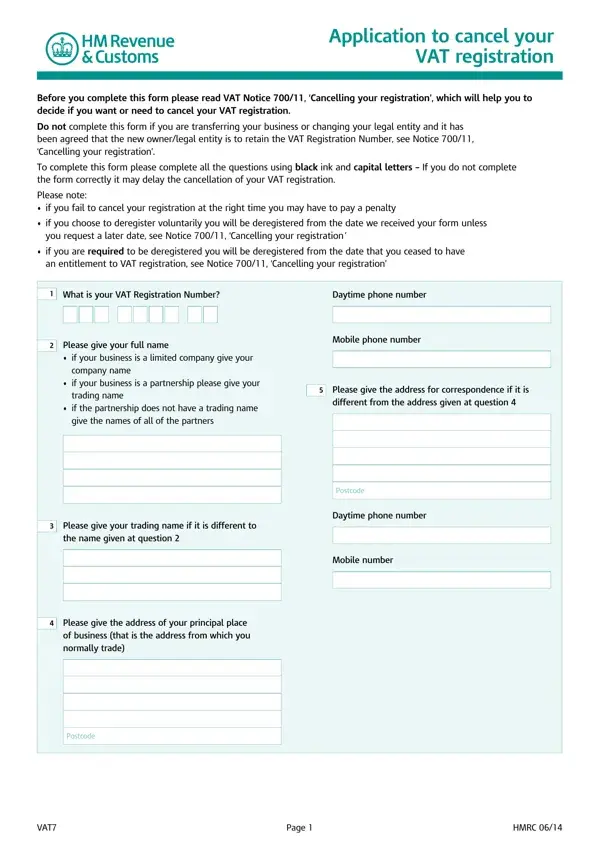
Understanding the VAT7 form is essential for businesses considering deregistration from VAT in the United Kingdom. This form serves as an application to cancel VAT registration and is crucial for businesses that have ceased trading, predict a turnover below the current deregistration threshold, or have changed the nature of their supplies to be out of scope for VAT. It is imperative to read VAT Notice 700/11, ‘Cancelling your registration’, before completing this form to grasp the implications and requirements of canceling VAT registration. Incorrect completion or failure to cancel at the appropriate time can lead to delays or penalties. The form requires detailed information about the business, including the VAT Registration Number, business and trading names, addresses, and reasons for deregistration. Specific sections guide applicants based on their circumstances, such as cessation of trade, reduction in taxable turnover, change in legal entity, or joining a VAT group, each with distinct requirements for the deregistration process. Applicants must declare the cessation date of taxable supplies and estimate the VAT inclusive value of stocks and assets at hand, which might be subject to VAT on the final return. A section for declaration confirms that the information provided is true and complete, necessitating attention to detail and accuracy in the application. This comprehensive approach ensures that the HMRC can accurately process deregistration requests, aligning with legal compliance and administrative requirements.

QuestionAnswer
Form NameVat7 Form
Form Length4 pages
Fillable?No
Fillable fields0
Avg. time to fill out1 min
Other namesvat7 form, vat7, form vat7 printable, form vat7 download

How to Edit Vat7 Form Online for Free

You'll be able to fill out form vat 7 without difficulty using our online tool for PDF editing. To make our tool better and less complicated to utilize, we constantly come up with new features, with our users' feedback in mind. If you're seeking to start, here is what it takes:

Step 1: Click the orange "Get Form" button above. It'll open our tool so you can begin completing your form.

Step 2: When you access the tool, you will see the document prepared to be filled in. Other than filling out different fields, you may as well do many other things with the form, such as putting on any text, changing the original text, adding images, affixing your signature to the document, and more.

In order to finalize this PDF document, ensure you type in the necessary details in every blank:

1. Start completing the form vat 7 with a number of necessary blank fields. Gather all the information you need and make certain there's nothing omitted!

vat7 pdf conclusion process described (portion 1)

2. After this part is filled out, go on to type in the suitable information in these: Mobile number, Please give the address of your, of business that is the address, normally trade, Postcode, VAT, Page, and HMRC.

Please give the address of your, HMRC, and normally trade of vat7 pdf

3. Your next step will be hassle-free - complete every one of the empty fields in Why are you applying to cancel, Please tick box only, A I have ceased to trade, B My taxable turnover in the, next months will be below the, C I am still trading but only make, supplies that are exempt or, supplies are solelymainly, D I am still trading but my taxable, exemption from VAT registration, E I am changing my legal entity, for example from a partnership to, F I have transferredsold my, business as a going concern, and go to question in order to complete this process.

Tips on how to complete vat7 pdf portion 3

People often make some errors when filling out go to question in this section. You need to read twice what you type in right here.

4. Completing F I have transferredsold my, business as a going concern, G I am joining a VAT group you, a VAT and VAT, you must also complete forms, H My VAT group is disbanding, VAT and VAT for each group member, I Other, go to question, go to question, go to question, go to question, DD MM YYYY, This is the date you will normally, and Please provide details of the is key in the fourth form section - be certain to invest some time and be mindful with each field!

Tips to fill in vat7 pdf step 4

5. The pdf must be completed by filling out this area. Here there is a detailed set of fields that need to be completed with accurate information in order for your form submission to be faultless: b If you remain registered for VAT, a repayment situation, Yes, You must continue to charge VAT on, Go to question, and Page.

Step number 5 of filling in vat7 pdf

Step 3: Check all the details you have inserted in the blanks and then press the "Done" button. Sign up with FormsPal today and instantly use form vat 7, available for downloading. Every last edit made is handily saved , allowing you to edit the file further when necessary. FormsPal offers safe document editor without personal data record-keeping or sharing. Rest assured that your details are secure with us!