
An Alaska motor vehicle power of attorney is a document that allows a vehicle owner to authorize another individual, the agent or attorney-in-fact, to handle specific tasks related to their motor vehicle. This includes registering the vehicle, applying for a title, and selling the vehicle on the owner’s behalf. To ensure the power of attorney is valid and enforceable, it must comply with Alaska’s legal requirements.
Last Updated: October 2026. This guide is reviewed and updated regularly to reflect current law. If you notice an error or outdated information, please contact us.

Build Your Document
Answer a few simple questions to make your document in minutes
Save and Print
Save progress and finish on any device, download and print anytime
Sign and Use
Your valid, lawyer-approved document is ready
To use the Alaska DMV Form 847 (Power of Attorney), fill in the vehicle owner, the attorney-in-fact, and the vehicle description (license plate number, VIN, year, make, model, body style, and color).[1] The form itself specifies the powers it grants, so you do not write them in.[1] The following points outline who signs Form 847 and who completes its notary section:
Form 847 sets its own rule at the foot of the page: “This form must be completed in full in ink. Only the original, notarized document is acceptable.”[1] The powers your agent receives are printed on the form, so read them before you sign.
Refer to the Alaska power of attorney forms for more detailed information on the POA and other related documents.
Tip: Make a copy of the finished form for your records and give your agent a copy too.
The Alaska Form 847 is a legal document used to grant certain vehicle-related powers from the vehicle owner to another person, known as the attorney-in-fact. This document is crucial for authorizing another party to handle affairs such as vehicle sales, purchases, or registration on behalf of the vehicle owner.
| Document Name | Alaska Motor Vehicle Power of Attorney Form |
| State Form Name | Power of Attorney, Form 847, Revision 08/03/2018 |
| Relevant Link | Alaska Division of Motor Vehicles |
| Avg. Time to Fill Out | 10 minutes |
| # of Fillable Fields | 15 |
| Available Formats | Adobe PDF |
The PDF this page hands out is the Alaska DMV’s Power of Attorney, Form 847 (Revision 08/03/2018), the edition at the DMV’s link on October 15, 2026.[1] Using the most recent form is essential to avoid any compliance issues, so check the Alaska Division of Motor Vehicles website if some time has passed. You can also use the FormsPal template through Create My Document.
Form 847 lists the powers for you, so there is nothing to select. The attorney-in-fact may sign any and all documents for the vehicle, including but not limited to Vehicle Purchase, Vehicle Sale, Application for Title and/or Registration, and Transfer of Ownership.[1]
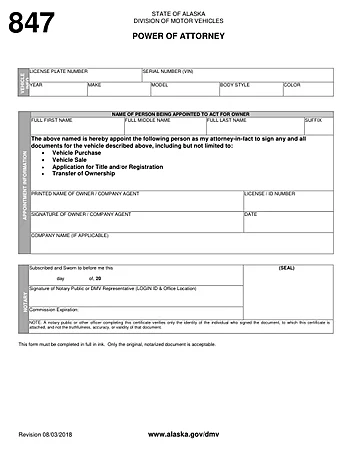
These steps follow the Alaska DMV’s Power of Attorney, Form 847 (Revision 08/03/2018), the official form this page hands out.[1] It is a single page. Open the PDF, fill in each part in the order below, and check your entries before you print. Keep your vehicle title or registration and your driver’s license or ID within reach.
The screenshots under each step show Alaska DMV Form 847, the official Alaska form, filled with sample entries in blue, so you can see where each answer goes. The names, numbers, dates and vehicle details are examples only.
Vehicle Info
In the VEHICLE INFO block at the top, enter the vehicle’s details. This section includes the vehicle’s license plate number, serial number (VIN), year, make, model, body style, and color.[1] Copy them from your title or registration.

Name of Person Being Appointed to Act for Owner
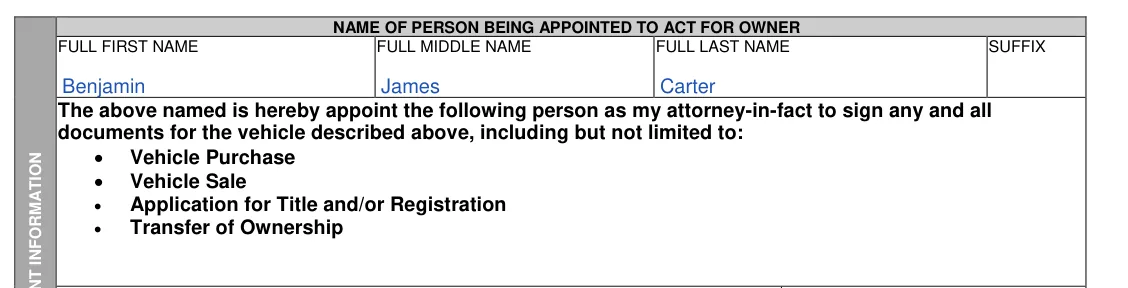
Enter the full first, middle and last name of the person you appoint as your attorney-in-fact, and a suffix such as Jr. if they use one. The paragraph below these boxes, with its list of powers (Vehicle Purchase, Vehicle Sale, Application for Title and/or Registration, Transfer of Ownership), is printed on the form, so there is nothing to enter there.
Printed Name of Owner / Company Agent and License / ID Number
Print your name as the vehicle owner, or the company agent’s name if a company owns the vehicle, and enter your license or ID number.

Signature of Owner / Company Agent, Date and Company Name
The signature section includes your signature and the date you executed the document.[1] The Signature line has a fillable box in the PDF, but leave it empty and sign by hand after you print, in front of the notary public or DMV representative (see the next step). Fill in Company Name only if it applies, for example when a company owns the vehicle.

Notary
Leave the NOTARY section blank. A notary public or a DMV representative completes it when you sign: the date on the “Subscribed and Sworn to before me” line, the “Signature of Notary Public or DMV Representative (LOGIN ID & Office Location)” line, the Commission Expiration line and the (SEAL) box.[1]
The foot of the form says: “This form must be completed in full in ink. Only the original, notarized document is acceptable.”[1] Read the whole page before you sign.
After the fields are filled in, the last part is signing. What signing takes depends on the document you use: Form 847, the DMV form this page hands out, or the FormsPal template you get from Create My Document. Take your time with each line and check that names and numbers match your ID and vehicle papers.
Most problems come from small slips, not from the form itself. A quick read-through before you sign catches the common ones. Go through this short list once the form is filled in.
It is a document in which a vehicle owner names another person, called the agent or attorney-in-fact, to handle specific vehicle tasks on the owner's behalf. The tasks named on this page include registering the vehicle, applying for a title, and selling the vehicle.
Yes, in two ways. The Form 847 PDF this page hands out has fillable fields, so you can type your entries before you print it. The form also says “This form must be completed in full in ink,” so sign by hand in ink, in front of the notary public or DMV representative, and fill in any line you left blank in ink.[1] Or select Create My Document at the top of this page and answer a few questions. That route uses the FormsPal template, not Form 847: the FormsPal tool builds the document from your answers, and you can save your progress, print it, or download it as a PDF.
Open the downloaded file in the FormsPal PDF editor to type in or change the fields. Print a clean copy when you are done.
The principal is the vehicle owner who signs the form. The agent, also called the attorney-in-fact, is the person the owner names to act for them.
Form 847 has no successor attorney-in-fact section. The FormsPal template from Create My Document has one: it names an alternate agent by name and address, and its wording covers the case where your first agent is unable or unwilling to serve.
Yes. Download the PDF and store it with your other vehicle papers. You can print more copies whenever you need them. For the DMV, use the signed paper form: only the original, notarized Form 847 is acceptable.[1]
Have these details ready before you start. Form 847 asks for:
Form 847 has no lines for addresses, a date of birth, a Social Security or Tax ID number, an odometer reading or an alternate agent. The FormsPal template from Create My Document asks for those.
General information, not legal or tax advice.
