
Updated:
A Massachusetts motor vehicle power of attorney is a written authorization in which an individual who owns a vehicle, called the principal, names an agent to handle vehicle transactions for them. Those tasks often include registration, title transfers, sales paperwork and visits to the state Registry of Motor Vehicles (RMV). Create yours online with the FormsPal template, or download the RMV’s own form, TTLREG109, as a PDF and fill it in yourself.
Build Your Document
Answer a few simple questions to make your document in minutes
Save and Print
Save progress and finish on any device, download and print anytime
Sign and Use
Your valid, lawyer-approved document is ready
This paperwork is mostly names, addresses and vehicle details, so it stays short. Before you start, gather the vehicle's certificate of title or state registration and an ID for everyone involved. Copying straight from those papers keeps every name and number consistent.
Massachusetts laws dictate specific requirements for the creation and execution of a Motor Vehicle POA to ensure it is legally binding:
Sections 5-501 to 5-507 of the Massachusetts General Laws pertain to the legal framework surrounding powers of attorney, including motor vehicle-related.
Owners usually sign this kind of authorization because they cannot be at the registry, the dealership or the insurance office themselves. These situations come up often, and in each one a trusted person carries the paperwork for the owner.
In every case, the agent works from what you enter, so it pays to check each address, number and spelling against the certificate of title before you print. Keep a copy of the signed pages with the registration and insurance papers, so everything about the vehicle sits in one folder.
If you are unsure what a field asks for, look at the matching screenshot in the steps below. Each image shows a sample entry, so you can compare your own entry with it before you move on to the next part of the PDF and the people who will read it.
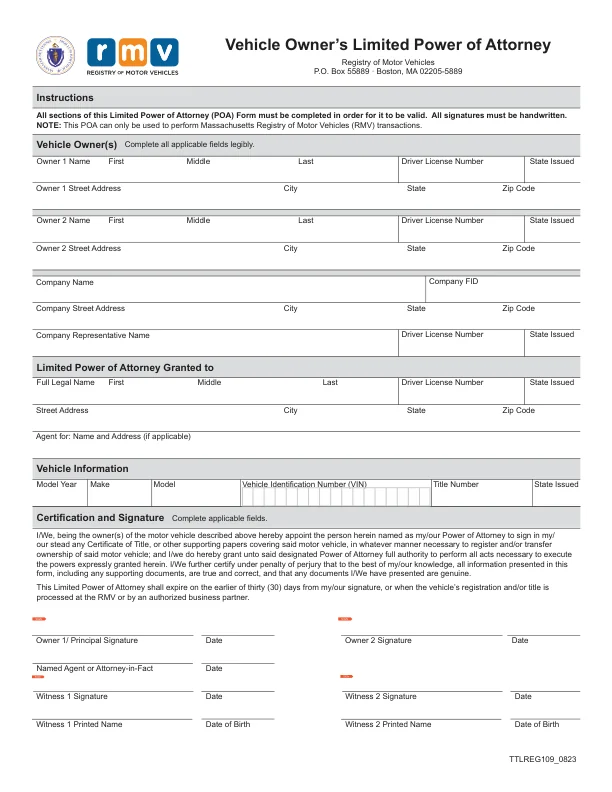
The Massachusetts TTLREG109 (Vehicle Owner’s Limited Power of Attorney) form, the PDF this page hands out, is used for vehicle transactions. It is valid for 30 days from the date of signature or until the RMV or an authorized business partner processes the vehicle registration and title.[2] The RMV accepts the TTLREG109 form or any other free-form POA that meets Massachusetts legal requirements.
| Document Name | Massachusetts Motor Vehicle Power of Attorney Form |
| State Form Name | Vehicle Owner’s Limited Power of Attorney, TTLREG109_0823 |
| Relevant Link | Massachusetts Registry of Motor Vehicles |
| Avg. Time to Fill Out | 15 minutes |
| # of Fillable Fields | 53 |
| Available Formats | Adobe PDF |
These steps follow the Massachusetts RMV’s Vehicle Owner’s Limited Power of Attorney, Form TTLREG109 (TTLREG109_0823), the official form this page hands out, in the order its parts appear on the PDF. The form must be completed accurately to avoid invalidation.[1] The instructions at the top of the form say all sections must be completed for it to be valid, all signatures must be handwritten, and the form can only be used for Massachusetts RMV transactions. The form specifically warns that you certify under penalty of perjury that all information provided is true and correct.
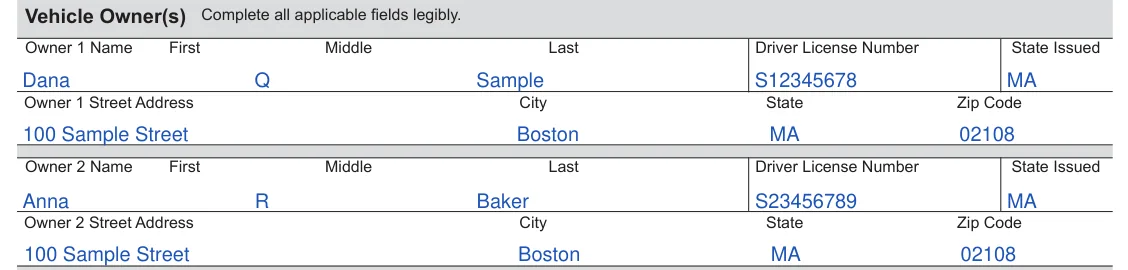
The screenshots under each step show the Massachusetts RMV Vehicle Owner’s Limited Power of Attorney (TTLREG109), the official Massachusetts form, filled with sample entries in blue, so you can see where each answer goes. The names, addresses, dates and vehicle details are examples only.
Vehicle Owner(s)
Fill in the Owner 1 lines, and the Owner 2 lines if the vehicle has a second owner. This section should include the first, middle, and last names, driver’s license numbers, and the states where the licenses were issued.[2] Also, provide complete addresses for each owner, including street, city, state, and zip code.[2]
Company lines
If a company owns the vehicle, fill in the Company Name, Company FID, the company’s street address, city, state and ZIP code, and the Company Representative Name with that person’s driver license number and state issued. Leave these lines blank if the owners are individuals.

Limited Power of Attorney Granted to
Enter the full legal name of your agent, first, middle and last, with the agent’s driver license number, the state issued, and the agent’s street address, city, state and ZIP code. Use the Agent for line only if it applies, for the name and address of the person or business the agent acts for.

Vehicle Information
Enter the model year, make, model, Vehicle Identification Number (VIN), title number and the state that issued the title. Copy them from the certificate of title.

Certification and Signature
Read the printed paragraph. It appoints the person you named as your power of attorney to sign title and registration papers for the vehicle, and it contains your certification under penalty of perjury. The next paragraph says the power expires on the earlier of 30 days from your signature or when the RMV or an authorized business partner processes the registration or title.[2]

Owner and agent signatures
Owner 1 signs by hand on the Owner 1/ Principal Signature line and dates it. A second owner signs and dates the Owner 2 Signature line. The named agent signs and dates the Named Agent or Attorney-in-Fact line.

Witness 1 and Witness 2
Each witness signs and dates a Witness Signature line, then prints their name and date of birth on the line below.

Once every field is filled in, the paperwork is ready for signatures. Print the finished PDF and keep a signed copy for your records before the original goes to your agent. A copy also comes in handy for registration, title transfer or insurance questions.
Certification and Signature
The owner(s) must certify the information in the document.[2] This involves signing and dating the form and declaring under penalty of perjury that all the information provided, including any supporting documents, is true and correct. The named agent also signs and dates the Named Agent or Attorney-in-Fact line. Ensure all signatures are handwritten, as this is a requirement for the form’s validity.
Complete Witness Information
Form TTLREG109 has no notary section.[2] It requires one witness signature for each owner who signs.[1] The form has signature and printed name lines for two witnesses.[2] Each witness must also provide their date of birth.[2] The witnesses’ details help further authenticate the document and ensure its legal standing.
Final Review and Submission
Review the document once all sections are filled out to ensure all information is complete and accurate. Check for any errors or missing information. After reviewing, submit the completed form to the Massachusetts Registry of Motor Vehicles.
The principal is the individual who owns the vehicle, signs the form and gives another person authority to act for them. The agent is that other person. The agent handles vehicle transactions, such as registration, title transfers and sales paperwork, on the owner's behalf.
Yes. Click Create My Document at the top of the page and answer a few questions to build the FormsPal template, or download the RMV form as a PDF and type into its fields. To fill in or edit the PDF on your computer, open it in the FormsPal PDF editor. The form says all signatures must be handwritten, so sign it by hand after you print.
Have these details ready before you start:
The VIN is printed on the vehicle's certificate of title, registration card and insurance card. Copy it exactly as shown.
The PDF is the RMV’s Form TTLREG109, a single page. It has the instructions, the Vehicle Owner(s) section with lines for a company owner, the Limited Power of Attorney Granted to section, Vehicle Information, and Certification and Signature with lines for the owners, the named agent and two witnesses. It has no notary section.[2]
General information, not legal or tax advice.
