
The Montana motor vehicle power of attorney is a legal document allowing you to designate someone else to act on your behalf regarding your vehicle registration and title matters. This form can be helpful if you are unable to handle these tasks yourself, such as due to illness, living out of state, or military deployment. Download the official MV65 form below, or create the FormsPal template online in minutes.
Last Updated: October 2026. This guide is reviewed and updated regularly to reflect current law. If you notice an error or outdated information, please contact us.
Build Your Document
Answer a few simple questions to make your document in minutes
Save and Print
Save progress and finish on any device, download and print anytime
Sign and Use
Your valid, lawyer-approved document is ready
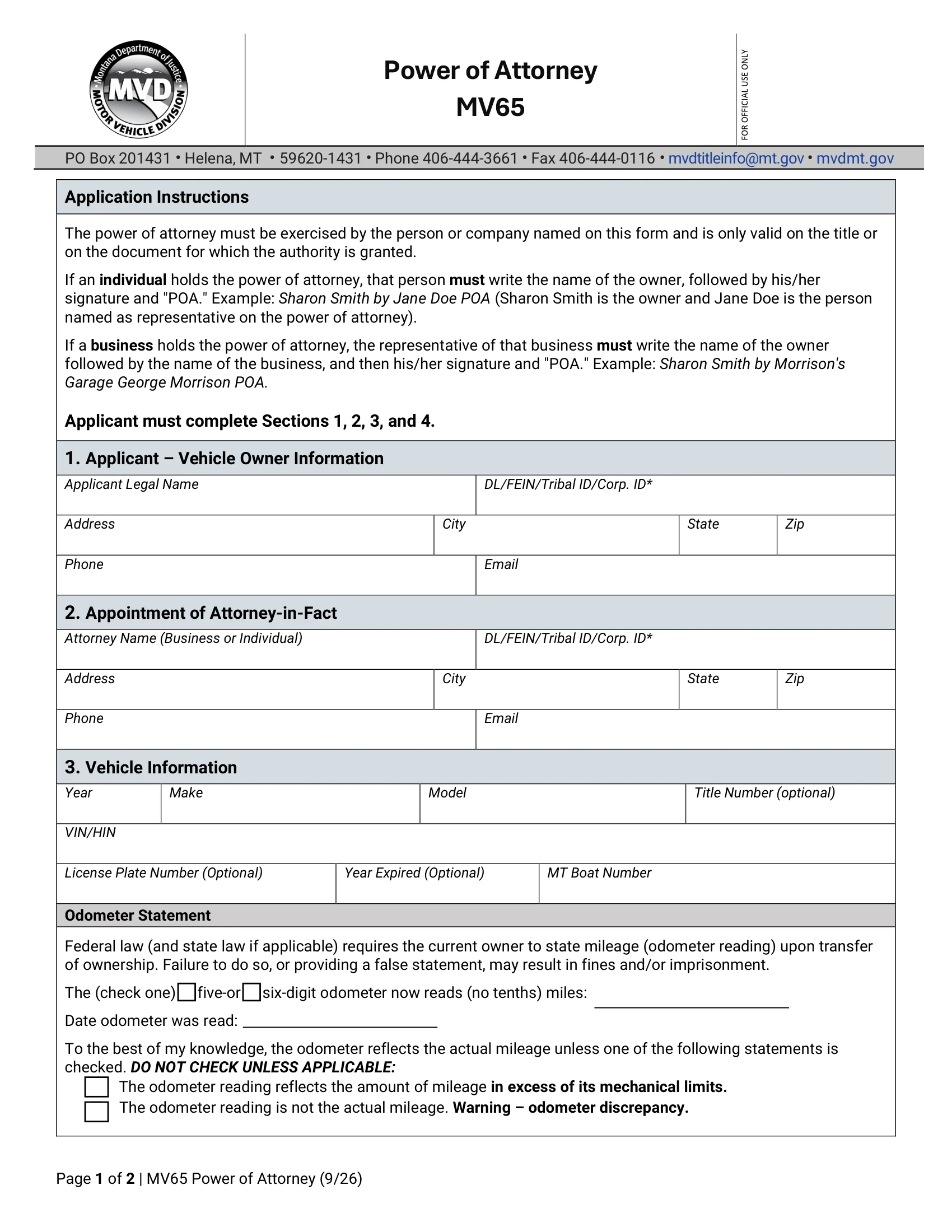
A Montana motor vehicle power of attorney is a signed document. In it, a vehicle owner, called the principal, names another person, called the agent or attorney-in-fact, to act for them. The PDF this page hands out is the Montana Motor Vehicle Division’s Form MV65, Power of Attorney (9/26).[2] It covers one motor vehicle or vessel and ends with a section for a notary. The FormsPal template behind Create My Document is a different document, with room for a successor agent and an acknowledgment page for a notary.
In Section 4 of Form MV65, you appoint the business or individual named in Section 2 as your attorney-in-fact, with full authority to sign instruments, documents and affidavits for these tasks on the motor vehicle or vessel named in Section 3:[2]
The form’s instructions say the power of attorney is only valid on the title or on the document for which the authority is granted. When your agent signs for you, they write your name, then their own signature and “POA”, for example “Sharon Smith by Jane Doe POA”.[2] Agree on the plan with your agent first, for example whether the agent will transfer the title or only handle the registration.
The Montana Uniform Power of Attorney Act provides the legal framework for creating and using POAs.[3] It outlines the requirements for validity, the duties of the agent (the person you appoint to act on your behalf), and the protections for the principal (you).
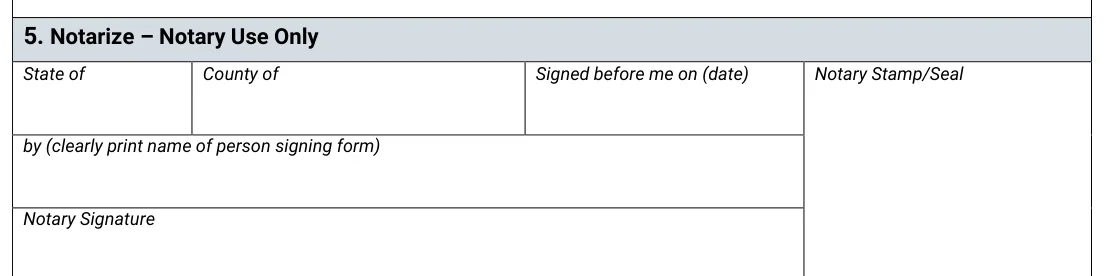
The Montana Motor Vehicle Division requires the principal’s signature on a motor vehicle power of attorney to be notarized, unless notarization is not required by certain jurisdictions.[1] Form MV65 has its own notary section, Section 5, headed “Notarize” and marked for notary use only. There the notary records the state, the county, the date the form was signed before them and the printed name of the person signing, then signs and adds a stamp or seal.[2] Because the notary records that the form was “Signed before me”, wait to sign until you are with the notary, and bring a photo ID.
The FormsPal template from Create My Document is a different document. Under the Montana Uniform Power of Attorney Act, a power of attorney must be signed by the principal, and a signature is presumed to be genuine if the principal acknowledges it before a notary public or another individual authorized by law to take acknowledgments.[4] So under the act, notarizing the template is optional and makes your signature presumed genuine. For a Montana vehicle transaction, though, the Motor Vehicle Division rule above still asks for the principal’s signature on a motor vehicle power of attorney to be notarized.[1] The template’s acknowledgment page is the part a notary public or other officer completes.
For broader legal needs beyond vehicles, check out various Montana POA forms to find one that suits your situation.
A motor vehicle power of attorney lets a vehicle owner hand vehicle paperwork to a trusted person. The Montana Motor Vehicle Division offers an official MV65 form for this purpose. Form MV65 is the PDF this page hands out, and the table sums up its basics.
| Document Name | Montana Motor Vehicle Power of Attorney Form |
| State Form Name | Form MV65, Power of Attorney (9/26) |
| Relevant Link | Montana Department of Justice – MV Division |
| Avg. Time to Fill Out | 15 minutes |
| # of Fillable Fields | 33 |
| Available Formats | Adobe PDF |
Filling in Form MV65 goes quickly when your papers are on the table. Set out the vehicle title, your photo ID and your agent's contact details, and write down what you need for each section of the form. Here is a short checklist.
The steps below follow Form MV65, Power of Attorney (9/26), the official form this page hands out, section by section in the order it appears.[2] The form says you, as the applicant, must complete Sections 1, 2, 3 and 4.
The screenshots under each step show Form MV65, the official Montana form, filled with sample entries in blue, so you can see where each answer goes. The names, addresses, dates and numbers are examples only.



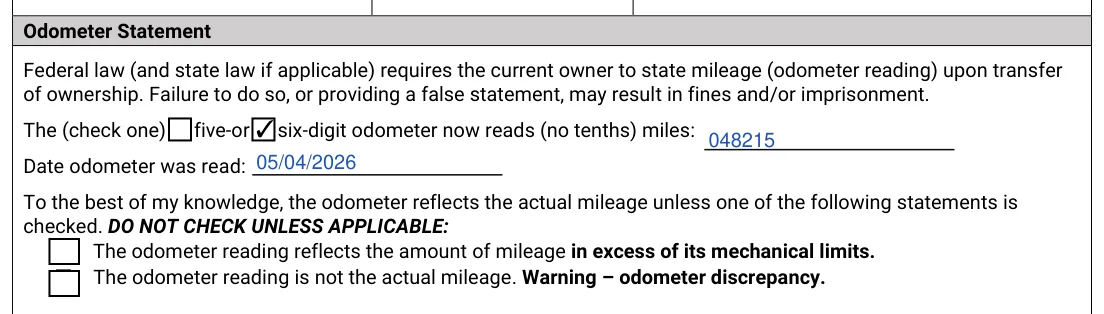
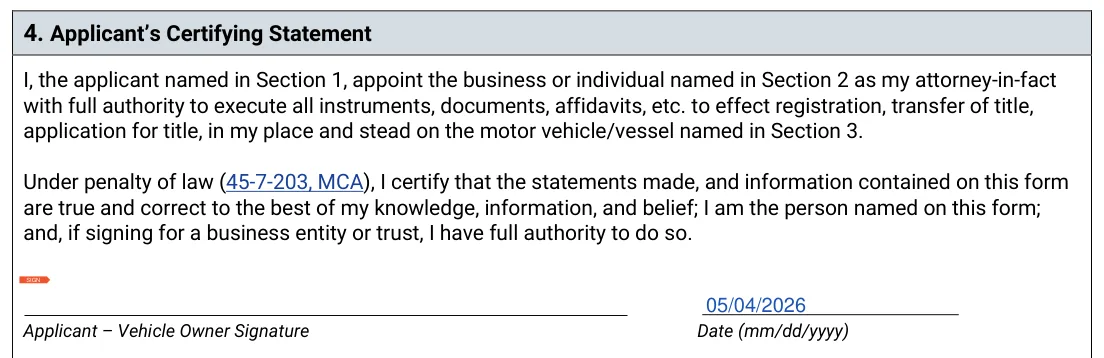
Print the form on plain paper and keep the signed pages with your records. Check that the names and the VIN match your IDs and the vehicle title before you sign.
Once Form MV65 is filled in, print it and work through the signing steps in order. Have the original and your photo ID ready before you meet the notary, and file the signed pages with your vehicle papers when you are done.
Sign and Date the Form
As the vehicle owner and applicant, you must sign and date the form to validate it.[2]
Notarization
Your signature on the form must be notarized, unless notarization is not required by certain jurisdictions.[1] Section 5 records that the form was “Signed before me”, so sign in front of the notary rather than bringing a form you signed earlier. The notary will fill out a section of the form, which includes their stamp or seal, the date, and the state and county where the notarization occurred.[2]
Additional Verification for Purchasers
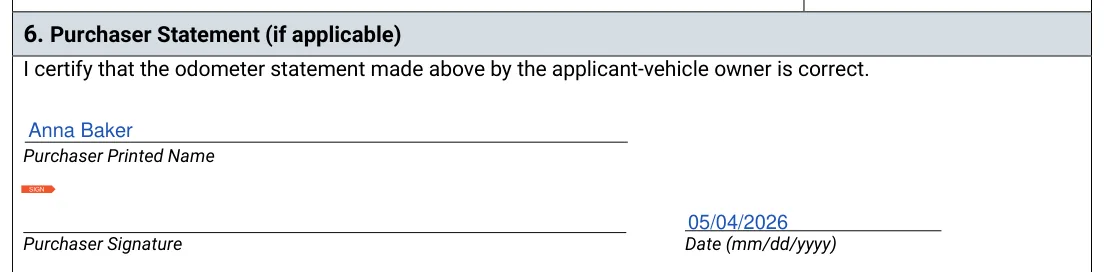
If Section 6 applies, the purchaser prints their name, signs and dates it, certifying that the odometer statement you made is correct.[2]
If you use the FormsPal template instead
The template from Create My Document has its own acknowledgment page for a notary public or other officer. Montana Notarization and Legal Background above explains when to have it notarized.
Review and Submit
Check every entry for accuracy and completeness, so no errors slow things down. Once everything is correct, submit the completed form to the appropriate Montana county and state authorities.
Small slips in the details are easy to make and just as easy to avoid. Read each entry once more against your papers before you sign, and ask your agent to look the finished document over as well.
Check these points before you sign:
The principal is the vehicle owner who signs the document. The agent, also called the attorney-in-fact, is the person the principal names to handle the vehicle matters listed in the form.
Gather these details before you start:
Most people finish in about 15 minutes. It goes faster when the vehicle title, your IDs and the contact details for your attorney-in-fact are on the table before you begin.
Form MV65 describes a single motor vehicle or vessel in Section 3, and its instructions say the power of attorney is only valid on the title or on the document for which the authority is granted.[2] Use a separate form for each additional vehicle.
Keep the original in a safe place and store a scan with your records. Agree with your agent on who keeps the original.
Form MV65 has no successor section. The FormsPal template from Create My Document includes a successor attorney-in-fact section. Write the name and address of the alternate agent there, and the alternate steps in if the first agent cannot serve. Pick someone who is easy to reach, so the paperwork does not stall.
Yes. Open the PDF in the FormsPal PDF editor and type your answers, or print it and write them by hand. You can also use the Create My Document button above to answer a few questions and get a finished document.
On Form MV65 it is Section 5, marked for notary use only. The notary fills in the state, the county, the date the form was signed before them and the printed name of the person signing, then signs and adds a stamp or seal.[2] The FormsPal template from Create My Document has an acknowledgment page instead, where a notary public or other officer records who appeared and signed, fills in the county, the day and their own name and title, then signs and adds a seal.
General information, not legal or tax advice.
