
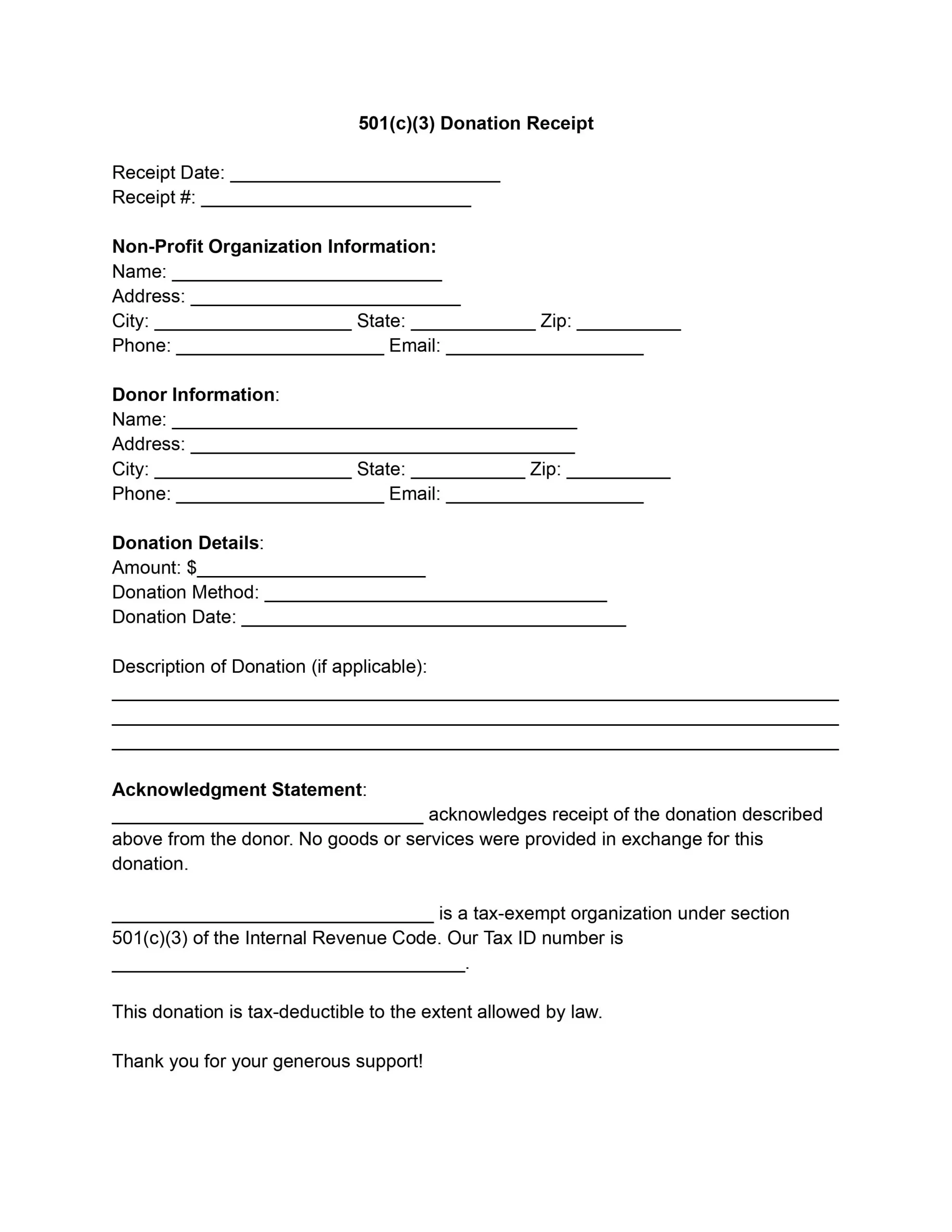
A 501(c)(3) donation receipt (also written as a 501c3 donation receipt) is a written record that a tax-exempt nonprofit gives a donor after a gift or contribution. It shows who gave, what was given, and when. A donation receipt template lays out those fields in a clear order, so you only fill in the details and keep a copy of each receipt for your records.
Last Updated: October 2026. This guide is reviewed and updated regularly to reflect current law. If you notice an error or outdated information, please contact us.
Adhering to the guidelines for issuing donation receipts is not just a matter of best practice; it’s a legal requirement for organizations recognized under Section 501 (c) (3) of the Internal Revenue Code. These receipts ensure that organizations maintain their tax-exempt status by demonstrating transparency and accountability in their financial dealings. Moreover, they’re needed in the organization’s record-keeping, helping to track the generosity that keeps their operations afloat.
Donors also rely on these receipts to claim tax deductions on their annual returns, providing a tangible benefit for their goodwill. By itemizing their donations and presenting the receipts as proof, donors can reduce their taxable income, ultimately receiving recognition from the government for their contributions to society. This tax incentive is a significant driver for charitable giving, encouraging individuals and corporations to invest in the betterment of their communities.
The exchange between a donor and a tax-exempt organization is more than simply a transaction because this partnership fuels change and supports vital causes. The 501(c)(3) donation receipt, a basic but essential document that legally acknowledges a donation to a tax-exempt organization, is fundamental to this transaction.
A simple filing habit keeps every receipt easy to find:
Whichever way you issue it, the receipt is a simple record that keeps both sides organized. If you are looking for a sample 501(c)(3) donation receipt letter, just use our PDF editor to fill out the already-prepared form.
Work through the template from top to bottom. The eight steps below follow the order of the fields, from the receipt date and number to the signature block. Use your records for each detail so every field matches your books.
Begin by entering the date when the receipt is issued in the “Receipt Date” field. Next, assign a unique identification number to each receipt for internal tracking and enter it in the “Receipt #” field.
Fill in these details for the organization:
These details establish the receipt’s authenticity and give the donor contact details for any queries.
Input the donor’s full name and address (city, state, zip code), along with their phone number and email address. This section is critical for personalizing the receipt and ensuring the donor’s information is accurately recorded for tax purposes.
Complete these three fields:
If the donation includes non-monetary items, provide a detailed description in the designated section. This description should be comprehensive, including the condition of the items, if applicable, to help determine their value.
Write the actual name of your non-profit in the acknowledgment statement. This statement confirms the donation receipt and clarifies that no goods or services were provided in exchange for the donation, which is essential for the donation to be tax-deductible.
Confirm your organization’s 501(c)(3) status by repeating its name and stating it is tax-exempt under the IRS code. Include your organization’s Tax ID number for the donor’s tax records.
An authorized representative of the non-profit should sign the receipt. Below the signature, print the representative’s name and title, along with the organization’s name, again for clarity.
The sample below shows how a finished receipt can look. The names, address, and tax ID are made up, so replace each one with your own details. Use it as a guide to support your own donation receipt, and compare each row with the eight steps above.
| Field | Example entry |
|---|---|
| Receipt Date and Receipt # | May 10, 2026, Receipt #1001 |
| Organization | Helping Hands Community Fund, 456 Oak Avenue, Springfield |
| Donor | Anna Baker, 123 Main Street, Springfield |
| Amount, Donation Method, and Donation Date | $250.00, check, May 8, 2026 |
| Description of Donation | Cash gift, no items donated |
| Acknowledgment Statement | Helping Hands Community Fund thanks Anna Baker for this gift. No goods or services were provided in exchange. |
| Tax-Exempt Status and Tax ID | 501(c)(3) organization, Tax ID 12-3456789 |
| Signature | Maria Lopez, Executive Director, Helping Hands Community Fund |
Clear wording lets anyone reading the receipts see what donors gave. List each item, say how many there are, and note its condition, which helps determine its value. These examples show the level of detail to aim for when donors give items instead of money.
Each line names the item, the quantity, and the condition. Copy the same pattern into the receipts your nonprofit sends.
Read the receipt once more before it goes to the donor. A quick check catches typos and missing details, and it takes only a minute or two. Go through this list for each of the donation receipts your nonprofit issues.
A habit of sending receipts promptly means donors always have a record of their donations, and your nonprofit has a matching record of every gift.
The template covers these parts:
List the items and their condition in the section for non-cash gifts. Add enough detail that anyone reading the receipt can tell what was given.
Write your nonprofit’s name and confirm that you received the donation. The next lines of the template state the organization’s tax-exempt status and Tax ID.
Yes. Nonprofits can use the same template for all donors and change only the details that differ for each gift, such as the donor’s name, the amount, and the date.
A receipt gives donors a written record of their donations, including the date, the amount, and the organization that received the gift. Donors can keep it with their own records.
An authorized representative of the organization signs it. Below the signature, print the representative’s name and title.
A unique receipt number makes each receipt easy to find later. Enter it in the “Receipt #” field and use the same number in your records.
General information, not legal or tax advice.
