
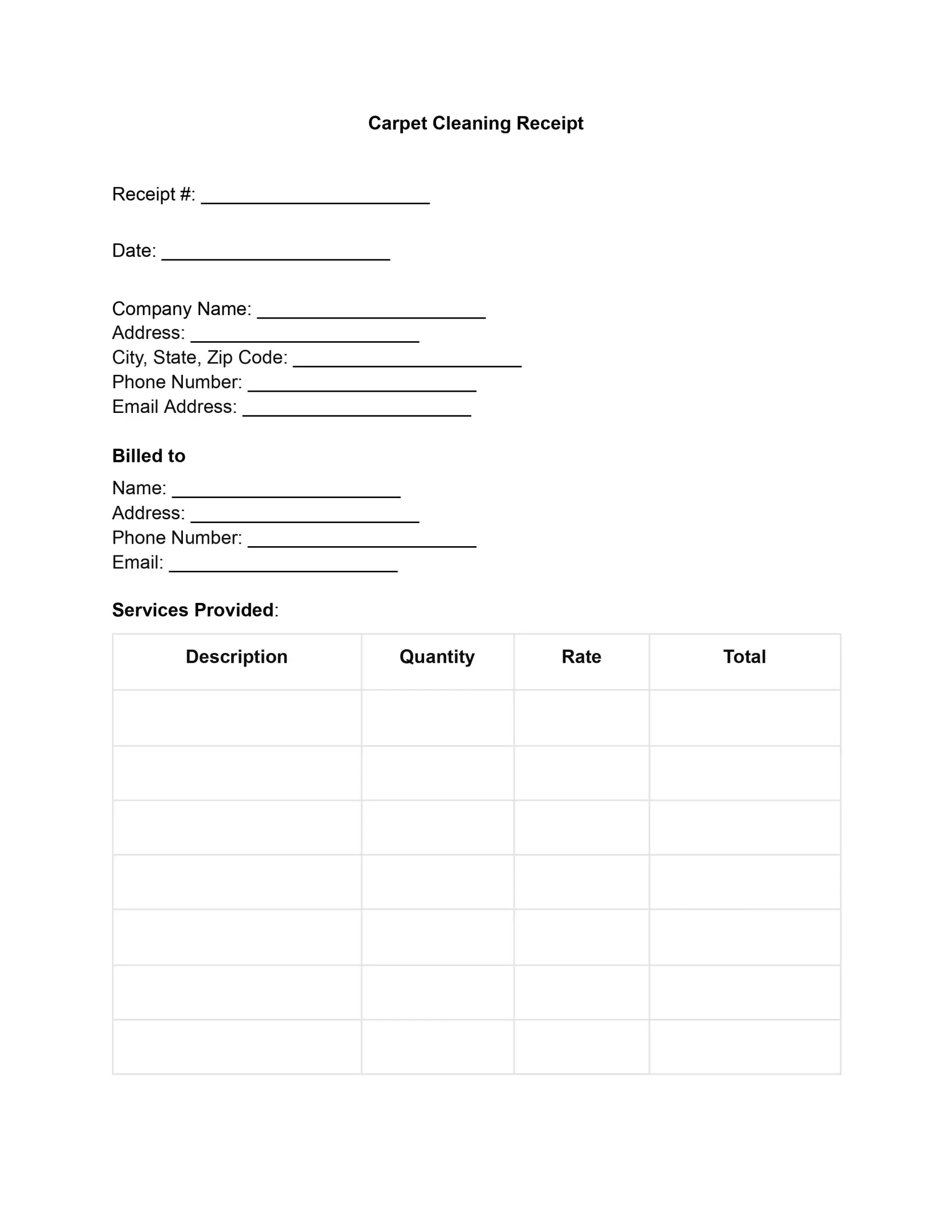
A carpet cleaning receipt is a document a cleaning company gives a client after the work is done. It lists the services done, the rates, the total, and how it was paid. A carpet cleaning receipt template puts those fields in a clear order, so you fill in the blanks, save a PDF, and keep a copy for your records.
Last Updated: October 2026. This guide is reviewed and updated regularly to reflect current law. If you notice an error or outdated information, please contact us.
A carpet cleaning receipt records the transaction between the service provider and the customer, including the services delivered, the charges, and the final payment. This document is critical for accounting and legal compliance and developing a transparent, trusting connection between businesses and their consumers.
A receipt also shows your brand. It tells clients they are working with a trustworthy firm that cares about clean carpets and clear paperwork.
In the competitive carpet cleaning industry, using a receipt template is a strategic move to ensure efficiency, consistency, and customer trust. Here’s why adopting a carpet cleaning receipt template is beneficial:
A template also helps new staff. Everyone sees the same fields in the same order, and the finished receipts become a searchable history of each client’s past visits. That makes repeat visits and follow-up questions easier to handle.
A clear carpet cleaning receipt answers three questions: who did the work, what was done, and what was paid. The template has a spot for each detail below, so you can fill them in quickly after the visit.
To edit the carpet cleaning receipt template, follow these steps to customize it for your business needs and transactions. The six steps below follow the order of the fields on the receipt, from your company details at the top to the signature at the bottom. Work through them one at a time, then save the finished receipt.
Start at the top with the “Company Name” field. Click each field and replace the placeholder text with your company’s actual information:
Scroll to the “Billed to” section. Here, you can enter your client’s name and the address where you cleaned the carpets. Do this before printing or sending the receipt, or leave these fields blank to be filled in manually later.
In the “Services Provided” section, enter the specific services you offered, the quantity of each service, the rate charged, and the total cost for each service line. Typical line items for a carpet cleaning visit include:
Repeat this process for as many services as you have provided.
Under “Payment Details,” fill in the “Subtotal,” “Taxes,” and “Total Amount Due” based on the services provided. If known, specify the “Payment Method” when creating the receipt.
The “Client’s Signature” and “Date” sections at the bottom are for the client to sign and date, indicating acknowledgment and payment. If sending digitally, you might opt for an electronic signature option.
After making all necessary edits, save your document. You can print it out for in-person transactions or save it as a PDF for digital distribution. Keep a signed copy for your own records.
The sample below shows how a finished carpet cleaning receipt can look. The names, address, and amounts are made up for illustration, so replace each one with the details of your own work.
Billed to: Anna Baker, 123 Main Street. Date: 10/10/2026. Payment method: Credit card.
| Service | Quantity | Rate | Total |
|---|---|---|---|
| Steam cleaning, living room | 1 | $90.00 | $90.00 |
| Steam cleaning, hallway | 1 | $60.00 | $60.00 |
| Stain treatment | 2 | $15.00 | $30.00 |
| Subtotal | $180.00 | ||
| Taxes | $0.00 | ||
| Total Amount Due | $180.00 | ||
A few small habits make a carpet cleaning receipt easier to read and easier to use later. Add them to your routine once, and every receipt you hand out will look consistent.
Most receipt problems come from small gaps in the details. Look over the common slips below before you hand out the receipt, and the client gets a clear record of the work.
A carpet cleaning receipt is a record of a finished service. It shows the work the client received, what each item cost, and how it was paid. Cleaning companies keep a copy for their books, and clients keep one for their own files.
A clear receipt lists these details, so both sides can see what was done and what was paid:
An invoice asks a client to pay for work. A receipt confirms that the money arrived. If you get paid on the spot, one receipt can cover the whole visit. If you bill afterward, send an invoice first and the receipt once the client has paid.
Yes. Save the finished receipt as a PDF and attach it to an email, or print it for in-person visits. If you send it digitally, you might opt for an electronic signature option so the client can sign without printing.
General information, not legal or tax advice.
