
Updated:
Get Form Now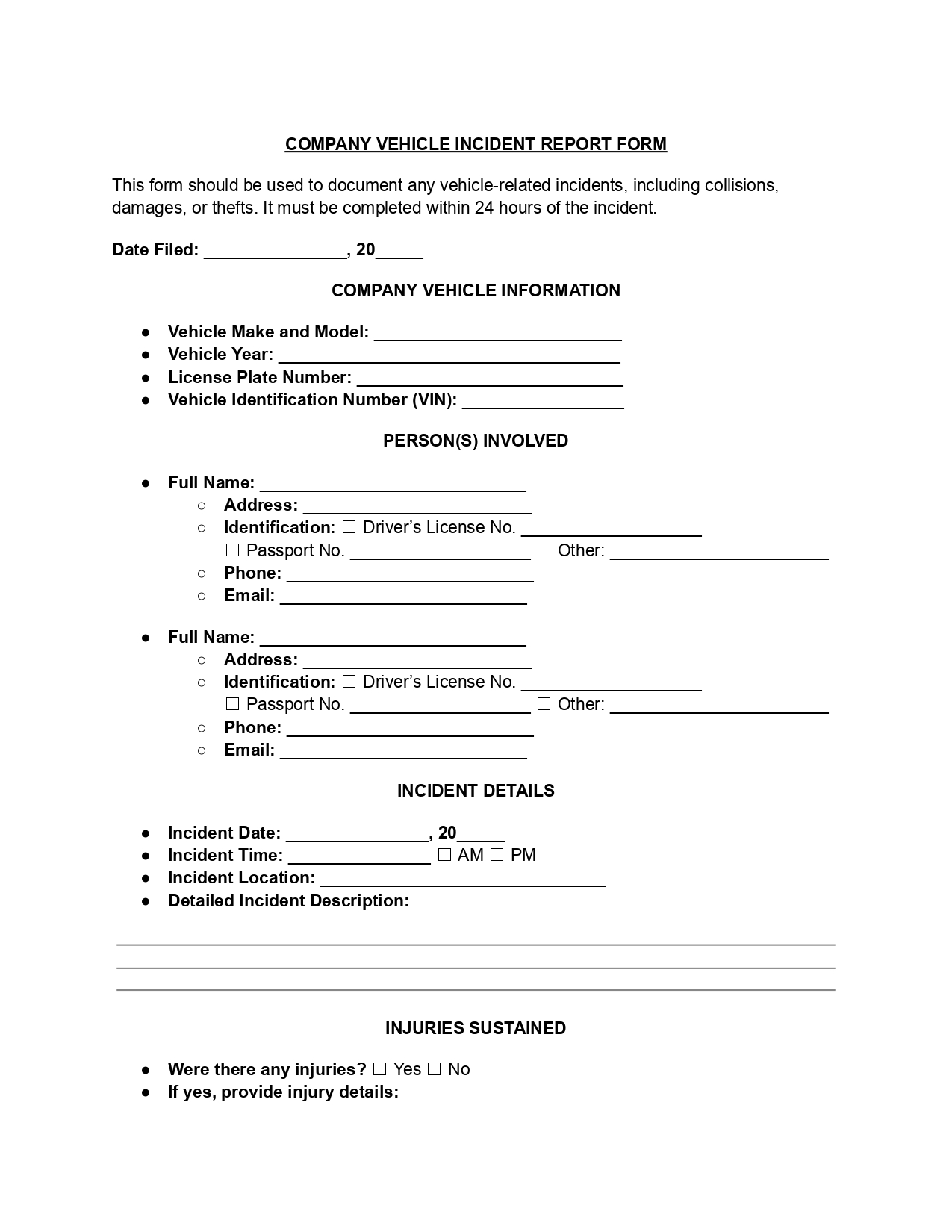
A company vehicle incident report is a commercial vehicle accident report form. It lists the vehicle, driver, date, place, injuries and bystanders for a crash, theft or damage. Fleet drivers and managers need one after every incident, especially before an insurance claim.
Fill out the free template below, follow the steps for each of its eight parts and keep a signed copy with your fleet and insurance papers.
A commercial vehicle accident report form is a company's own template for describing a crash, a theft or damage to a car, van or truck that the business owns or leases. The driver fills it in, and managers, insurers and safety staff read it later.
Some teams call it a company vehicle accident report, and the form works the same way under either name. Every copy asks for the same details in the same order:
A shared template gives your team one standard way to describe what happened. Saved reports are easy to find and compare, your insurer and your manager work from the same facts, and over time repeated reports show patterns such as the same route, location or driver.
Company vehicle accident reporting procedures follow one order: make the scene safe, collect the facts, tell your employer, then complete the incident report while details are fresh. The steps below fit a collision, a theft or harm to a parked company car.
Tip: Describe only what you saw and heard. Stick to facts such as times and places, and leave out guesses about who was at fault.
If your company runs trucks or buses, read the federal rules further down too: they add their own steps after some accidents.
This company template is an internal account of the event: it does not replace a crash report that police or a state motor vehicle agency asks for, and those rules differ by state, as the California DMV, California Driver's Handbook shows.
Under the California DMV, California Driver's Handbook, a driver in a collision must report it to DMV within 10 days if the collision caused more than $1,000 in damage to property or anyone was injured or killed, even with minor injuries.
The California DMV, California Driver's Handbook says each driver files a Report of Traffic Accident Occurring in California (SR 1), whether or not that driver caused the collision, even when it happened on private property.
The California DMV, California Driver's Handbook also asks for a report to law enforcement within 24 hours of the collision if anyone is injured or killed.
Elsewhere, look up the motor vehicle agency where the crash happened before you rely on this template alone. Write any crash report number you receive in the police part of the template.
Federal rules from the Federal Motor Carrier Safety Administration (FMCSA) reach a commercial vehicle accident when a motor carrier is involved: under 49 CFR 390.15, motor carriers must maintain an accident register for 3 years after the date of each accident.
Under 49 CFR 390.5, a commercial motor vehicle is used on a highway in interstate commerce to carry passengers or property and meets one of four tests. Two of those tests, under 49 CFR 390.5, are a weight rating or weight of 10,001 pounds or more, and a design or use to carry more than 8 passengers, including the driver, for compensation. The other two tests in 49 CFR 390.5 cover larger passenger vehicles not used for compensation and vehicles carrying placarded hazardous materials.
An accident under 49 CFR 390.5 is an occurrence involving a commercial motor vehicle on a highway in interstate or intrastate commerce that results in one of these:
A company car that meets none of the four vehicle tests falls outside these definitions in 49 CFR 390.5, and your employer can still ask for this report after any incident.
Under 49 CFR 390.15, each register entry lists the accident's date, the city or town and State, the driver's name, the number of injuries, the number of fatalities and whether hazardous materials other than spilled fuel were released. The register also keeps copies of all accident reports required by State or other governmental entities or insurers, under 49 CFR 390.15, so those reports are separate from this company template.
The template already asks for the date, the place, the driver and the injuries. For a commercial motor vehicle, add the number of deaths and any cargo release to the description so the person who keeps the register has every item.
The post-accident tests of 49 CFR 382.303 have their own scope: under 49 CFR 382.103, Part 382 applies to employers and persons who operate a commercial motor vehicle in commerce in any State and are subject to the commercial driver's license requirements of part 383, the Licencia Federal de Conductor (Mexico) requirements or the commercial drivers license requirements of the Canadian National Safety Code.
Part 382 uses its own vehicle definition in 49 CFR 382.107: a gross vehicle weight rating or weight of 26,001 pounds or more, a combination of 26,001 pounds or more towing a unit over 10,000 pounds, a design to carry 16 or more passengers including the driver, or a vehicle of any size carrying hazardous materials that require placards.
Under 49 CFR 382.107, a vehicle of 10,001 to 26,000 pounds that meets none of those tests does not bring its driver into the Part 382 tests, even though it meets the 49 CFR 390.5 weight test.
The reach also differs the other way: 49 CFR 382.107 counts as commerce both trade between States and trade in the United States which affects it, while the 49 CFR 390.5 definition above names a vehicle used in interstate commerce. A driver with a commercial driver's license on a trip inside one State can therefore fall under Part 382 without meeting the 49 CFR 390.5 definition.
Under 49 CFR 382.303, an employer covered by Part 382 tests each surviving driver for alcohol and controlled substances as soon as practicable after an accident that involved the loss of human life, if the driver was performing safety-sensitive functions with respect to the vehicle.
Under 49 CFR 382.303, the employer also tests a driver after an accident with an injury treated away from the scene or a vehicle towed away, only if the driver receives a citation for a moving traffic violation arising from the accident within 8 hours (alcohol) or thirty-two hours (controlled substances).
When a test takes place, note it in the police and medical part of the template.
An incident is the widest of the three words: it covers accidents and also thefts, break-ins and vandalism, while a near miss caused no harm at all. Picking the right word helps the reader of your report.
Many company fleets also write up near misses, because they show workers and managers where the next accident could happen.
Gather the vehicle details, the driver's ID, your scene photos and the names of people who saw the crash before you open the template. With these at hand you will not stop halfway through to look anything up.
The template has eight parts, from the date filed to the signature, and it works best when you go through them in order. Write plain facts that anyone at the company could follow, and write N/A in any part that does not apply.
Start by entering the current date in the “Date Filed” field at the top of the form. This is the date you complete the form, not the date the incident occurred.
Write the company vehicle's make and model in the first field. Then add these details:
Enter the full name, home address, phone number and email of the person involved in the incident. Choose the appropriate identification type (Driver’s License, State ID, or other) and provide the corresponding number or details.
Fill in the exact date and time of the incident, with AM or PM. Name the place with street names or nearby landmarks, then describe what happened in the order it happened.
Tick yes or no for injuries. If anyone was hurt, describe each injury and who received it in the space provided.
Note whether anyone saw the incident and add each person's name and contact details. These names let your manager or insurer follow up later.
Mark whether the police were called and whether they wrote a report, and add its number. Then mark whether medical help was given, declined, or took place on site, at a hospital or elsewhere.
The person filling out the report should sign at the bottom to authenticate the information, including the date the form was completed, and print their name.
A clear incident description gives the day, the time, the place and the events in order, without guesses about fault. Managers, insurers and safety teams read this part first.
Sample description (all details are made up):
On Tuesday at 2:15 PM, Anna Baker was driving the white company van north on Main Street. A delivery truck backed out of the driveway at 123 Main Street and hit the rear passenger side of the van. Anna stopped at once, checked that no one was hurt and took photos of both cars.
The sample gives the day, the time, the street and the order of events. It does not guess why the truck backed out or who was to blame, which keeps the report factual.
The most common mistakes on a vehicle incident report are a late start, opinions in place of facts and missing details such as the time, the place or the VIN. A slow read before you sign catches most of them.
Mistakes to avoid:
Check before you sign:
After you sign the company vehicle accident report, hand it to your manager, send the photos to whoever handles insurance and book repairs. These follow-ups close the loop for your team.
Fleet and safety managers read completed reports to see where, when and how accidents happen, and repeated entries for the same route, car or time of day point to the next fix.
A person who saw the incident can write their own account on a witness incident report. If something other than the car was harmed, such as a fence or a building, a property damage incident report can sit alongside this one.
The driver, or the person in charge of the car at the time, usually fills it out, and a manager or fleet supervisor can add notes afterward. Workers who drive a company car for their job should know where to find the template.
Complete it as soon as everyone is safe. Details are easiest to remember right after the event, and your photos and notes are still fresh.
No. This template is your company's own account of the event, and a crash report written by police officers is a separate document. Write the police report number on the template so the two can be matched, and see the state crash report section above.
Photos are not a field on the form, but they back up your description. Take pictures of both cars, the scene, the road and the area around it, and keep them with the signed report.
Use short, clear sentences and tell the story in order. Say where you were going, what you saw, what happened next and who took part. Two to four short paragraphs are usually enough.
Yes. Companies often adjust the template to fit their own needs, such as adding fields for a fleet number or a job site, and the core details about the accident can stay the same.
Keep a signed copy with your fleet or insurance records. Store a digital copy where your safety team can find it when they review incidents.
General information, not legal or tax advice.
