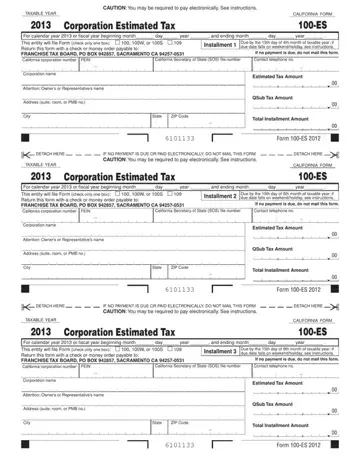
Completing the California Form 100-ES online is straightforward with FormsPal's free PDF editor. Follow the steps below to fill out your corporation estimated tax payment voucher accurately.
Step 1: Click the orange "Get Form Now" button at the top of this page. The 100-ES form opens instantly in your browser. No software download is needed.
Step 2: Use the editing toolbar to add text, make corrections, and fill in the required fields. You can add, delete, highlight, and reposition content anywhere in the document.
Step 3: Fill in your corporation information at the top of the form. Enter your corporation name, California Secretary of State (SOS) file number, and your federal employer identification number (FEIN). Add your contact telephone number as well.
Step 4: Enter the taxable year beginning and ending dates. Select the correct installment period by checking the appropriate box on the voucher. The four calendar-year installment periods correspond to April, June, September, and December due dates.
Step 5: Enter your estimated tax amount in the appropriate field. If your corporation has qualified subchapter S subsidiaries (QSubs), enter the QSub tax amount in the separate QSub field. The total installment amount is the combined total of the estimated tax and any QSub tax.
Step 6: Review all amounts carefully before finalizing. Each installment should equal approximately 25% of your total estimated annual tax liability. Confirm that you have selected the correct installment voucher for the current payment period.
Step 7: Complete the declaration section at the bottom of the payment voucher. Verify all information is accurate and consistent with your corporation's tax records.
Step 8: Click the "Done" button to save your completed form. Download the PDF and print it. Detach the payment voucher along the perforated line, then mail it with your payment to the California Franchise Tax Board by the installment due date. You can also make your payment online through the FTB's Web Pay for Business service.
Tips for completing Form 100-ES accurately
- Use your prior year California Form 100 return as a starting point to estimate current year income and tax.
- Pay at least 100% of your prior year's tax to avoid underpayment penalties under R&TC Section 19142.
- Mark the correct quarter on the voucher before detaching and mailing the payment.
- Keep a copy of each payment voucher you submit for your accounting records.
- If your business income changes significantly during the year, recalculate your estimated tax and adjust future installments accordingly.
- Large corporations required to pay electronically should use the FTB's Web Pay for Business or EFT service.
Related estimated tax and corporate forms
California corporations with multi-state operations or related tax obligations may also need these forms:
- NC Estimated Tax Payment - for corporations with North Carolina tax obligations
- Federal Estimated Tax Form - for federal quarterly estimated tax payments (Form 1120-W)
- West Virginia Estimated Tax - for corporations with West Virginia tax obligations
- Minnesota Tax Return Payment - for corporations with Minnesota operations


, 


, 


, 


, 


, 


, 


, 


, 


, 


, 


, 


,