
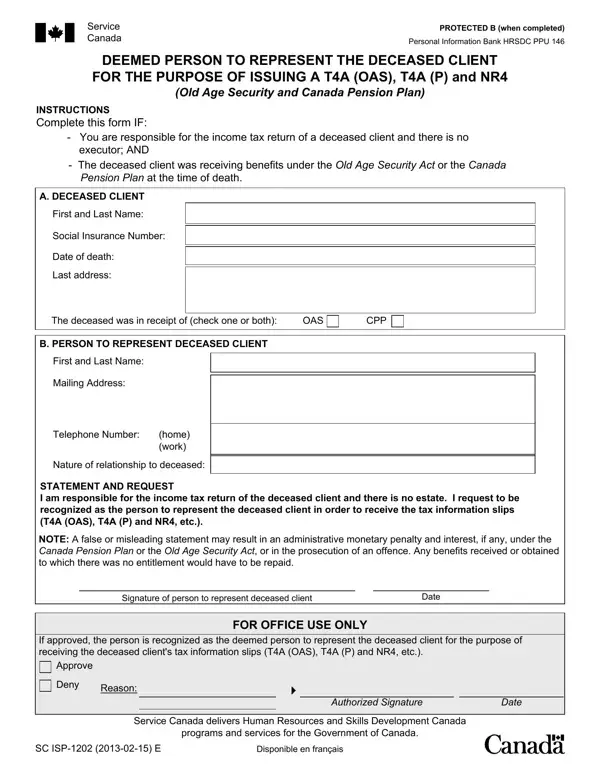
ISP 1202 Form Details and Instructions

The ISP 1202 form is issued by Service Canada and is required when a person assumes responsibility for the income tax return of a deceased individual who received Old Age Security (OAS) or Canada Pension Plan (CPP) benefits, and no executor has been appointed.

Who Should Complete the ISP 1202 Form

This form is intended for the surviving spouse, common-law partner, or other close relative who takes on the responsibility of the deceased's tax affairs. If the deceased had a named executor, that executor handles the tax return and this form is not required.

What Information You Need

To complete the ISP 1202, you will need the following ready:

What Happens After Submission

Once submitted to Service Canada, the agency processes the form and sends the relevant tax information slips to the authorized representative. These slips are required to complete the deceased's final income tax return with the Canada Revenue Agency (CRA).

QuestionAnswer
Form Name1202 Form
Form Length2 pages
Fillable?No
Fillable fields0
Avg. time to fill out30 sec
Other namesad 1202 form, sc isp 1202, income tax form isp 1202, form 1202

How to Edit 1202 Form Online for Free

The ISP 1202 form can be completed online using FormsPal's free PDF editor. Follow the steps below to fill out and submit the form accurately.

  1. Open the form: Click the "Get Form" button at the top of this page to open the ISP 1202 in the online PDF editor.
  2. Enter the deceased's information: Fill in the deceased person's full legal name, Social Insurance Number (SIN), date of birth, date of death, and last known mailing address.
  3. Enter your information: Provide your full name, SIN, phone number, and mailing address in the representative section of the form.
  4. State your relationship: Indicate your relationship to the deceased, such as spouse, common-law partner, adult child, or other relative.
Completing part 1 of isp 1202
  1. Review the second section: Complete the NOTE and authorization fields, including your signature and the date. Confirm all fields are accurate before proceeding.
Filling in section 2 in isp 1202
  1. Sign and date: Add your signature and the date in the declaration section to confirm the information is accurate and complete.
  2. Download or print: Save a completed copy for your records, then print or download the finished PDF.
  3. Submit to Service Canada: Mail the completed ISP 1202 to your nearest Service Canada office. You may also need a Service Canada medical report form or other related documents.

If the deceased had additional tax obligations, view related income tax return forms or the 1088 tax form for further reference.