
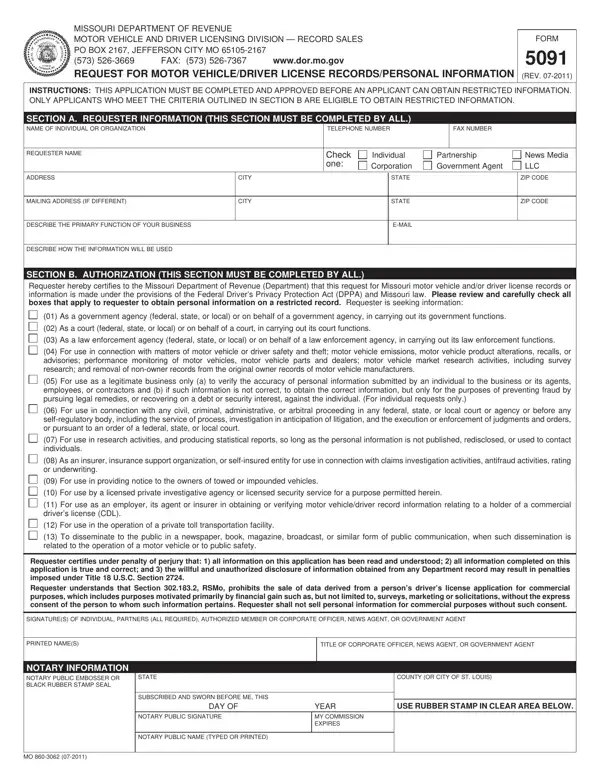
Incomplete forms will be returned for more information.
Documentation: documentation must be submitted with this form to verify your eligibility, including but not limited to business license, insurance license, bar card.
Boxes: select all boxes that apply to the requester to obtain personal information on a restricted record.
Information type: select Current Owner or lienholder, Title History, Mileage History, Name Search or Other (Requires Motor Vehicle Approval).
Sale: Section 302.170.7, RSMo, prohibits the sale of data derived from a person's driver's license application for commercial purposes without express consent.
Requests: records can be submitted by walk-in, mail-in, or e-mail request.
| Question | Answer |
|---|---|
| Form Name | Form 5091 |
| Form Length | 2 pages |
| Fillable? | Yes |
| Fillable fields | 89 |
| Avg. time to fill out | 15 min |
| Edition | Rev 09-2022 |
| Where to send | Motor Vehicle Bureau, P.O. Box 2048, Jefferson City, MO 65105-2048; appropriate documentation must be submitted with this form |
| Matches the agency's file | Yes, checked October 2, 2026 |
| Other names | 5091, Form 5091, Missouri Form 5091, Missouri 5091, Request for Motor Vehicle Records with Personal Information |
| Official source | Form 5091 (Rev 09-2022), Missouri Department of Revenue |
5091 Form isn’t the one you’re looking for?