
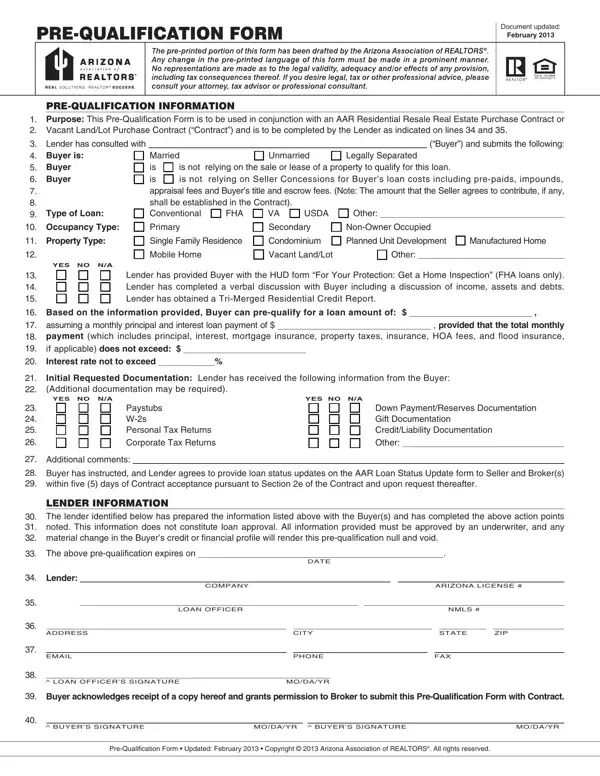
The AAR Prequalification Form was last updated in February 2013 by the Arizona Association of REALTORS. It is used alongside an Arizona Residential Resale Real Estate Purchase Contract or Vacant Land/Lot Purchase Contract to confirm that the buyer has been evaluated by a licensed lender before the transaction proceeds.
The lender documents several key areas on the form: loan type (conventional, FHA, VA, USDA, or other), loan terms, whether the purchase depends on the sale or lease of another property, whether seller concessions are expected, occupancy type (primary residence, second home, or investment property), and initial documentation reviewed. Because Arizona is a community property state, the buyer's marital status is also recorded. Documentation typically reviewed includes pay stubs, W-2s, tax returns, bank statements, and credit reports.
A pre-qualification is not a loan approval. It is a lender's preliminary assessment that must still be verified by an underwriter. Any material change in the buyer's income, debt, employment, or assets can invalidate the pre-qualification and require a new evaluation. The lender is required to update the seller's broker on any loan status changes during the transaction. For related financial documents, see the Mortgage Prequalification Worksheet, the Prequalification Mortgage Paper, or the Real Estate Questionnaire for Buyers.
| Question | Answer |
|---|---|
| Form Name | AAR Prequal Form |
| Full Name | Arizona Association of Realtors Pre-Qualification Form |
| Form Length | 1 pages |
| State | Arizona |
| Issuer | Licensed Lender (Arizona Licensed Mortgage Company) |
| Last Updated | February 2013 |
| Used With | AAR Residential Resale Purchase Contract or Vacant Land/Lot Purchase Contract |
| Fillable? | No |
| Fillable fields | 0 |
| Avg. time to fill out | 15 sec |
| Other names | arizona association of realtors pre qualification form, arizona lsu form 2021, aar prequal form, arizona pre approval form |
Aar Prequal Form isn’t the one you’re looking for?