Please rate Acd 1069 Form

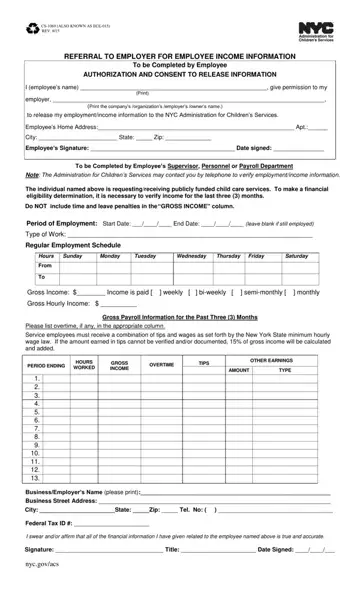
The ACD 1069 form is issued by the New York City Administration for Children's Services (ACS) to verify employee income when a family applies for publicly funded child care programs. ACS sends this form directly to the employee's employer, requesting a detailed income report covering a 90-day period.
Employers must document the employee's gross earnings, including regular wages, overtime pay, and tips. Time-and-leave penalties are excluded from gross income calculations. The employer completes the form and returns it to ACS with an authorized signature, confirming the accuracy of all reported data.
The form has two main parts. Part 1 covers the employee's regular work schedule, type of employment, and gross income broken down by day. Part 2 collects the employer's name, address, Federal Tax ID, and a signed certification. Both parts must be complete before submission.
For related NYC income and employment documents, see the Employer Verification of Earnings form and the Employment Verification form. Families applying for child care assistance may also need the childcare receipt template and the 1005 Verification of Employment form.
| Question | Answer |
|---|---|
| Form Name | ACD 1069 Form |
| Also Known As | CS-1069, ECE-015, NYC ACS 1069 |
| Issued By | NYC Administration for Children's Services (ACS) |
| Purpose | Employer income verification for childcare subsidy eligibility |
| Jurisdiction | New York City, NY |
| Form Length | 1 page |
| Fillable? | No (use our PDF editor) |
| Fillable fields | 0 |
| Avg. time to fill out | 15 min |
| Other names | cs 1069 form rev 4 18, nyc administration form 1069, acs 1069 2018, acd 1069 form downloads |
Acd 1069 Form isn’t the one you’re looking for?
Please rate Acd 1069 Form
