Please rate Adidas Employee Store Pass

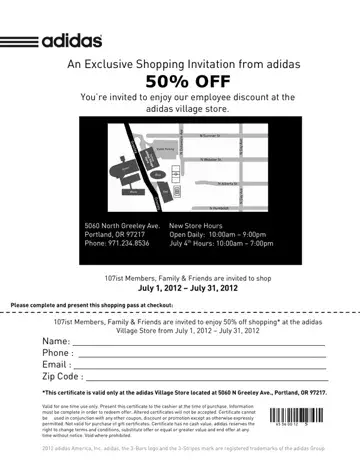
Accessing the Adidas Employee Store can be an exciting prospect, offering a range of products at potentially reduced prices. The key to entry lies within the employee store pass form, a document that must be filled out accurately and completely to ensure eligibility. This form serves as a gatekeeper, ensuring that only employees and, in some instances, their close acquaintances can enjoy the benefits offered by the store. The information required typically includes personal details, employment verification, and the planned dates of the visit. Special codes or invitations may also be part of the process, further emphasizing the exclusive nature of access. Precise adherence to the guidelines set forth by Adidas not only streamlines the entry process but also upholds the integrity of the store's access policy.
The pass grants access to a dedicated Adidas retail facility that offers products at below-retail prices. Eligible shoppers can find athletic footwear, apparel, and accessories, often at discounts ranging from 20% to 50% off the standard retail price. The store typically operates on a reservation system, meaning each visit requires a valid pass and, in many cases, a prior appointment. Employees can usually bring a limited number of guests, depending on current store policies and available capacity.
To qualify, you generally need to be a current Adidas employee or an approved affiliate of the company. Some stores also extend access to employees of partner organizations during promotional periods. When filling out the form, you will need to provide your employee ID, your department, and the planned visit date. Accurate information helps avoid delays at the store entrance and ensures a smooth check-in process. Store locations vary by region, with notable facilities in Portland, Oregon, near the Adidas North American headquarters. The pass is typically valid for a single visit or a defined time window, so plan your visit date carefully.
For other workplace paperwork, our collection of employment forms covers a wide range of HR and administrative documents. You may also find the employee availability form useful if you need to document scheduling preferences for your team.
| Question | Answer |
|---|---|
| Form Name | Adidas Employee Store Pass |
| Form Length | 1 pages |
| Fillable? | No |
| Fillable fields | 0 |
| Avg. time to fill out | 15 sec |
| Other names | adidas employee store reservation, adidas employee store appointment, how to get adidas employee store pass 2021, adidas employee store |
Adidas Employee Store Pass isn’t the one you’re looking for?
Please rate Adidas Employee Store Pass
