
AF Form 813 PDF Details

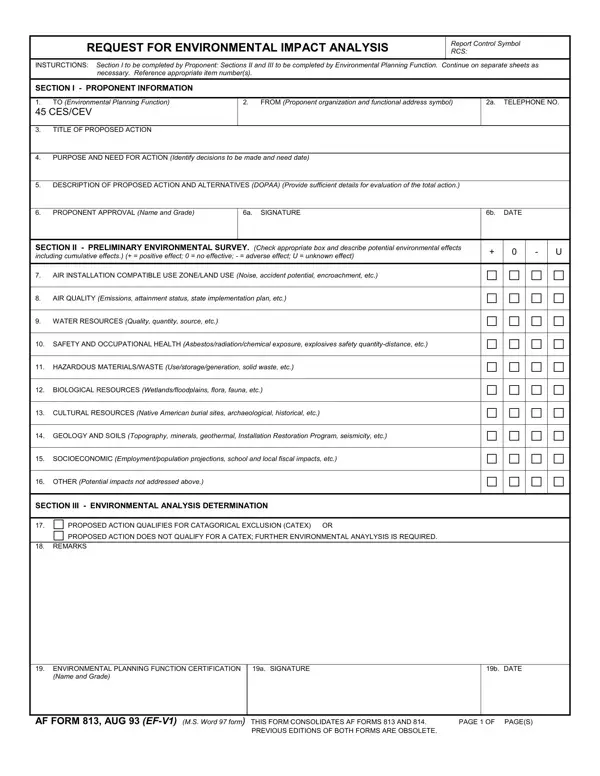
Understanding the AF Form 813 is crucial for those involved in initiating actions that may impact the environment within the framework of military operations and infrastructure planning. This form serves as a request for an environmental impact analysis, acting as the first step in scrutinizing the potential environmental implications of proposed projects or actions. The form is divided into three sections that require detailed input from the proponent (the person or entity proposing the action) and the Environmental Planning Function, responsible for evaluating the environmental ramifications.

Section I gathers comprehensive details from the proponent, including the purpose and necessity of the action, along with a descriptive analysis of the proposed activity and any alternatives. Section II focuses on a preliminary environmental survey, guiding the user through a checklist to assess potential effects on various environmental aspects such as air quality, water resources, and biological resources, among others. This section ensures a comprehensive evaluation of how the proposed action may positively or adversely impact the environment, considering cumulative effects as well. Section III determines whether the proposed action qualifies for a categorical exclusion or if a more in-depth environmental analysis is required. This determination is vital in the decision-making process for proceeding with the proposed action.

The AF Form 813 is required under Air Force Instruction 32-7061 and the National Environmental Policy Act (NEPA). It applies to all proposed actions on Air Force installations that could affect the environment, including construction projects, land use changes, and training activity modifications. The form helps installation commanders and environmental officials determine the scope of environmental review needed before approving a project. In cases where the action clearly falls within a predefined categorical exclusion, the process may be completed quickly. For actions with significant potential impacts, a full environmental assessment or environmental impact statement may follow.

Common situations requiring an AF Form 813 include building renovations, changes to facility operations, new construction on base, and modifications to flight training patterns. The proponent must describe each alternative considered, including the no-action alternative, to ensure decision-makers have a full picture of options and their respective environmental consequences.

For other Air Force administrative forms, see AF Form 103 for base civil engineer work orders, or Air Force Form 102 for incident reports. You can also browse related Air Force documentation such as AF Form 1206, used for nomination and recommendation records.

QuestionAnswer
Form NameAf Form 813
Form Length2 pages
Fillable?No
Fillable fields0
Avg. time to fill out30 sec
Other namesaf form 813, 813, af 813, CATEX

Form Preview Example

REQUEST FOR ENVIRONMENTAL IMPACT ANALYSIS

Report Control Symbol RCS:

INSTURCTIONS: Section I to be completed by Proponent: Sections II and III to be completed by Environmental Planning Function. Continue on separate sheets as necessary. Reference appropriate item number(s).

SECTION I - PROPONENT INFORMATION

1.TO (Environmental Planning Function)

45 CES/CEV

2.FROM (Proponent organization and functional address symbol)

2A. TELEPHONE NO.

3.TITLE OF PROPOSED ACTION

4.PURPOSE AND NEED FOR ACTION (Identify decisions to be made and need date)

5.DESCRIPTION OF PROPOSED ACTION AND ALTERNATIVES (DOPAA) (Provide sufficient details for evaluation of the total action.)

6. PROPONENT APPROVAL (Name and Grade)

6A. SIGNATURE


SECTION II - PRELIMINARY ENVIRONMENTAL SURVEY. (Check appropriate box and describe potential environmental effects including cumulative effects.) (+ = positive effect; 0 = no effective; - = adverse effect; U = unknown effect)

6B. DATE

+ 0 - U

7.AIR INSTALLATION COMPATIBLE USE ZONE/LAND USE (Noise, accident potential, encroachment, etc.)

8.AIR QUALITY (Emissions, attainment status, state implementation plan, etc.)

9.WATER RESOURCES (Quality, quantity, source, etc.)

10.SAFETY AND OCCUPATIONAL HEALTH (Asbestos/radiation/chemical exposure, explosives safety quantity-distance, etc.)

11.HAZARDOUS MATERIALS/WASTE (Use/storage/generation, solid waste, etc.)

12.BIOLOGICAL RESOURCES (Wetlands/floodplains, flora, fauna, etc.)

13.CULTURAL RESOURCES (Native American burial sites, archaeological, historical, etc.)

14.GEOLOGY AND SOILS (Topography, minerals, geothermal, Installation Restoration Program, seismicity, etc.)

15.SOCIOECONOMIC (Employment/population projections, school and local fiscal impacts, etc.)

16.OTHER (Potential impacts not addressed above.)

SECTION III - ENVIRONMENTAL ANALYSIS DETERMINATION

17.

PROPOSED ACTION QUALIFIES FOR CATAGORICAL EXCLUSION (CATEX) OR


PROPOSED ACTION DOES NOT QUALIFY FOR A CATEX; FURTHER ENVIRONMENTAL ANAYLYSIS IS REQUIRED.

18.REMARKS

19.ENVIRONMENTAL PLANNING FUNCTION CERTIFICATION (Name and Grade)

19A. SIGNATURE

19B. DATE

AF FORM 813, AUG 93 (EF-V1) (M.S. Word 97 form) THIS FORM CONSOLIDATES AF FORMS 813 AND 814.

PAGE 1 OF PAGE(S)

PREVIOUS EDITIONS OF BOTH FORMS ARE OBSOLETE.


AF FORM 813, AUG 93, CONTINUATION SHEET

PAGE OF PAGE(S)

How to Edit Af Form 813 Online for Free

To complete the AF Form 813 accurately, follow each section in order and provide thorough responses. Incomplete or vague entries often delay the environmental review process and may require resubmission. The guide below explains each section and common errors to avoid.

How to Fill Out Section I

Section I captures the proponent's information and the proposed action details. Enter the name and office symbol of the requesting organization, the date of the request, and a clear description of the proposed action. Describe the purpose and need for the action in concrete terms, avoiding vague language. Include all viable alternatives, including the no-action alternative, as NEPA requires consideration of alternatives. List the location using installation name, building number, or geographic coordinates where applicable.

How to Complete Section II

Section II is a checklist of environmental resource areas that may be affected by the proposed action. Review each resource category, including air quality, noise, water resources, biological resources, and cultural resources. For each category, indicate whether the proposed action could affect that resource. If uncertain, mark yes and provide a brief explanation. The Environmental Planning Function reviews these responses to determine the level of analysis needed. Thorough and honest responses at this stage prevent costly revisions later in the process.

Completing Section III

Section III is completed by the Environmental Planning Function, not the proponent. This section records the determination of the appropriate level of environmental review. The possible outcomes include a categorical exclusion (CATEX), a finding of no significant impact (FONSI) following an environmental assessment, or a full environmental impact statement. The proponent should understand these outcomes because they determine how quickly a project may proceed. A CATEX typically allows the fastest approval, while an environmental impact statement may take years to complete.

Common Mistakes to Avoid

Several errors frequently cause AF Form 813 submissions to be returned. Leaving Section I fields blank or using unclear project descriptions slows the review. Checking no for all environmental resource categories in Section II without justification raises red flags with reviewers. Failing to include all project alternatives, including no-action, is a common NEPA compliance error. Using an outdated version of the form may cause rejection at the installation level. Always confirm you have the current version before submitting.

Frequently Asked Questions

What is the AF Form 813 used for?

The AF Form 813 is the official request form for an environmental impact analysis on U.S. Air Force installations. It is required before initiating any action that could affect the environment under NEPA and Air Force Instruction 32-7061.

Who submits the AF Form 813?

The project proponent (the person or office proposing an action) submits the form. The Environmental Planning Function then reviews and completes Section III.

How long does it take to process an AF Form 813?

Processing time varies. Actions qualifying for a categorical exclusion may be approved within days. Projects requiring a full environmental assessment can take 6 to 18 months or longer depending on the complexity and scope of the proposed action.

Is the AF Form 813 required for all Air Force projects?

The form is required for any proposed action that could affect the environment on an Air Force installation. Routine maintenance activities that clearly fall under an approved categorical exclusion may not require a new form submission. Check with your installation's Environmental Management office for guidance.