
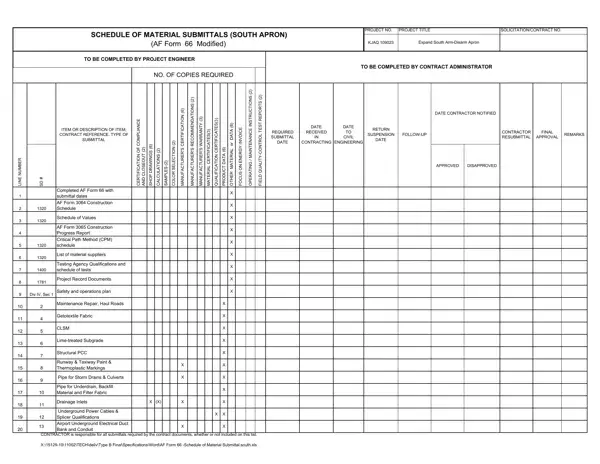
What Is AF Form 66?
AF Form 66 is the Schedule of Material Submittals used in Air Force construction projects. It provides a systematic record of all materials, shop drawings, and compliance documents that contractors must submit for a project. The form helps the construction team verify that every required item has been reviewed and approved before installation or use on the project site.
Who Uses AF Form 66?
Three key roles work with AF Form 66 throughout a construction project:
- Contractors submit the required materials and document each item on the form.
- Project engineers review submissions and record approval or rejection status.
- Contract administrators oversee compliance with all contract document specifications.
Key Fields on AF Form 66
When completing AF Form 66, you will need to enter the following information for each submittal item:
- Item number and submittal type (shop drawing, product data, sample, or certificate)
- Number of copies required by the contract
- Planned submission date and review deadline
- Review status: approved, approved as noted, rejected, or resubmit
- Final approval date after all revisions are accepted
How to Complete AF Form 66
Follow these steps to fill out AF Form 66 correctly:
- Enter project information. Record the project number, project title, and contracting officer contact details at the top of the form.
- List all required submittals. Review your contract documents to identify every material submittal that must be tracked. Enter each one on a separate row.
- Record the submission type. Note whether each item is a shop drawing, manufacturer's certification, warranty, color selection, or quality control report.
- Specify the number of copies. Enter the exact number of copies that the contract requires for each submittal type.
- Track dates and status. Enter the planned submission date and update the form as each item moves through review.
- Record the final outcome. After each review, enter the result. Mark items that need resubmission and log the resubmission date.
Common Mistakes to Avoid
Several errors can delay the review process for AF Form 66 submittals:
- Incomplete entries. Leaving fields blank causes reviewers to return the submittal for correction. Fill in every required field before submission.
- Wrong copy count. Always confirm the correct number of copies for each submittal type by checking the contract documents.
- Missing resubmittals. Track rejected items carefully and submit corrected versions by the required deadline.
- Incorrect submittal type. Confirm whether an item requires a shop drawing, product data sheet, or sample before logging it on the form.
Related Air Force and Construction Forms
Many Air Force construction projects require additional forms alongside AF Form 66. The AF Form 1768 is used for staff summary sheets, while the AF Form 2583 handles personnel security action requests. For broader construction documentation, the certificate of completion is often required at project close-out.
Can AF Form 66 be filled out online?
Yes. You can complete AF Form 66 online using the FormsPal editor. Click the button at the top of this page to open the form, fill in the required fields, and download your completed document as a PDF.
Is AF Form 66 only for the South Apron project?
AF Form 66 was originally developed for the South Apron construction project. The format can also be adapted for other Air Force construction projects that require systematic material submittal tracking.
What is the difference between AF Form 66 and a standard submittal log?
AF Form 66 is a standardized military form with specific fields required by Air Force construction contracts. A standard submittal log varies in format across projects. Using AF Form 66 ensures your documentation meets all Air Force contract requirements for material submittals.
