Our qualified software engineers have worked collectively to design the PDF editor that you're going to work with. The following software makes it simple to submit Agora Enrollment Forms Packet documentation quickly and effortlessly. This is everything you need to undertake.
Step 1: Select the button "Get Form Here".
Step 2: You're now on the document editing page. You may edit, add text, highlight selected words or phrases, insert crosses or checks, and insert images.
The next areas are what you are going to create to have the ready PDF document.
Make sure you type in the crucial data in the I Student Information Last Name, City, County Mailing Address If, City, Date Of Birth, First Name, State, Zip Code, Telephone, State, Age, Zip Code, II School District of Residence, Former School Information Other, and Public School field.
The application will request particulars to automatically fill in the area Name of Former School, Address of Former School, Previous Grade, Withdrawal Date From Former School, Was Your Child Receiving Special, Yes, If Yes Do You Have The Childs, Yes, Page of Charter School Student, and PDE.
In section III ParentGuardian Information, Child Lives With, Both Parents Legal Guardian, Both Parents Alternately Foster, Other Adult, Mother Only, Father Only, Special Custodial Court, Yes, Complete ParentGuardian Name and, Fathers Name Address City Home, Mothers Name Address City Home, State, Zip Code, and Work Telephone, state the rights and responsibilities.
Finish by taking a look at the next areas and filling them in as needed: Mothers Name Address City Home, State, Zip Code, Work Telephone, If The Student Is Not Living With, Guardians Name Name Address City, Foster Parents Name, Other Adult Name, State, Zip Code, My signature on this form, Signature of ParentGuardian, and Date.
Step 3: When you are done, choose the "Done" button to upload your PDF document.
Step 4: Make duplicates of your document. This will prevent possible future difficulties. We do not check or distribute your information, so be assured it is secure.
Frequently Asked Questions
What documents are needed to complete the Agora enrollment packet?
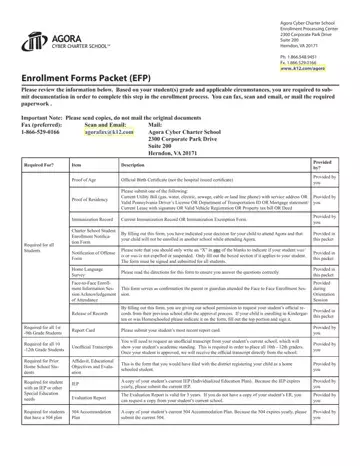
The enrollment packet requires proof of age, proof of residency, immunization records, academic transcripts, and any special education documents such as an IEP. Gather all materials before starting the form to complete it in one session.
Can I fill out the enrollment packet online without downloading software?
Yes. FormsPal's browser-based PDF editor lets you complete this enrollment packet directly online without downloading any software. Click the "Get Form Here" button at the top of this page to open the editor and begin.
How many pages is the Agora Enrollment Forms Packet?
The packet contains 8 pages covering student information, former school details, parent or guardian information, and required compliance statements. Most families complete the form in under 30 minutes when all records are on hand.
For related education forms, see the Preschool Enrollment Intake Form or the School Letter of Intent Template available at FormsPal.