Form NGB 336 PDF Details

The Air National Guard Order Application Request, known formally as the NGB 336 form, is a comprehensive document designed for use by members of the Air National Guard to apply for various types of orders. The form is governed by the prescribing directive ANGI 33-101 and overseen by the proponent agency ANG/A6, ensuring its users have a standardized method to submit their information for processing within the Air National Guard Reserve Order Writing System (AROWS). It contains several critical sections, including personal and contact information, travel details, duty assignments, justification for orders, and funding specifics to streamline the order application process. The privacy of applicants is protected under the authority of Title 5 USC Section 552a and Executive Order 9397, with the disclosure of the Social Security Number being voluntary, though necessary for the application to be processed. This form requires detailed input from the applicants, ranging from their names and social security numbers to specific travel arrangements and duty locations, along with any special instructions or justifications that need to be communicated to the Transportation Management Office (TMO) or other relevant authorities. Additionally, it covers aspects related to official contingency support, permanent change of station (PCS) details, and various authorizations concerning transportation, lodging, and financial expenditures associated with the execution of orders. The completion and processing of the NGB 336 form are critical steps in the mobilization, deployment, and logistical planning for Air National Guard members, ensuring they are equipped and authorized to fulfill their duty assignments efficiently.

QuestionAnswer
Form Name Ngb 336 Form
Form Length 7 pages
Fillable? No
Fillable fields 0
Avg. time to fill out 1 min 45 sec
Other names ngb orders request form 336, 336 form ngb, ngb 336 national guard form, ang form 336 pdf

Form Preview Example

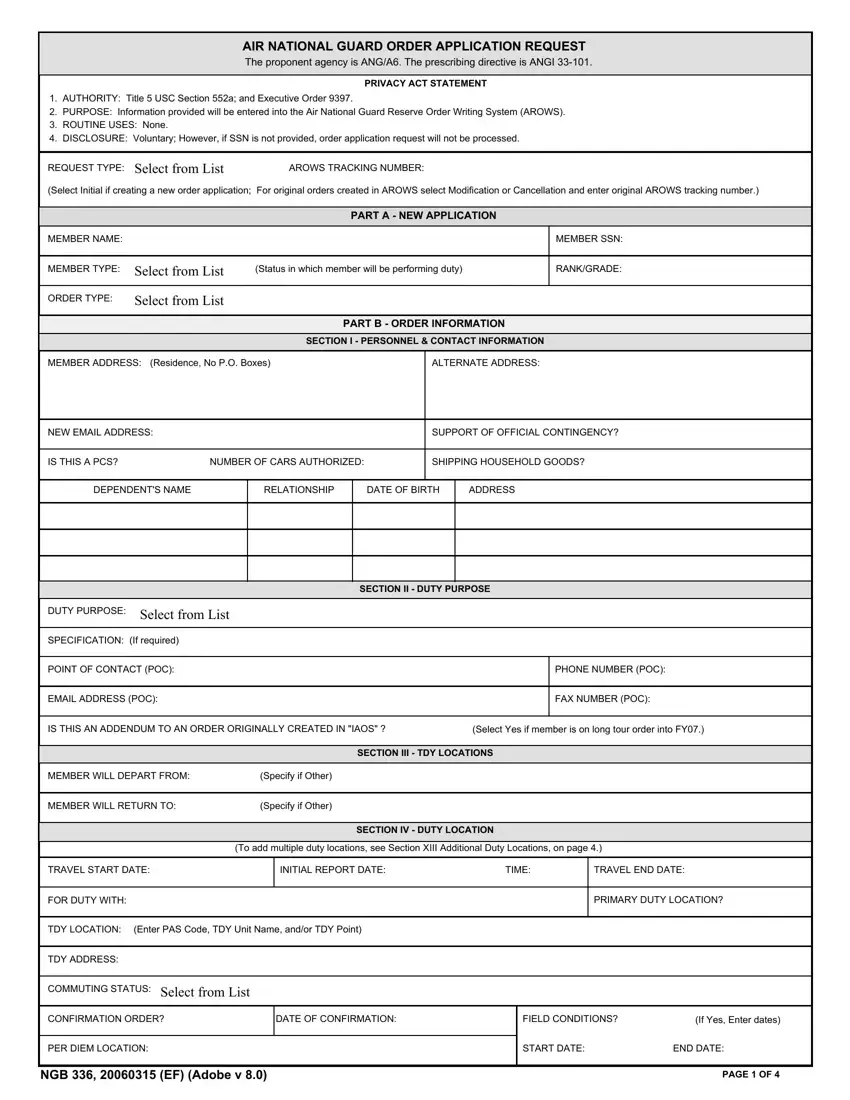
AIR NATIONAL GUARD ORDER APPLICATION REQUEST

The proponent agency is ANG/A6. The prescribing directive is ANGI 33-101.

PRIVACY ACT STATEMENT

1.AUTHORITY: Title 5 USC Section 552a; and Executive Order 9397.

2.PURPOSE: Information provided will be entered into the Air National Guard Reserve Order Writing System (AROWS).

3.ROUTINE USES: None.

4.DISCLOSURE: Voluntary; However, if SSN is not provided, order application request will not be processed.


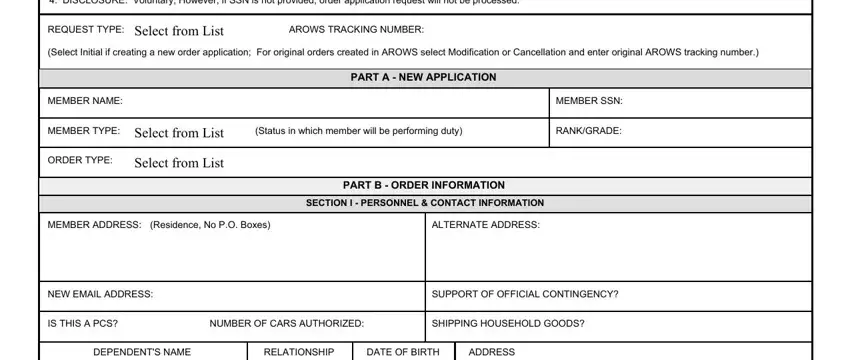
REQUEST TYPE:

Select from List

AROWS TRACKING NUMBER:


(Select Initial if creating a new order application;

For original orders created in AROWS select Modification or Cancellation and enter original AROWS tracking number.)


PART A - NEW APPLICATION


MEMBER NAME:


MEMBER SSN:


MEMBER TYPE:

Select from List

(Status in which member will be performing duty)

RANK/GRADE:


ORDER TYPE:

Select from List


PART B - ORDER INFORMATION


SECTION I - PERSONNEL & CONTACT INFORMATION


MEMBER ADDRESS: (Residence, No P.O. Boxes)

ALTERNATE ADDRESS:

NEW EMAIL ADDRESS:

SUPPORT OF OFFICIAL CONTINGENCY?

IS THIS A PCS?

NUMBER OF CARS AUTHORIZED:

SHIPPING HOUSEHOLD GOODS?

DEPENDENT'S NAME

RELATIONSHIP

DATE OF BIRTH

ADDRESS

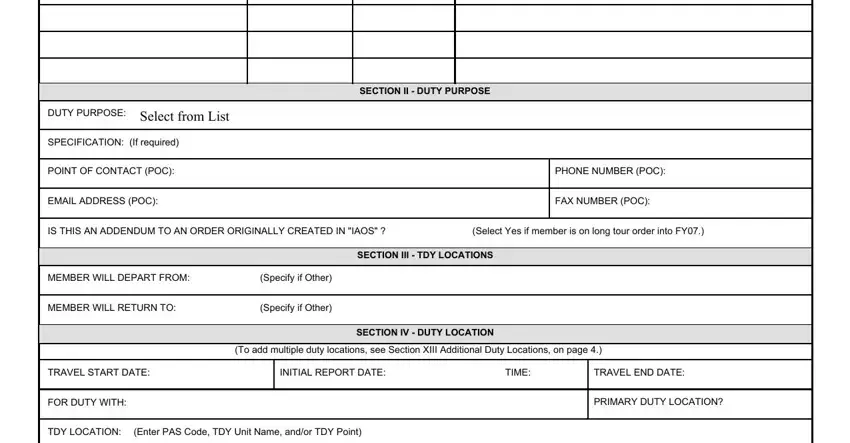
SECTION II - DUTY PURPOSE

DUTY PURPOSE: Select from List

SPECIFICATION: (If required)

POINT OF CONTACT (POC):

EMAIL ADDRESS (POC):

PHONE NUMBER (POC):

FAX NUMBER (POC):


IS THIS AN ADDENDUM TO AN ORDER ORIGINALLY CREATED IN "IAOS" ?

(Select Yes if member is on long tour order into FY07.)


SECTION III - TDY LOCATIONS


MEMBER WILL DEPART FROM:

(Specify if Other)


MEMBER WILL RETURN TO:

(Specify if Other)


SECTION IV - DUTY LOCATION


(To add multiple duty locations, see Section XIII Additional Duty Locations, on page 4.)


TRAVEL START DATE:


INITIAL REPORT DATE:

TIME:

TRAVEL END DATE:


FOR DUTY WITH:


PRIMARY DUTY LOCATION?


TDY LOCATION: (Enter PAS Code, TDY Unit Name, and/or TDY Point)


TDY ADDRESS:


COMMUTING STATUS: Select from List


CONFIRMATION ORDER?


DATE OF CONFIRMATION:


FIELD CONDITIONS?

(If Yes, Enter dates)


PER DIEM LOCATION:


START DATE:


END DATE:


NGB 336, 20060315 (EF) (Adobe v 8.0)


PAGE 1 OF 4

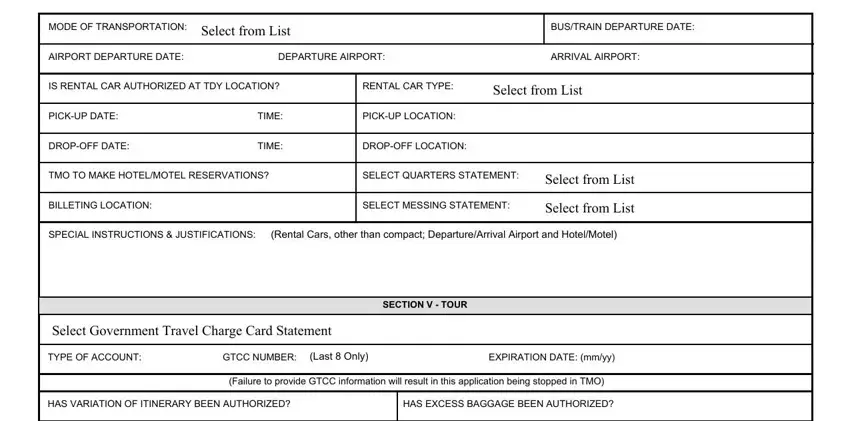
MODE OF TRANSPORTATION: Select from List


BUS/TRAIN DEPARTURE DATE:

AIRPORT DEPARTURE DATE:


DEPARTURE AIRPORT:


ARRIVAL AIRPORT:


IS RENTAL CAR AUTHORIZED AT TDY LOCATION?

RENTAL CAR TYPE:

Select from List


PICK-UP DATE:


TIME:

PICK-UP LOCATION:


DROP-OFF DATE:


TIME:

DROP-OFF LOCATION:


TMO TO MAKE HOTEL/MOTEL RESERVATIONS?

SELECT QUARTERS STATEMENT:

Select from List


BILLETING LOCATION:


SELECT MESSING STATEMENT:

Select from List


SPECIAL INSTRUCTIONS & JUSTIFICATIONS:

(Rental Cars, other than compact; Departure/Arrival Airport and Hotel/Motel)


SECTION V - TOUR


Select Government Travel Charge Card Statement


TYPE OF ACCOUNT:

GTCC NUMBER: (Last 8 Only)

EXPIRATION DATE: (mm/yy)


(Failure to provide GTCC information will result in this application being stopped in TMO)


HAS VARIATION OF ITINERARY BEEN AUTHORIZED?


HAS EXCESS BAGGAGE BEEN AUTHORIZED?


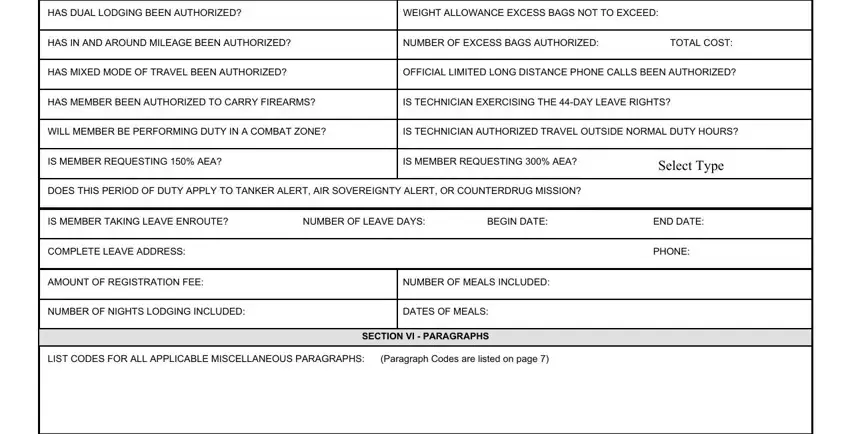
HAS DUAL LODGING BEEN AUTHORIZED?


WEIGHT ALLOWANCE EXCESS BAGS NOT TO EXCEED:


HAS IN AND AROUND MILEAGE BEEN AUTHORIZED?


NUMBER OF EXCESS BAGS AUTHORIZED:

TOTAL COST:


HAS MIXED MODE OF TRAVEL BEEN AUTHORIZED?


OFFICIAL LIMITED LONG DISTANCE PHONE CALLS BEEN AUTHORIZED?


HAS MEMBER BEEN AUTHORIZED TO CARRY FIREARMS?


IS TECHNICIAN EXERCISING THE 44-DAY LEAVE RIGHTS?


WILL MEMBER BE PERFORMING DUTY IN A COMBAT ZONE?


IS TECHNICIAN AUTHORIZED TRAVEL OUTSIDE NORMAL DUTY HOURS?


IS MEMBER REQUESTING 150% AEA?


IS MEMBER REQUESTING 300% AEA?

Select Type


DOES THIS PERIOD OF DUTY APPLY TO TANKER ALERT, AIR SOVEREIGNTY ALERT, OR COUNTERDRUG MISSION?


IS MEMBER TAKING LEAVE ENROUTE?

NUMBER OF LEAVE DAYS:

BEGIN DATE:

END DATE:


COMPLETE LEAVE ADDRESS:


PHONE:


AMOUNT OF REGISTRATION FEE:


NUMBER OF MEALS INCLUDED:


NUMBER OF NIGHTS LODGING INCLUDED:


DATES OF MEALS:


SECTION VI - PARAGRAPHS


LIST CODES FOR ALL APPLICABLE MISCELLANEOUS PARAGRAPHS: (Paragraph Codes are listed on page 7)


LIST NON-STANDARD PARAGRAPHS:

(Additional Remarks)


SECTION VII - JUSTIFICATION


GENERAL COMMENTS & JUSTIFICATION INFORMATION FOR HARD HOLDS:


NGB 336, 20060315 (EF) (Adobe v 8.0)

PAGE 2 OF 4


SECTION VIII - FUNDING INFORMATION


Orders Specialist (OS), please select separate funding for each Fiscal Year (FY).


WORK UTILIZATION CODE (WUC):

(Required for active duty order types)

ESP CODE: (If known)


LOCAL FUNDING INFORMATION/DESCRIPTION:

OTHER FUNDING INFORMATION/DESCRIPTION:

SECTION IX - SCHOOL

BETM refer to Training Line Number RIP(s) for all school information.

LIST ANY SPECIAL NOTES TO BASE EDUCATION AND TRAINING MANAGER:


SECTION X - ACTIVATION


EXECUTIVE ORDER: Select from List


AERO RATING:


OTHER (SPECIFY):


FLYING STATUS:


RESERVE ACTIVE DUTY REASON:

Select from List


UTC:


MOBILIZATION INDICATOR:


Select from List

MOBILIZATION AUTHORIZATION NUMBER:


SECTION XI - AGR TOUR


This Section is to be completed by the Duty Section.


DUTY TITLE:


UMDG PAS CODE:


CAFSC:


MILITARY FUNCTIONAL ACCOUNT CODE:


PAFSC:


MILITARY POSITION NUMBER:


DAFSC:


MILITARY AUTHORIZED GRADE:

Select from List


TAFMS DATE:


This Section is to be completed by the Human

Resources Office (HRO)


TAFMS:


UMDA PAS CODE:


GAINING COMMAND:


UMDA POS NUMBER:


UNIT OF ASSIGNMENT:


UMDA FUNCTIONAL CODE:


RESOURCE IDENTIFICATION CODE (RIC):


UMDA POS TITLE:


ANG ACTIVE DUTY STATUS CODE:


UMDA AUTH MIL GRADE:


Select from List


UMDA AUTH CIV GRADE:


SECTION XII - SIGNATURES


SUPERVISOR SIGNATURE:


Signature Field


APPROVING OFFICIAL SIGNATURE:

Signature Field


LOCAL AUTHORIZATION: (Optional and may be locally assigned. Example: Unit Workday Control Officer, Resource Advisor, etc.)

NGB 336, 20060315 (EF) (Adobe v 8.0)

PAGE 3 OF 4

SECTION XIII - ADDITIONAL DUTY LOCATIONS

DUTY LOCATION 2


TRAVEL START DATE:


INITIAL REPORT DATE:

TIME:


TRAVEL END DATE:


FOR DUTY WITH:


PRIMARY DUTY LOCATION?


TDY LOCATION: (Enter PAS Code, TDY Unit Name, and/or TDY Point)


TDY ADDRESS:


COMMUTING STATUS: Select from List


CONFIRMATION ORDER?


DATE OF CONFIRMATION:


FIELD CONDITIONS?

(If Yes, enter dates)


PER DIEM LOCATION:


START DATE:

END DATE:


MODE OF TRANSPORTATION:

Select from List


BUS/TRAIN DEPARTURE DATE:


AIRPORT DEPARTURE DATE:


DEPARTURE AIRPORT:


ARRIVAL AIRPORT:


IS RENTAL CAR AUTHORIZED AT TDY LOCATION?

RENTAL CAR TYPE:

Select from List


PICK-UP DATE:


TIME:

PICK-UP LOCATION:


DROP-OFF DATE:


TIME:

DROP-OFF LOCATION:


TMO TO MAKE HOTEL/MOTEL RESERVATIONS?

SELECT QUARTERS STATEMENT:


Select from List


BILLETING LOCATION:


SELECT MESSING STATEMENT:


Select from List


SPECIAL INSTRUCTIONS & JUSTIFICATIONS:

(Rental Cars, other than compact; Departure/Arrival Airport and Hotel/Motel)


DUTY LOCATION 3


TRAVEL START DATE:


INITIAL REPORT DATE:

TIME:


TRAVEL END DATE:


FOR DUTY WITH:


PRIMARY DUTY LOCATION?


TDY LOCATION: (Enter PAS Code, TDY Unit Name, and/or TDY Point)


TDY ADDRESS:


COMMUTING STATUS: Select from List


CONFIRMATION ORDER?


DATE OF CONFIRMATION:


FIELD CONDITIONS?

(If Yes, enter dates)


PER DIEM LOCATION:


START DATE:

END DATE:


MODE OF TRANSPORTATION:

Select from List


BUS/TRAIN DEPARTURE DATE:


AIRPORT DEPARTURE DATE:


DEPARTURE AIRPORT:


ARRIVAL AIRPORT:


IS RENTAL CAR AUTHORIZED AT TDY LOCATION?

RENTAL CAR TYPE:

Select from List


PICK-UP DATE:


TIME:

PICK-UP LOCATION:


DROP-OFF DATE:


TIME:

DROP-OFF LOCATION:


TMO TO MAKE HOTEL/MOTEL RESERVATIONS?

SELECT QUARTERS STATEMENT:


Select from List


BILLETING LOCATION:


SELECT MESSING STATEMENT:


Select from List


SPECIAL INSTRUCTIONS & JUSTIFICATIONS:

(Rental Cars, other than compact; Departure/Arrival Airport and Hotel/Motel)


NGB 336, 20060315 (EF) (Adobe v 8.0)

PAGE 4 OF 4

INSTRUCTIONS TO COMPLETING ANG ORDER APPLICATION REQUEST

This form must be filled out completely or orders will not be processed. All "dates" will be entered as (yyyymmdd), unless otherwise specified.

PART A - NEW APPLICATION

1.Member Name and Social Security Number - enter name of member performing duty and/or travel.

2.Order Type - select appropriate order type applicable to the type of duty and/or travel the member is performing.

3.Rank/Grade - enter grade if in civilian status and enter rank if in military status, if ITO enter appropriate Mr., Mrs., Ms. or Miss.

4.Member Type (Status) - select civilian or military for the type of status in which the member will be performing duty.

PART B - ORDER INFORMATION

SECTION I - PERSONNEL & CONTACT INFORMATION

1.Member's Residence - enter member's complete home address to include street address with city, state, and zip+4 (No P.O. Boxes). This will not update VMPF.

2.Alternate Address - use this block as an alternate address to include street address with city, state, and zip+4 if needed for delivery of paper airline tickets.

3.New E-mail address - enter e-mail address of member, (other than .mil).

4.Support of Official Contingency - select yes or no based on the definition: Official Contingency is a military operation designated by SECDEF.

Contact your Unit Deployment Monitor, Logistics Readiness Section, or Wing Plans for assistance.

5.Is this a PCS? - select yes or no for permanent change of station (PCS).

6.Number of Cars Authorized (PCS Only) - Only use if PCS is authorized, reference JFTR for more information.

7.Shipping House Hold Goods - Shipment of Household Goods may be authorized for TDY(JFTR Para U4710/JTR C2300) and for PCS (JFTR U5300/JTR C5152).

8.Dependent's Name, Relationship, Date of Birth, and Address - complete the blocks with only the dependents that will be moving (PCS) with the member.

(Note: If more space is needed please provide information on a blank sheet of paper and attach it to the form.)

SECTION II - DUTY PURPOSE

1.Duty Purpose - select applicable duty purpose. If "other" is selected member must enter the purpose in the Specification block.

2.Name of TDY Point of Contact - enter the point of contact's name at the TDY location if available.

3.Phone and Fax number of POC - enter the point of contact's phone number at the TDY location to include area code or designate as DSN.

4.E-mail of POC - enter the point of contact's e-mail address at the TDY location.

5.Addendum statement - select yes, if member is on a long tour order that crosses into Fiscal Year (FY) 07 and was originally created in IAOS.

SECTION III - TDY LOCATIONS

1.Member will depart from? and Member will return to? - select Permanent Duty Station (PDS) or Other. If "other" selected enter the address in the next block. Enter complete address to include street address with city, state, and zip+4 (No P.O. Boxes).

SECTION IV - DUTY LOCATION (Note: If multiple locations, use the space provided on page 4)

1.Travel Start Date - enter first travel day.

2.Initial Report Date - enter date to report on the first duty day. Initial Report Time - enter time to report on the first duty day (military time).

3.End Date - enter the last travel day for this location. If multiple legs enter the last travel day for each location.

4.For Duty With - enter the unit that you will be supporting at TDY location.

5.Primary Duty Location - Select appropriate answer, last duty location or furthest point of travel prior to return to home station.

6.TDY Location - enter PAS Code, TDY Unit Name, and/or TDY point.

7.TDY Address - address of TDY point (No P.O. Boxes). If you entered the PAS Code in the previous block you do not need to complete this block. Enter member's complete TDY address to include street address with city, state, and zip+4.

8.Commuting Status - select appropriate status.

9.Confirmation Order - (Verbal Orders of the Commander); Date of Confirmation - enter date of the verbal order (1st date of duty or before) (AFI 33-327 Section A). Note to Order Specialist: VOCO information must be typed as a non-standard paragraph.

10.Field Conditions - select whether or not the member will be in field conditions. If yes, enter Start Date and End Date of field conditions.

11.Per Diem Locations - enter Per Diem locations of City/County and State/Country.

12.Mode of Transportation - select mode of transportation for travel.

13.Bus/Train Departure Date - enter date of departure.

14.Airplane Departure Date - enter date of departure; Enter appropriate departure airport; Enter appropriate arrival airport .

15.Is a rental car authorized at TDY location? - select yes or no; if yes complete rental car size, pick-up information, and drop-off information blocks.

16.Rental Car Size - select appropriate size of rental vehicle.

17.Pick-Up Date- enter the pick-up date of the rental car; Enter the time member will pick-up rental car; Enter location member will pick-up rental car.

18.Drop-Off Date - enter the drop-off date of the rental car; Enter the time member will drop-off rental car; Enter location member will drop-off rental car.

19.Select if TMO to make Hotel/Motel reservations - enter appropriate answer if you need TMO to make your hotel/motel reservations.

20.Select Quarters Statement - select appropriate quarters statement; Billeting - If quarters available, provide location if known (Example: Navy Lodge).

21.Select Messing Statement - select appropriate meal statement

22.Special Instructions and Justifications - enter any special instructions to TMO to include hotel/motel reservations and justifications for special authorizations. Justifications will be needed for all rental car sizes except compact.

SECTION V - TOUR

1.Select Government Travel Charge Card (GTCC) Statement - select the appropriate GTCC statement.

2.Type of Account - select type of GTCC to be used to charge the commercial airline ticket. Individually Billed Account (IBA) or Centrally Billed Account (CBA- TMO's)

3.GTCC Number (last 8 only) - enter the last 8 digits of the IBA GTCC number if using IBA to purchase commercial airline ticket; Enter the expiration date (mm/yy). Members who do not provide this information must contact TMO directly for airline tickets.

4.Has variation of itinerary been authorized? Variations in Itinerary can only be approved prior to member traveling. (JFTR U2135/JTR C4425).

5.Has dual lodging been authorized? When a member retains lodging at one TDY location for other than personal convenience and procures lodging at a second TDY location on the same calendar day (JFTR U4135/JTR C4555).

6.Has in and around mileage been authorized? In and around mileage must be logged daily and turned in to Finance on a SF 1164 or a log to file with the final settlement travel voucher (JFTR U3500/JTR C2402)

7.Has mixed mode of travel been authorized? Travel by two or more modes of transportation (Example: Bus, Plane, or POC (JFTR U3305/JTR C4661).

8.Has the member been authorized to carry firearms? Refer to reporting instructions if available.

9.Will the member be performing duty in a combat zone? Refer to reporting instructions if available.

10.Is the member requesting 150% AEA? Wing Cdr can approve AEA up to 150% of the locality per diem rate for both lodging and/or meals

(JFTR U4200 and Appendix L/JTR C4600).

11.Does this period of duty apply to Tanker Alert, Air Sovereignty Alert, or Counter Drug Mission? Members on these three order types must sign a sanctuary waiver if they will obtain 18 years of Total Active Federal Military Service (TAFMS) during the effective date of the order.

NGB 336, 20060315 (EF) (Adobe v 8.0)

PAGE 5

How to Edit Form NGB 336 Online for Free

It won't be challenging to prepare ngb orders request form 336 using our PDF editor. Here's how one could conveniently build your form.

Step 1: The following web page contains an orange button saying "Get Form Now". Click it.

Step 2: Once you've accessed the ngb orders request form 336 editing page you'll be able to discover the whole set of functions you may perform regarding your template within the upper menu.

Fill out the next parts to create the document:

336 air national guard form empty fields to consider

Type in the information in the DUTY PURPOSE, SPECIFICATION, If required, POINT OF CONTACT POC, EMAIL ADDRESS POC, SECTION II DUTY PURPOSE, PHONE NUMBER POC, FAX NUMBER POC, IS THIS AN ADDENDUM TO AN ORDER, Select Yes if member is on long, SECTION III TDY LOCATIONS, MEMBER WILL DEPART FROM, Specify if Other, MEMBER WILL RETURN TO, and Specify if Other field.

Finishing 336 air national guard form step 2

In the TDY ADDRESS, COMMUTING STATUS, CONFIRMATION ORDER, DATE OF CONFIRMATION, FIELD CONDITIONS, If Yes Enter dates, PER DIEM LOCATION, START DATE, END DATE, NGB EF Adobe v, and PAGE OF box, identify the vital information.

part 3 to completing 336 air national guard form

Identify the rights and obligations of the sides within the field MODE OF TRANSPORTATION, BUSTRAIN DEPARTURE DATE, AIRPORT DEPARTURE DATE, DEPARTURE AIRPORT, ARRIVAL AIRPORT, IS RENTAL CAR AUTHORIZED AT TDY, RENTAL CAR TYPE, PICKUP DATE, DROPOFF DATE, TIME, TIME, PICKUP LOCATION, DROPOFF LOCATION, TMO TO MAKE HOTELMOTEL RESERVATIONS, and SELECT QUARTERS STATEMENT.

Filling out 336 air national guard form stage 4

Finish by analyzing the next fields and filling in the suitable information: HAS DUAL LODGING BEEN AUTHORIZED, WEIGHT ALLOWANCE EXCESS BAGS NOT, HAS IN AND AROUND MILEAGE BEEN, NUMBER OF EXCESS BAGS AUTHORIZED, TOTAL COST, HAS MIXED MODE OF TRAVEL BEEN, OFFICIAL LIMITED LONG DISTANCE, HAS MEMBER BEEN AUTHORIZED TO, IS TECHNICIAN EXERCISING THE DAY, WILL MEMBER BE PERFORMING DUTY IN, IS TECHNICIAN AUTHORIZED TRAVEL, IS MEMBER REQUESTING AEA, IS MEMBER REQUESTING AEA, DOES THIS PERIOD OF DUTY APPLY TO, and IS MEMBER TAKING LEAVE ENROUTE.

part 5 to entering details in 336 air national guard form

Step 3: When you have selected the Done button, your document is going to be accessible for export to each gadget or email address you specify.

Step 4: Produce a copy of each document. It would save you some time and permit you to refrain from complications in the long run. By the way, your data will not be revealed or checked by us.

Watch Form NGB 336 Video Instruction

Please rate Ngb 336 Form

1 Votes
If you believe this page is infringing on your copyright, please familiarize yourself with and follow our DMCA notice and takedown process - click here to proceed .