
AMC Form 140 at a glance
What it is: AMC Form 140 is the Space-Available Travel Request.
Where and when to file: Space-A sign-up is good for a 60-day period, or when your leave expires, whichever comes first. This information is required for Space-Available travel registration. Upon completion, place the upper right corner of this form, and the back of your leave form into the date/time validator. Be sure to deposit one copy of this request into the box; retain a copy for the Space-A roll call. For facsimile (fax) requests, telefax header will establish date/time of sign-up.
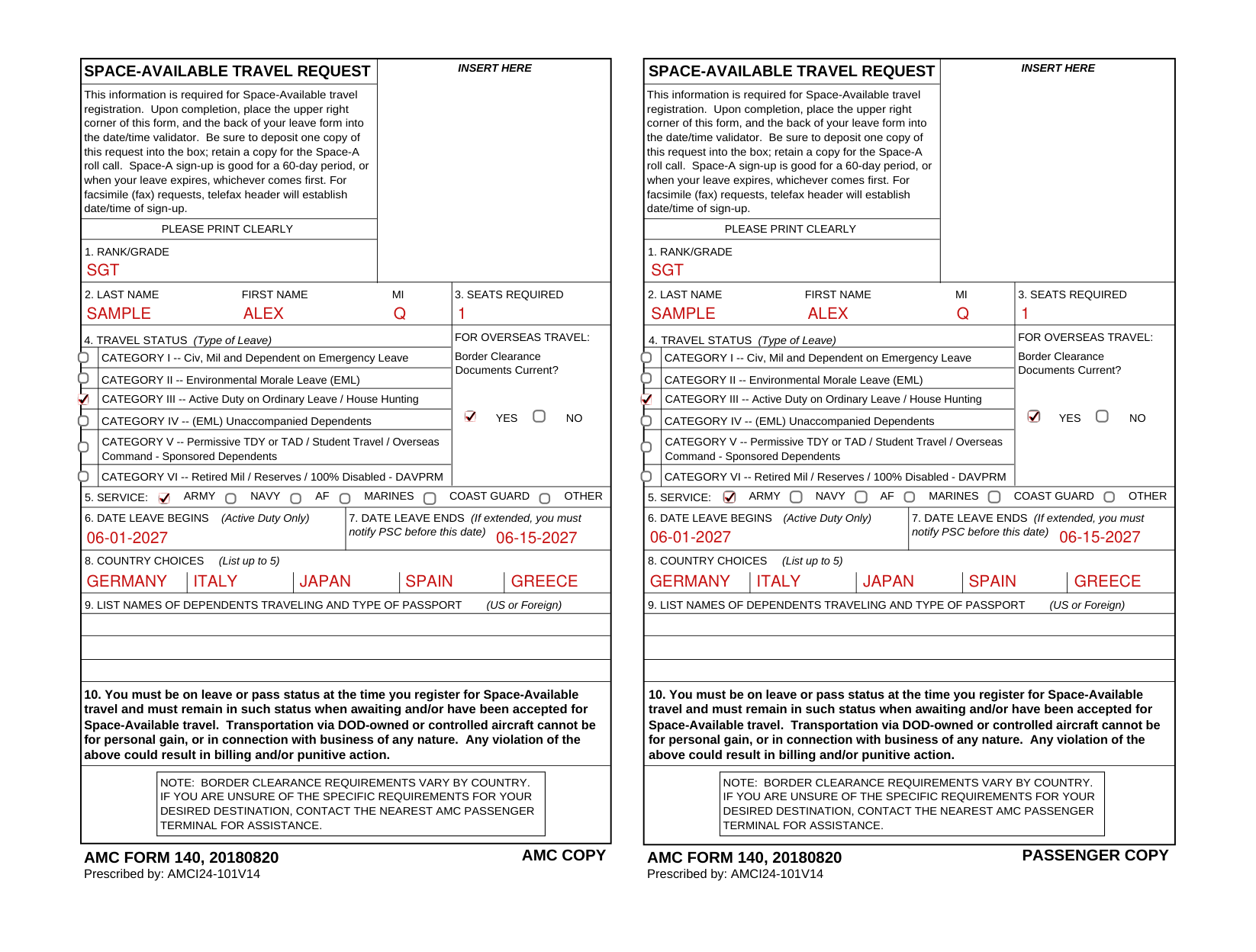
A filled-in AMC Form 140 example: a sergeant requests Space-A travel
How to fill out AMC Form 140, box by box
Rank/grade, name and seats required

Enter your rank/grade in box 1.
Enter your last name, first name and MI in box 2, and the seats required in box 3.
Travel status (Type of Leave)

Box 4 is the travel status (Type of Leave) for overseas travel.
CATEGORY I: Civ, Mil and Dependent on Emergency Leave.
CATEGORY II: Environmental Morale Leave (EML).
CATEGORY III: Active Duty on Ordinary Leave / House Hunting.
CATEGORY IV: (EML) Unaccompanied Dependents. The YES and NO on this line are not part of the category.
CATEGORY V: Permissive TDY or TAD / Student Travel / Overseas Command - Sponsored Dependents.
CATEGORY VI: Retired Mil / Reserves / 100% Disabled - DAVPRM.
Border Clearance Documents Current?

Mark YES or NO for Border Clearance Documents Current?
Border clearance requirements vary by country. If you are unsure of the specific requirements for your desired destination, contact the nearest AMC passenger terminal for assistance.
Service

Box 5, the service, is ARMY, NAVY, AF, MARINES, COAST GUARD or OTHER.
Date leave begins and ends

Enter the date leave begins in box 6 (Active Duty Only) and the date leave ends in box 7; if extended, you must notify PSC before the date leave ends.
Country choices

List up to 5 country choices in box 8.
Names of dependents traveling and type of passport

List the names of dependents traveling and the type of passport (U.S. or Foreign) in box 9.
On leave or pass status when you register
You must be on leave or pass status at the time you register for Space-Available travel and must remain in such status when awaiting and/or have been accepted for Space-Available travel. Transportation via DOD-owned or controlled aircraft cannot be for personal gain, or in connection with business of any nature. Any violation could result in billing and/or punitive action.
More rules for AMC Form 140
Please print clearly.
Sources
[1] AMC Form 140 (20180820), Space-Available Travel Request, Air Mobility Command (the Official source link on this page).
