
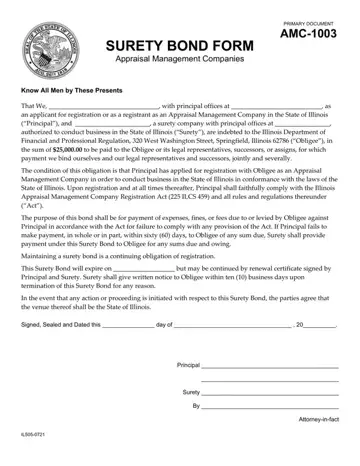
In the realm of business operations within the State of Illinois, particularly for Appraisal Management Companies aiming to navigate the legal and regulatory landscape, the AMC-1003 Surety Bond Form emerges as a critical document. This bond plays a pivotal role in ensuring that Appraisal Management Companies meet the stringent requirements set forth by the Illinois Department of Financial and Professional Regulation. By binding themselves to a $25,000.00 obligation, the companies, together with a surety company authorized in Illinois, pledge to adhere to the provisions of the Illinois Appraisal Management Company Registration Act and associated rules. Not just a mere formality, this bond symbolizes a company's commitment to legality and ethical conduct in its operations, stipulating conditions for compliance, consequences for lapses, and mechanisms for renewal and termination. It articulates the ongoing nature of the surety bond's validity, underscores the financial responsibilities in case of non-compliance, and specifies the procedural nuances for disputes and legal actions related to the bond. Whether a company is in the registration phase or a fully registered entity, understanding and fulfilling the requirements of the AMC-1003 form is indispensable for maintaining good standing and the privilege to operate legally within Illinois.
| Question | Answer |
|---|---|
| Form Name | Form Amc 1003 |
| Form Length | 1 pages |
| Fillable? | No |
| Fillable fields | 0 |
| Avg. time to fill out | 15 sec |
| Other names | Obligee, form of surety bond, withprincipalofficesa, surety bond format |
