
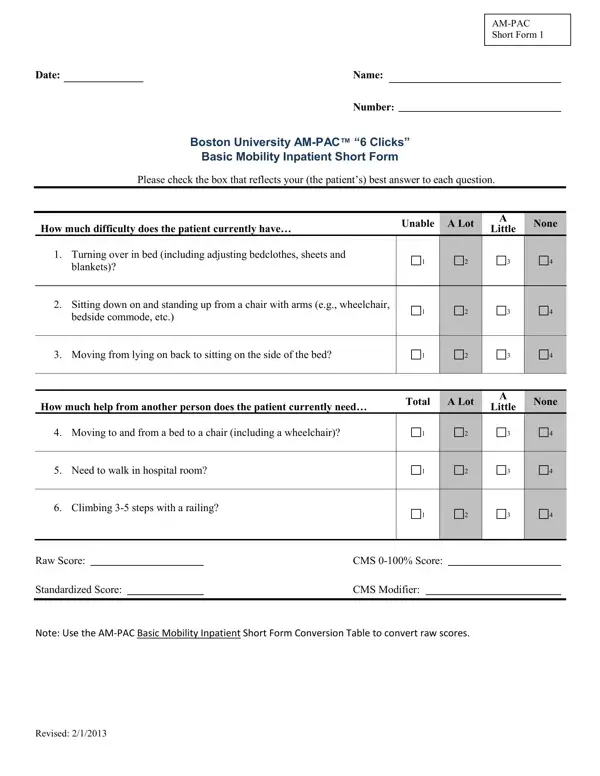
The AM-PAC™ “6 Clicks” Basic Mobility Inpatient Assessment was developed by Alan Jette and colleagues at Boston University as a concise, valid measure of basic mobility for patients in inpatient rehabilitation and post-acute care (PAC) environments. It is part of the broader Activity Measure for Post-Acute Care (AM-PAC) framework, which spans three primary activity domains: Applied Cognitive, Personal and Instrumental Daily Activity, and Movement and Physical/Basic Mobility.
This assessment focuses on the Basic Mobility domain. Clinicians or patients rate difficulty on six items using a 4-point scale: “unable” (score of 1), “a lot” (2), “a little” (3), and “none” (4). Items assessed include turning over in bed, moving from lying to sitting, transferring between bed and chair, sitting to standing, walking in the hospital room, and climbing stairs. Raw scores from all six items are summed and converted to a standardized score using a published conversion table, facilitating progress tracking across care transitions and supporting CMS reporting requirements. Scores are also mappable to CMS G-codes for outpatient rehabilitation billing.
Beyond the basic inpatient version, the AM-PAC family includes a Computer Adaptive Test (CAT) variant that selects items matched to each patient’s functional abilities, reducing assessment burden while maintaining validity. Validated in peer-reviewed research published in the Archives of Physical Medicine and Rehabilitation, the AM-PAC “6 Clicks” demonstrates strong reliability and responsiveness across acute hospital populations. Physical therapists and occupational therapists use this activity measure to determine the level of daily activity assistance required, inform discharge planning, and benchmark patient progress throughout a hospital stay. Revised in February 2013, it remains widely adopted across inpatient rehabilitation facilities, acute care hospitals, and skilled nursing facilities nationwide.
| Question | Answer |
|---|---|
| Form Name | Ampac 6 Clicks Form |
| Form Length | 1 pages |
| Fillable? | No |
| Fillable fields | 0 |
| Avg. time to fill out | 15 sec |
| Other names | mobility am pac form, basic mobility ampac, am pac form print, basic am pac form |
Ampac 6 Clicks Form isn’t the one you’re looking for?