
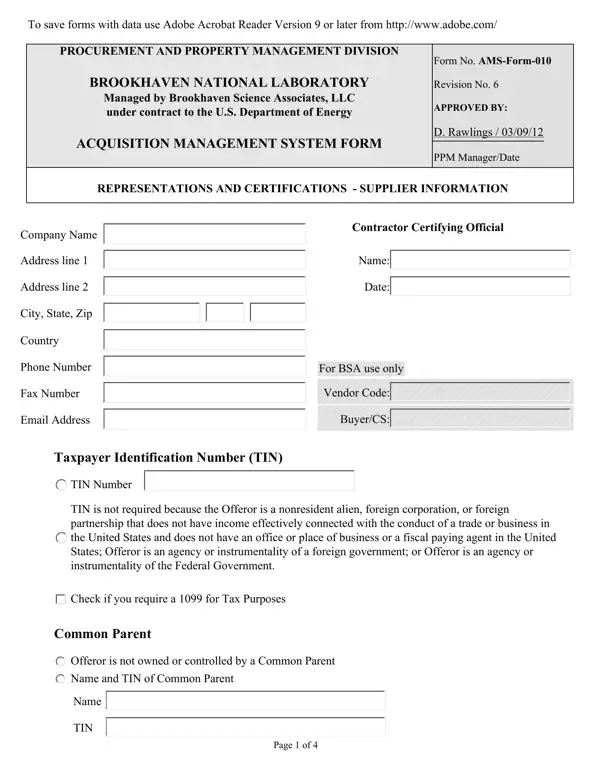
Ams Form 010 PDF Details

The AMS Form 010 (Acquisition Management System Form No. AMS-Form-010) is a procurement document used at Brookhaven National Laboratory. It was approved by D. Rawlings on March 9, 2012 and is periodically updated to reflect DOE acquisition requirements.

This 4-page form gathers supplier details across four areas:

Suppliers submit this form to BNL Procurement before entering any contract. A completed small business self-certification may also be required for SDB and similar designations. The NAICS Code and Size Standard fields help BNL classify vendors under DOE acquisition rules.

Once accepted, BNL assigns a vendor number. Also prepare a completed ACH vendor payment form for your banking details.

QuestionAnswer
Form NameAms Form 010
Form Length4 pages
Fillable?No
Fillable fields0
Avg. time to fill out1 min
Other namesladwp com ams, brookhaven national amsform, ams form 010, ams form system form get

QuestionAnswer
Form NameAms Form 010
Form Length4 pages
Fillable?No
Fillable fields0
Avg. time to fill out1 min
Other namesladwp com ams, brookhaven national amsform, ams form 010, ams form system form get

How to Edit Ams Form 010 Online for Free

Our PDF editor makes it simple to fill out the AMS Form 010 online. Use these steps to complete the supplier registration process accurately before submitting to Brookhaven National Laboratory.

Step 1: Open the Form

Click the orange "Get Form" button at the top of this page. The PDF editor loads the AMS-Form-010 document in your browser. No software download is needed.

ams form 010 completion process detailed (stage 1)

Step 2: Enter Company and Tax Details

Fill in all required fields in the first two pages. Key fields include:

  • TIN Number (or check the box if no TIN is required)
  • Common Parent name and TIN if your company has a parent entity
  • Page count fields for the full 4-page document
Best ways to prepare ams form 010 step 2

Review the Name field carefully. Errors here are the most common cause of processing delays.

Step 3: Complete the Representations Section

Check all boxes that apply to your business type and size. This section covers your NAICS Code, Size Standard, and company classifications:

  • Small business, SDB, WOSB, VOSB, SDVOSB, or HUBZone status
  • Educational institution or government agency designations
  • Offeror affiliation and size representations
Step # 3 in completing ams form 010

Step 4: Review the Revision Date and Page Count

Confirm the AMSForm revision number and Date Approved. Complete the Page of fields to account for all four pages in the document.

Completing segment 4 of ams form 010

Step 5: Add Banking Details and Submit

The final section collects banking information for Electronic Funds Transfer payments. Enter:

  • BSA Procurement Representative name
  • Seller Company Name or DBA
  • Vendor Number (if previously assigned by BNL)
  • Authorization signature and financial account details
Vendor Number if applicable, BSA Procurement Representative, and Financial Information inside ams form 010

Click "Done" when finished. Download, email, or save the completed form to your FormsPal cabinet. Your data stays encrypted and private throughout the process.

AMS Form 010 FAQ

What is the AMS Form 010 used for?

It is a supplier information and certification form required by Brookhaven National Laboratory before any procurement contract. It captures company details, tax status, business type, and banking data for EFT setup.

Can I fill it out online?

Yes. Use the PDF editor on this page to complete it digitally. You can then download, print, or email the finished document directly from the editor.

How long does it take to complete?

Most suppliers finish in under 5 minutes. Have your TIN, NAICS code, and banking account details ready before you start.