
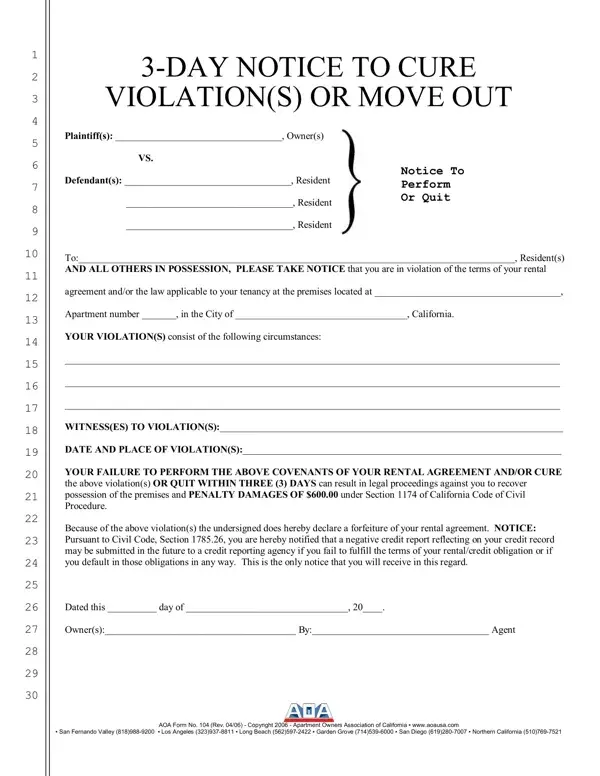
The AOA Day Notice is a standardized template published by the Apartment Owners Association of California. Landlords use this PDF when a tenant has broken the terms of a California lease agreement or applicable housing law. The template gives the occupant 72 hours to resolve the problem or move out of the rental home.
This PDF addresses several types of lease breaches. Common reasons for serving it include unauthorized occupants, keeping pets in a restricted unit, excessive noise, damage to the premises, and illegal activity. The landlord must list each specific infraction so the tenant knows exactly what needs to change. Many documents in this category also require a clear description of how the tenant can remedy the issue.
California law requires landlords to deliver this document through one of three accepted methods. The first option is personal delivery directly to the tenant. The second involves leaving a copy with a responsible person at the residence and mailing an additional copy. The third option is posting it on the front door and mailing a copy to the occupant. The Proof of Service section at the bottom is where the process of delivery gets recorded with the date, time, and method used.
If the tenant corrects all listed infractions within the required timeframe, the tenancy continues under the original lease terms. If the occupant does not take action to move, the landlord can file an unlawful detainer lawsuit in court. The completed Proof of Service becomes relevant evidence, so landlords should fill it out carefully. Tenants who receive this AOA document should understand that an eviction filing may affect their credit record and their ability to move into a new rental home.
| Question | Answer |
|---|---|
| Form Name | AOA Day Notice Form |
| Form Length | 2 pages |
| Fillable? | No |
| Fillable fields | 0 |
| Avg. time to fill out | 30 sec |
| Other names | aoa 30 day notice to quit in ca, aoa 3 day notice, aoa 30 day notice of rent increase, aoa eviction notice |
Aoa Day Notice Form isn’t the one you’re looking for?