
Aon Registration Form PDF Details

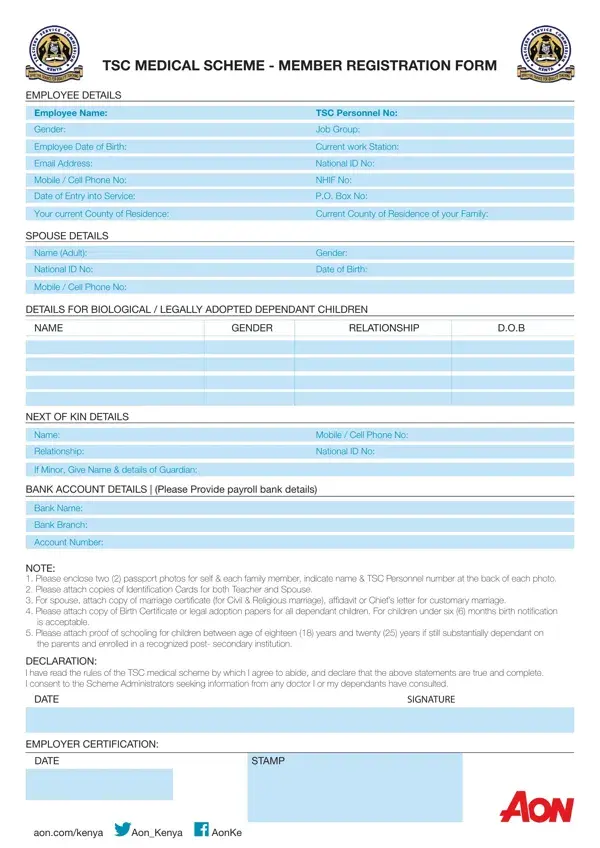
The Aon Registration Form is used by Teachers Service Commission (TSC) employees in Kenya to enroll in the TSC Medical Scheme administered by Aon Kenya. It registers the employee, their spouse, and dependent children for medical coverage.

The employee section collects your full name, TSC Personnel Number, gender, job group, date of birth, work station, and phone number. The form also gathers details for your spouse and each biological or legally adopted dependent child, including their names, genders, dates of birth, and national ID numbers.

Required supporting documents include two passport photos for the employee and each family member, a national ID card, a marriage certificate for the spouse, and birth certificates or adoption papers for dependent children. Students in post-secondary education must provide proof of enrollment. Bank account details are required for payroll deductions.

The form ends with a declaration and signature by the employee, plus employer certification. For related forms, see our health insurance application and health insurance enrollment pages.

QuestionAnswer
Form NameAon Registration Form
Form Length1 pages
Fillable?No
Fillable fields0
Avg. time to fill out15 sec
Used byTSC employees in Kenya
PurposeTSC Medical Scheme enrollment
Issued byAon Kenya
Other namesbit ly memberuploads, aon minet portal login, https collaboration kenya minet com tsc 3, collaboration minet tsc

How to Edit Aon Registration Form Online for Free

You can fill out the Aon Registration Form online without any software downloads. FormsPal's free PDF editor works directly in your browser and lets you complete, sign, and save your form in minutes.

Step 1: Click the orange "Get Form" button at the top of this page. The PDF editor opens in your browser immediately. In the first section, fill in your personal details: your full name, TSC Personnel Number, gender, job group, date of birth, work station, and phone number.

Stage # 1 for filling in aon minet tsc portal login

Step 2: Complete the next sections with your family and financial information. Enter your next of kin details, spouse information, and each dependent child's name, relationship, date of birth, and national ID number. In the Bank Account Details section, provide your bank name, branch, and account number for payroll deductions.

Completing section 2 of aon minet tsc portal login

Step 3: In the final section, add the date and any official stamps. Review every field carefully before signing the declaration. Your signature confirms all the information is accurate and complete.

Part # 3 for completing aon minet tsc portal login

When you have finished, click "Done" to save your completed form. You can download it as a PDF, print it, or send it by email. Create a free FormsPal account to store your form and access it at any time.

For related insurance and benefits documents, you may also need a health insurance application form, a health insurance renewal form, or a beneficiary designation form.