Application Raising Canes Job PDF Details

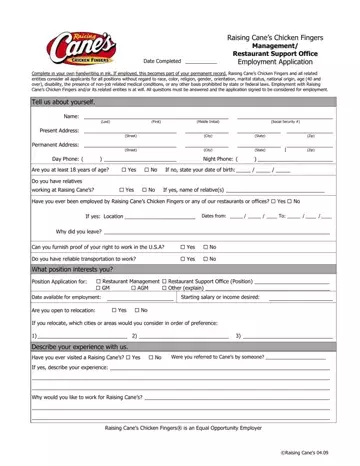
The Application Raising Canes Job form is a 4-page document used by candidates seeking crew member, cashier, or shift leader positions at any Raising Cane's location. The form must be filled out truthfully and completely. Any false information may result in disqualification or termination after hire. The declaration at the end requires your signature confirming the accuracy of all provided details.

What the form covers

The application gathers information across several areas:

Equal employment opportunity

Raising Cane's is an equal opportunity employer. The company evaluates all applicants without discrimination based on race, color, religion, gender, sexual orientation, national origin, age, disability, or any other protected class under federal and state law.

Frequently asked questions

How many pages is the Raising Cane's job application?
The form is 4 pages long and includes 222 fillable fields.

Can I apply for any position?
Yes. The form covers roles in both restaurant operations and office administration. Indicate your preferred position in the application.

How far in advance should I submit my application?
Submit your application as far in advance of your desired start date as possible. Most locations review applications within a few days of receipt.

Do I need to fill out a paper copy?
No. You can complete the form digitally using FormsPal's PDF editor and download or print the finished document.

QuestionAnswer
Form NameApplication Raising Canes Job
Form Length4 pages
Fillable?Yes
Fillable fields222
Avg. time to fill out22 min 44 sec
Other namescane's application online, raisingcanes application, raising canes application, cane's application

How to Edit Application Raising Canes Job Online for Free

Completing the Raising Cane's job application PDF with FormsPal's online editor is quick and straightforward. Follow the steps below to fill out your form and save or print the finished document.

Step-by-step guide

Step 1: Click the orange "Get Form Here" button on this page to open the application in the PDF editor.

Step 2: You are now in the editing panel. You can type directly into form fields, add checkmarks, insert your signature, and annotate any section of the document.

Complete the first section of the form with your contact details, desired position, availability, and salary expectations.

filling out caniaccareers com part 1

Move on to the education section. Fill in each level of schooling you have completed, including high school, college, trade school, or graduate school. Indicate whether you graduated and enter your degree information where applicable.

part 2 to entering details in caniaccareers com

In the skills section, list your office and administrative capabilities such as typing speed and computer proficiency. Use the Other Important Information field to add any relevant details about how you heard about the position or your schedule availability.

part 3 to completing caniaccareers com

Fill in your skills for restaurant management or office administration positions. Indicate your computer proficiency, typing speed, and any other relevant technical abilities.

caniaccareers com Skills for Office / Administration, Typing WM:  Computer proficiency:, 10 Key:  Yes  No  Other(s): , Other Important Information, How were you referred to us for, Our restaurants are open 7 days a, In the past seven (7) years, and If yes blanks to insert

Enter your previous work experience. Complete all fields for each employer, including company name, address, employment dates, annual pay, job duties, and reason for leaving. Accurate work history strengthens your application.

stage 5 to entering details in caniaccareers com

Step 3: Once you have filled in all required fields, click the "Done" button. Your completed application is ready to download, print, or send by email.

Step 4: Save at least two copies of the completed form for your own records before submitting.

Tips for a stronger application

  • Use clear, accurate information in every field. Inconsistencies can delay your application.
  • Mention your availability openly, including evenings and weekends, since Raising Cane's restaurants operate 7 days a week.
  • List any experience in food service or customer-facing roles, even if it is from a different restaurant or retail employer.
  • Provide at least two professional or personal references who can speak to your reliability and work ethic.

Related job application forms

Looking for other fast-food and restaurant employment forms? FormsPal offers applications for many popular chains:

Watch Application Raising Canes Job Video Instruction

Please rate Application Raising Canes Job

1 Votes
If you believe this page is infringing on your copyright, please familiarize yourself with and follow our DMCA notice and takedown process - click here to proceed .
