
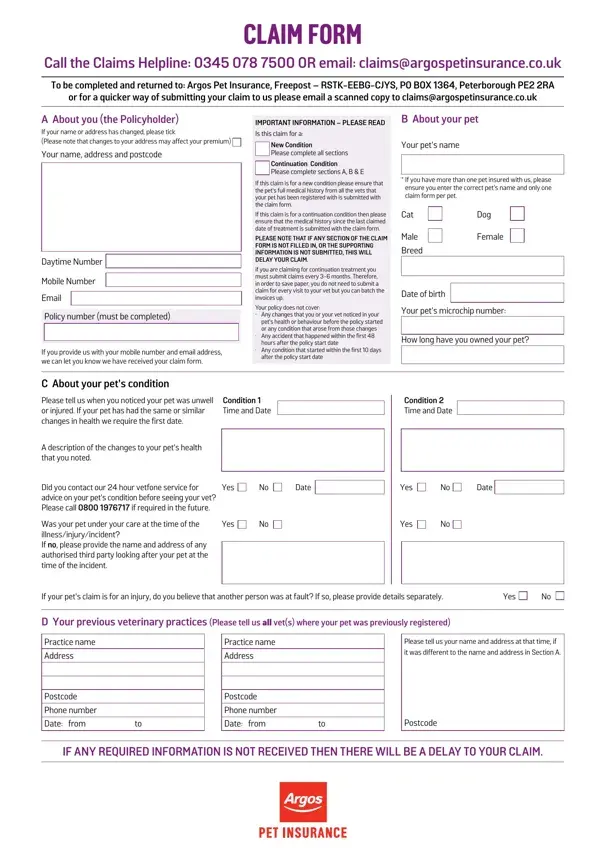
You can fill out the Argos pet insurance claim form online using FormsPal's free PDF editing tool. We update the tool regularly based on user feedback. Follow the steps below to get started.
Step 1: Click the "Get Form" button above. This opens the PDF editor so you can begin completing your form.
Step 2: Use the editor to add text, modify existing content, and add a signature. You can work with the PDF in several ways to suit your needs.
As for the fields of this particular form, here is what you should know:
1. The Argos pet insurance claim form requires certain information to be entered. Make sure all of the following fields are completed:
2. After completing the first section, move on to the next part. Enter the required details in all fields, including: Did you contact our 24-hour Vetfone, Was your pet under your care at the time, treatment dates, previous veterinary practice name and address, your personal contact details, and postcode and phone number.
3. In this section, complete the payment preference fields. These include: who you would like paid, how you would like to be paid, your signature, payment type (cheque or electronic), policyholder and joint policyholder details, and the payee name. Fill in each field with care.
4. The next section asks for treatment information. Complete all fields, including: treatment dates, whether this claim continues from a previous one, whether the condition was pre-existing, the pet's body condition score, and cruciate ligament details if applicable.
Pay close attention to the treatment dates and pre-existing condition fields. These are the areas where most errors occur.
Step 3: Review every field you have entered, then click "Done." After creating a free 7-day trial account, you can download the completed Argos pet insurance claim form or send it by email. FormsPal protects the confidentiality of all personal data entered into the system.
Tips for Completing Your Argos Pet Insurance Claim
These tips will help make sure your claim is processed without delays:
- Gather all veterinary invoices, receipts, and your pet's full medical history before starting the form.
- Complete all five sections (A to E). Missing sections will cause processing delays.
- If your pet is being treated for a new condition, include the complete medical history.
- Check your policy wording for exclusions before submitting. Common exclusions include dental treatment (unless caused by injury) and any condition that began before your policy start date.
- Contact the Argos Pet Insurance helpline before submitting if you have questions about coverage.
- Sign the declaration section before sending. Unsigned forms will not be processed.
Frequently Asked Questions About the Argos Pet Insurance Claim Form
What information do I need to complete the Argos Pet Insurance Claim Form?
You will need your policy number, your pet's name and species, the name and address of your veterinary practice, the dates of treatment, a description of the condition being claimed, and invoices from your vet. You will also need to choose a payment method: cheque or electronic transfer.
Can I fill out the Argos Pet Insurance Claim Form online?
Yes. You can use FormsPal's free PDF editor to complete the form online. Type your details directly into the PDF fields, then download or email the completed form when you are done.
How long does the Argos Pet Insurance claims process take?
Processing times vary depending on the completeness of the form and the complexity of the claim. To avoid delays, fill in all sections (A to E) and include all supporting documents such as vet invoices and medical records.
What conditions does the Argos Pet Insurance Claim Form cover?
The form covers vet fees for eligible conditions. Certain exclusions apply, including pre-existing conditions, dental treatment (unless caused by an injury), and any condition that began before the policy start date. Check your policy wording for the full list of exclusions before submitting a claim.
What happens after I submit the Argos Pet Insurance Claim Form?
Argos Pet Insurance will review your claim and may contact your vet for additional information. They may also share your information with third-party service providers as part of the claims management process. You will receive a decision on your claim after review.
Related Pet Insurance and Claim Forms
If you need claim forms from other pet insurance providers, the following pages may be useful:
