
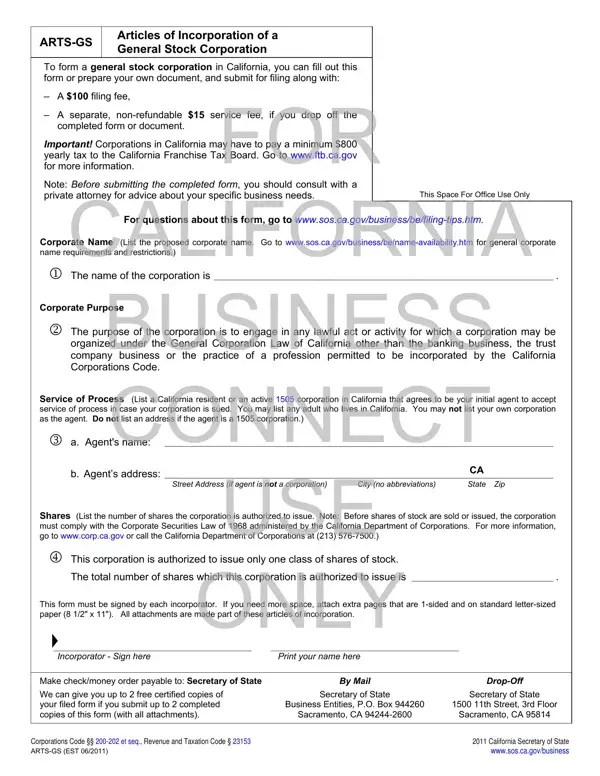
You are able to fill in incorporator without difficulty by using our PDFinity® editor. In order to make our editor better and easier to work with, we continuously develop new features, with our users' suggestions in mind. All it requires is several easy steps:
Step 1: Firstly, access the pdf tool by clicking the “Get Form Button” above on this webpage.
Step 2: This tool gives you the capability to modify PDF forms in a range of ways. Enhance it by adding your own text, correct original content, and add a signature - all close at hand!
Be attentive when filling out this form. Make sure that all required fields are done properly.
1. For starters, when completing the incorporator, begin with the form section that features the next blank fields:
2. The next step is usually to fill in the following blanks: This corporation is authorized to, The total number of shares which, This form must be signed by each, ONLY, Incorporator Sign here, Print your name here, Make checkmoney order payable to, We can give you up to free, By Mail, Secretary of State, DropOff, Secretary of State, Business Entities PO Box , th Street rd Floor, and Sacramento CA .
Be very attentive when filling in This corporation is authorized to and Secretary of State, because this is where many people make a few mistakes.
Step 3: Spell-check the information you have entered into the form fields and hit the “Done” button. Make a free trial plan at FormsPal and get instant access to incorporator - download or edit in your FormsPal cabinet. At FormsPal, we do our utmost to be certain that your information is maintained protected.
What information do you need to file the ARTS-GS?
Before you begin, gather the following information:
- Proposed corporate name and an alternative name
- California business purpose statement for your corporation
- Name and California street address of the initial agent for service of process
- Total number of authorized shares the corporation will issue
- Name, address, and signature of each incorporator
How to submit the completed ARTS-GS filing
You can file the ARTS-GS with the California Secretary of State by mail or in person. To file by mail, send your completed document to: Business Entities, PO Box 944260, Sacramento, CA 94244-2600. To submit in person, visit the Sacramento office at 1500 11th Street, 3rd Floor. In-person submissions require the additional $15 service fee. Make your check or money order payable to the Secretary of State. Standard processing times vary; expedited processing is available at the drop-off window for an additional charge.
What happens after you file the ARTS-GS form
After the California Secretary of State accepts your filing, your corporation is officially formed on the file date. You will receive a stamped copy of your Articles of Incorporation as confirmation. Within 90 days of the file date, you must submit a Statement of Information to the state. You must also register with the California Franchise Tax Board and pay the $800 minimum tax before your first tax year closes. These obligations apply to all active corporations in California, regardless of revenue or status.
Related California business filing forms
If you are forming a limited liability company in California rather than a corporation, you will need the Articles of Organization and a California LLC operating agreement. If your corporation ever needs to wind down, the Articles of Dissolution covers the process.
