
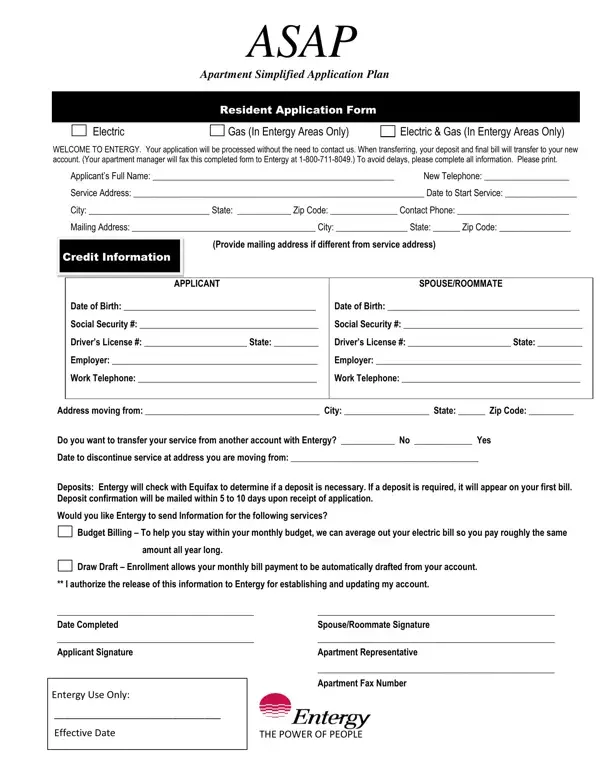
The ASAP Resident Application Form gives apartment residents in Entergy service areas a straightforward way to set up electric and gas utilities. Instead of contacting Entergy by phone, tenants submit this form through their apartment management office to activate service at a new address.
The form collects personal details, contact information, service address, and mailing address. It also handles transfers from a previous account. Deposit requirements are determined by a credit check through Equifax. Be prepared to provide credit information as part of the application.
Entergy offers two payment options on the form. Budget Billing keeps your monthly payments consistent year-round. Draw Draft automates payments from your bank account. Both options are listed in the additional services section of the ASAP Resident Application.
To complete the form, both the applicant and any spouse or roommate must sign. The apartment representative also adds their signature to verify the submission. For similar forms, see the application for electric service or the Winn residential application.
| Question | Answer |
|---|---|
| Form Name | Asap Resident Application Form |
| Form Length | 1 pages |
| Fillable? | No |
| Fillable fields | 0 |
| Avg. time to fill out | 15 sec |
| Other names | entergy, asap application, asap form, entergy bill form |
Asap Resident Application Form isn’t the one you’re looking for?