
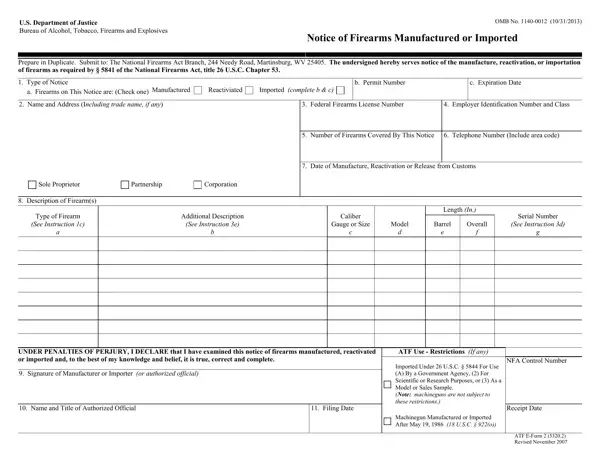
ATF Form 2 can be filled out and reviewed online using FormsPal's free PDF editor. You do not need to download any software or install any application. Follow the steps below to complete the form accurately before submitting it to the ATF National Firearms Act Branch in Martinsburg, West Virginia.
Step 1: Open the Form
Click the orange "Get Form" button at the top of this page. The form will open in FormsPal's online PDF editor, where you can type directly into each field.
Step 2: Complete the Required Fields
Fill in each section of ATF Form 2 carefully. The form requires the following information in the order it appears:
- Name and address of the manufacturer or importer
- FFL number and Special Occupational Tax (SOT) class
- Type of NFA firearm (e.g., machine gun, silencer, SBR)
- Manufacturer's name and model designation
- Caliber or gauge
- Serial number of the firearm
- Date of manufacture or importation
- Signature of the manufacturer or importer, along with the printed name and title
- Filing date
Review each entry before moving to the next section. The fields for the FFL number, SOT number, and serial number must be entered exactly as they appear on your license and on the physical firearm.
Pay close attention to the Filing Date and the Imported Under USC section, as these fields require precision. The ATF Use section, the NFA Control Number, and the Receipt Date are completed by ATF personnel after they receive the form. Do not fill in those fields yourself.
Under Penalties of Perjury: the authorized official must sign and date the form before submission. The signature confirms that all information is accurate and that the filing complies with the requirements of the National Firearms Act.
Step 3: Download and Submit
After completing all required fields, download the finished PDF using the "Done" button. Print the completed form and mail it to the ATF National Firearms Act Branch. The ATF does not currently accept email submissions of Form 2. Keep a copy of the filed form for your records. The ATF will assign an NFA Control Number after processing.
Frequently Asked Questions About ATF Form 2
What is ATF Form 2 used for?
ATF Form 2 is the official Notice of Firearms Manufactured or Imported. Licensed SOT manufacturers and importers file it to register each new NFA firearm with the ATF under the requirements of the National Firearms Act.
Who files ATF Form 2?
SOT Class 1 importers and SOT Class 2 manufacturers file ATF Form 2. Standard FFL dealers and private individuals do not use this form. It is only for licensed entities that manufacture or import NFA items as part of their business.
How long does it take to file ATF Form 2?
The form itself takes approximately 5 to 10 minutes to complete when all required information is ready. The filing deadline is 20 days from the date the NFA firearm is manufactured or imported. Late filings can result in NFA compliance violations.
What happens after I file ATF Form 2?
The ATF National Firearms Act Branch reviews the submission and assigns an NFA Control Number to the registered firearm. The Receipt Date and any ATF Use restrictions are added by ATF staff. The manufacturer or importer should retain a stamped copy for their records once it is returned. You can also review ATF E-Form 3 for subsequent transfers of the registered item between FFLs.
