
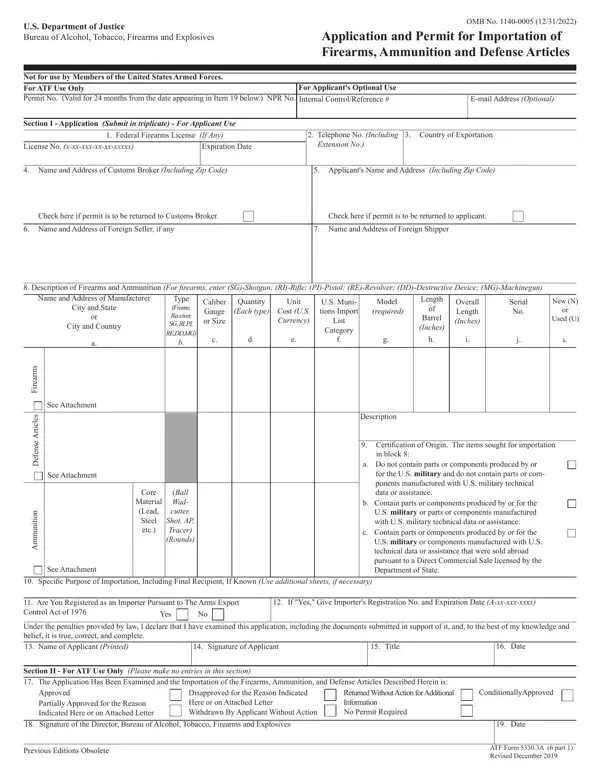
You may complete atf form 6 easily using our PDFinity® editor. The tool is constantly upgraded by us, getting new features and becoming better. To get the process started, go through these simple steps:
Step 1: First, open the tool by clicking the "Get Form Button" above on this site.
Step 2: With this online PDF editing tool, it's possible to do more than just fill in blank fields. Express yourself and make your docs appear great with customized textual content added, or modify the original content to excellence - all comes with the capability to incorporate your own pictures and sign the file off.
When it comes to blank fields of this precise document, here is what you should consider:
1. To get started, while completing the atf form 6, begin with the area that has the next blank fields:
2. The third step is to fill out these blank fields: s e l c i t r, A e s n e f e D, n o i t i n u m m A, See Attachment, See Attachment, Core, Material Lead Steel etc, Ball Wad cutter Shot AP Tracer, Description, Certification of Origin The items, in block, a Do not contain parts or, for the US military and do not, b Contain parts or components, and c Contain parts or components.
3. The next stage is generally easy - fill in all the fields in to complete this segment.
4. This next section requires some additional information. Ensure you complete all the necessary fields to proceed further in your process!
5. This very last point to conclude this form is pivotal. You need to fill in the displayed blanks, like, prior to finalizing. Failing to do it might contribute to an unfinished and probably nonvalid form!
Many people frequently get some things incorrect while filling in this field in this part. Be sure you review everything you type in here.
Step 3: Once you've looked again at the details in the blanks, just click "Done" to finalize your form. Find the atf form 6 after you sign up at FormsPal for a 7-day free trial. Immediately gain access to the document from your personal account, together with any modifications and changes being all saved! We do not sell or share the details you type in whenever working with documents at FormsPal.
Tips for Completing ATF Form 6 Accurately
Before submitting your application, review these key points to avoid delays. Make sure the article descriptions match the exact terminology used by the manufacturer or exporter. Double-check the country of manufacture for each line item, since mixing up the country of export with the country of manufacture is one of the most frequent errors on this form.
Attach the certification of origin for every item being imported. If the final recipient is already known, include that information in the designated field. Submit the form in triplicate and retain your approved copy for customs presentation when the shipment arrives.
Related ATF Forms
Depending on your situation, you may also need to work with other ATF forms. ATF Form 6A is used to document the release and receipt of imported firearms or ammunition and is typically required when the goods enter the country. If you are a licensed dealer transferring a firearm to a buyer, you will also need ATF Form 4473 (Firearms Transaction Record). Manufacturers who want to make or transfer a National Firearms Act weapon should look at ATF Form 1, and licensed manufacturers or importers must use ATF Form 2 to report the making of an NFA firearm. Those applying for a federal firearms license may also need the Federal Firearms License Application.
