
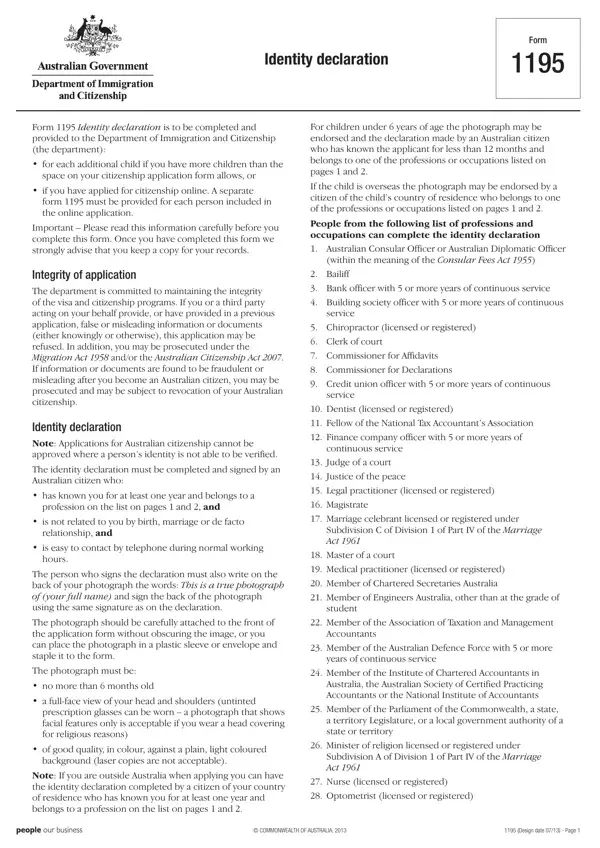
Australia Form 1195 is the official identity declaration form issued by the Department of Home Affairs. It is a four-page form used to verify the identity of people applying for Australian citizenship. The identity declaration confirms that a qualified witness has known the applicant personally for at least one year.
You need Form 1195 when applying for Australian citizenship online. You also need it when the standard citizenship application does not have enough space to include details about your children. Each family member listed in an online application must have their own separate Form 1195 completed and submitted.
The identity declaration gives the Department of Home Affairs a way to verify your identity through a trusted endorser. This is especially important when applying from outside Australia or when biometric documents alone are not enough.
The endorser must be an Australian citizen. They cannot be a relative of the applicant by blood or marriage. They must have known the applicant for at least 12 months before signing the form.
The Department of Home Affairs requires the endorser to belong to one of the approved professional groups. This list includes doctors, teachers, lawyers, accountants, pharmacists, registered nurses, dentists, police officers, architects, engineers, and migration agents. Having an endorser from a recognised profession adds credibility to your identity declaration.
Applicants living outside Australia can still use Form 1195. A comparable professional from their country can act as the endorser. The same rules apply: the endorser must confirm they have known the applicant for at least 12 months and that all details in the declaration are correct.
You must attach a recent photograph to Form 1195. The photograph must meet passport-style standards set by the Department of Home Affairs. It must clearly show the applicant's face against a plain light background.
The endorser must sign the back of the photograph. This signature confirms that the photo is a true likeness of the applicant. If the photograph does not meet the required standards, your citizenship or visa application may be delayed or refused.
Form 1195 covers several areas across its four pages. Here is what the main sections include:
Each section must be filled out fully and correctly. The Department of Home Affairs warns that providing false or misleading information can result in your citizenship application being refused. In serious cases, incorrect information can also lead to legal prosecution.
Always keep a copy of your completed Form 1195 for your personal records. The Department of Home Affairs recommends this in case any follow-up enquiries arise about your citizenship application or visa documents.
If you are applying for Australian citizenship or immigration, you may also need other forms. The Australia Immigration Form 80 is used for personal history and character checks in visa applications. The Statutory Declaration for Partner Visa is required when applying for a partner visa and must be submitted alongside your application documents.
| Question | Answer |
|---|---|
| Form Name | Australia Form 1195 |
| Form Length | 4 pages |
| Fillable? | Yes |
| Fillable fields | 49 |
| Avg. time to fill out | 1 min 12 sec |
| Other names | 1195 form, form 1195 fill online, form 1195 identity declaration pdf, how to fill form 1195 identity declaration |
Australia Form 1195 isn’t the one you’re looking for?