
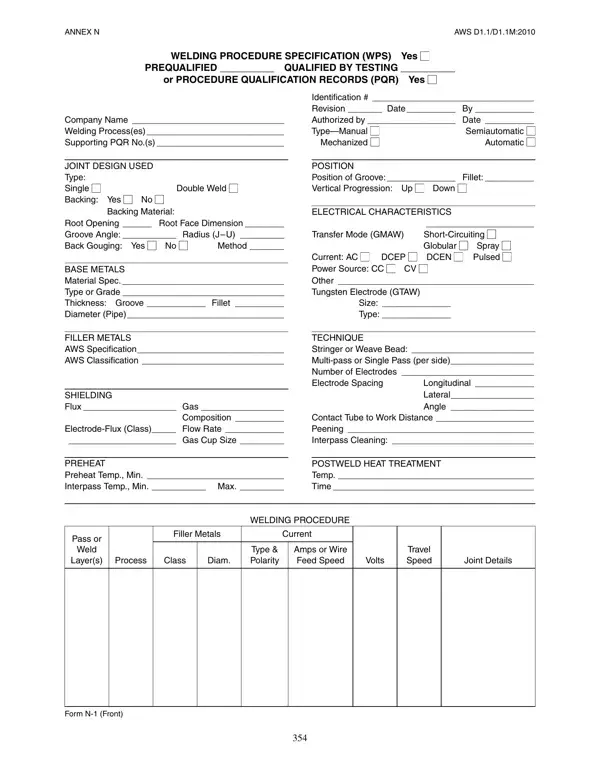
AWS D1.1 weld procedure specification forms can be filled out online effortlessly. Simply make use of FormsPal's PDF editor to do the job quickly. To keep our editor on the cutting edge of convenience, we aim to integrate user-oriented features and improvements on a regular basis. We are always looking for feedback - play a vital role in remolding how we work with PDF docs. Here's what you need to do to get going:
Step 1: Simply press the "Get Form Button" above on this page to start up our PDF file editing tool. Here you'll find all that is required to work with your file.
Step 2: Using this online PDF file editor, you could accomplish more than simply fill in blanks. Edit away and make your documents look professional with customized text, or optimize the file's original content to perfection - all backed up by the capability to add images and sign it off.
For you to complete this PDF form, be sure to type in the required information in every single area:
1. It's essential to fill out the weld procedure specification properly, so be mindful while filling out the segments containing all of these blanks:
2. After filling out the previous part, go to the subsequent part and fill in the necessary details in these fields - SHIELDING Flux Gas Composition, TECHNIQUE Stringer or Weave Bead, PREHEAT Preheat Temp Min, POSTWELD HEAT TREATMENT Temp Time, WELDING PROCEDURE, Filler Metals, Current, Process, Class, Diam, Type Polarity, Amps or Wire Feed Speed, Volts, Travel Speed, and Joint Details.
3. Throughout this stage, look at ANNEX N, AWS DDM, Procedure Qualification Record PQR, Test Results, TENSILE TEST, Specimen, Width, Thickness, Area, Ultimate Tensile, Ultimate Unit, Character of Failure, Load lb, Stress psi, and Location. Each of these will need to be filled out with utmost precision.
4. The subsequent paragraph will require your input in the following areas: VISUAL INSPECTION Appearance, FILLET WELD TEST RESULTS, Minimum size multiple pass Maximum, Macroetch, Other Tests, All-weld-metal tension test, Tensile strength psi Yield, Welder's name, Clock no Stamp no, Tests conducted by Laboratory, Test number, Per, We the undersigned certify that, year, and Signed. Remember to provide all needed information to go forward.
It's easy to make errors while completing your Macroetch section, so be sure to review it before finalizing the form.
5. As you near the completion of the document, there are a few extra points to undertake. Notably, Manufacturer or Contractor, By, Title, Date, and Form N Back must be done.
Step 3: Before moving on, check that blank fields were filled in correctly. Once you determine that it's fine, click on "Done." Download the weld procedure specification form the instant you sign up at FormsPal for a 7-day free trial. View the PDF form within your personal account, with any edits and changes being automatically saved. FormsPal ensures your information privacy via a protected method that never records or shares any sensitive information. Feel safe knowing your docs are kept confidential when you use our editor.
Common Questions About AWS Welding Forms
What is the AWS D1.1 WPS form used for?
The AWS D1.1 Welding Procedure Specification form documents the specific conditions under which a weld must be made. It records all essential variables including process, base metal, filler metal, preheat temperature, and postweld heat treatment. Welding contractors use this WPS to demonstrate that their welding procedures have been qualified by testing or meet prequalified status under the AWS D1.1 structural welding code for steel.
Do I need a separate welder qualification record?
Yes. The WPS form documents the procedure, while a separate AWS D1.1 Welder Qualification Form documents that an individual welder has demonstrated the skill to produce welds that meet AWS D1.1 requirements. Both documents are required for a complete and compliant welding qualification package on structural steel projects.
What is a Procedure Qualification Record (PQR)?
A Procedure Qualification Record (PQR) is a record of the welding data used when preparing a test coupon and the test results obtained when qualifying a welding procedure specification. The PQR number is entered on the WPS form to link the two documents. Both the WPS and PQR must be on file before a welder can begin production welding under AWS D1.1 on a given project.
Can I download a blank sample of the AWS WPS form?
Yes. Using FormsPal's editor, you can open, fill out, and download a blank or sample AWS WPS form (Annex N, AWS D1.1/D1.1M:2010) at no cost. You can also save a completed copy to your FormsPal account for easy access in future projects.
