
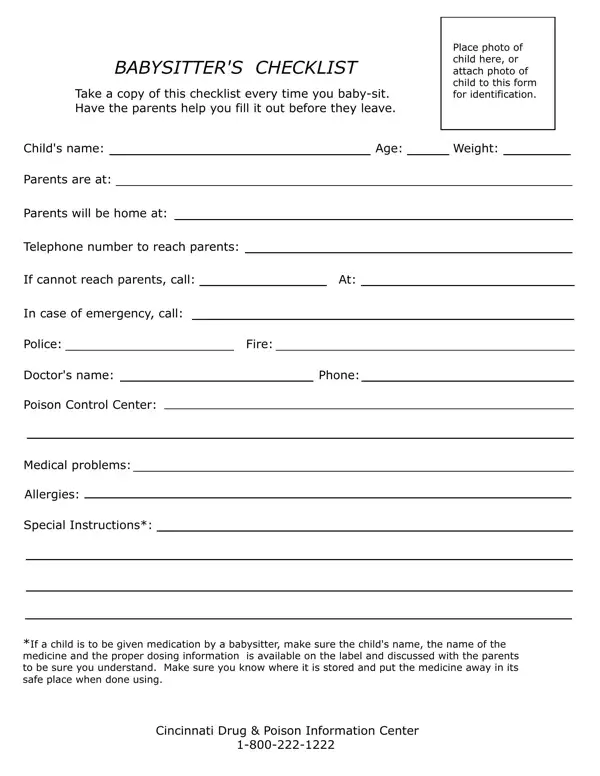
Ensuring the safety and well-being of a child in one's care is a paramount responsibility, which becomes significantly easier with the aid of a carefully crafted Babysitter's Checklist. This comprehensive form is designed as a tool for babysitters to use every time they take on the responsibility of caring for a child, encouraging a thorough exchange of necessary information between the parents and the babysitter before the former departs. From the critical basics like the child's name, age, and a photo for identification purposes, to detailed contact information for reaching parents or emergency contacts, including the police, fire department, family doctor, and the Poison Control Center, the checklist covers all bases. It goes further to include the child's weight, any medical problems or allergies they may have, and specific instructions for medication administration, ensuring that babysitters are well-prepared to handle a range of scenarios. The inclusion of the Cincinnati Drug & Poison Information Center's contact information underscores the importance of having immediate access to professional advice in case of an emergency. This checklist not only serves as a critical resource for babysitters but also offers parents peace of mind, knowing that their child's caretaker has all the necessary information at hand.
The babysitter checklist form is organized into clear sections that cover every aspect of child care. The child information section captures the child's full name, date of birth, and any identifying details. The emergency contacts section lists phone numbers for both parents, local emergency services, and the family doctor. A dedicated medical section records allergies, current medications with dosage amounts, and any chronic conditions the babysitter needs to know about. The house rules section outlines bedtime routines, approved snacks, screen time limits, and any restricted areas in the home. Completing every field before parents leave ensures the babysitter can act quickly and correctly in any situation, whether routine or unexpected.
Parents and babysitters both benefit from reviewing the babysitter checklist together before care begins. This shared review builds trust and ensures the babysitter feels confident handling daily tasks and emergencies alike. Whether you are a first-time babysitter or an experienced caregiver, using a standardized checklist every time you take a new job demonstrates professionalism and shows parents that child safety is your top priority.
| Question | Answer |
|---|---|
| Form Name | Babysitter Checklist Form |
| Form Length | 1 pages |
| Fillable? | No |
| Fillable fields | 0 |
| Avg. time to fill out | 15 sec |
| Other names | Babysitting Information Sheet, Babysitting Checklist Form |
Babysitter Checklist Form isn’t the one you’re looking for?