Blank Fire Department Pre Plan Form PDF Details

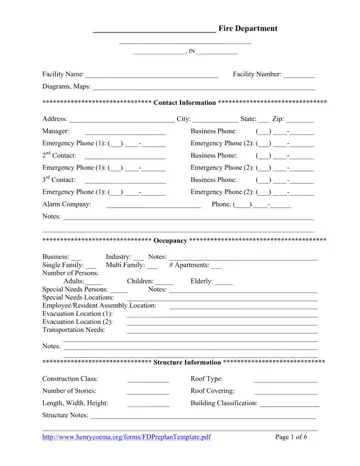
In the realm of emergency preparedness within fire departments, the Fire Department Pre Plan form stands as a comprehensive tool designed to encapsulate critical information about facilities in the event of a fire or emergency scenario. This form, meticulously structured to guide fire departments through the anatomy of potential hazardous situations, encompasses a wide array of details ranging from contact information, occupancy specifics, and structure information to fire access points, water supply data, and hazardous materials (HAZMAT) present at the facility. It also includes provisions for diagrams and maps, ensuring a graphical representation of the premises is available for a holistic understanding. By furnishing emergency responders with particulars such as contact numbers for key personnel, the types of construction materials used in the building, detailed locations of access points, and the whereabouts of critical utilities like gas and electrical shutoffs, the form endeavors to arm fire departments with the knowledge necessary to formulate strategic response plans. Additionally, it addresses the occupants' needs, highlighting assembly and evacuation points, thereby underlining the emphasis not only on structural and material concerns but on human safety and evacuation strategies as well. This document, therefore, serves an invaluable function in preparing fire departments to respond effectively and efficiently to emergencies, minimizing potential risks and damages through thorough planning and foresight.

QuestionAnswer
Form NameBlank Fire Department Pre Plan Form
Form Length6 pages
Fillable?No
Fillable fields0
Avg. time to fill out1 min 30 sec
Other namesfire department preplan, fire pre plan template pdf, pre incident plan template, fire pre plan checklist

How to Edit Blank Fire Department Pre Plan Form Online for Free

We found the top programmers to develop the PDF editor. The app will enable you to complete the fire department preplan form simply and won't take up a great deal of your time and effort. This easy-to-follow procedure will allow you to get started.

Step 1: Find the button "Get Form Here" and press it.

Step 2: Now, you may update the fire department preplan. Our multifunctional toolbar will let you insert, get rid of, modify, highlight, and perform other sorts of commands to the content and fields within the file.

It is important to provide the following data so you can create the file:

writing fire pre plan template pdf stage 1

Put down the details in the Notes, Occupancy, Business Single Family Multi, Apartments, Industry Notes, Elderly, Children, Adults Special Needs Persons, Notes Notes, Structure Information, Construction Class, Roof Type, Number of Stories, and Roof Covering area.

fire pre plan template pdf Notes, Occupancy, Business  Single Family  Multi, Apartments, Industry  Notes, Elderly, Children, Adults  Special Needs Persons, Notes        Notes, Structure Information, Construction Class, Roof Type, Number of Stories, and Roof Covering blanks to complete

You'll have to include certain information inside the box Number of Stories, Roof Covering, Length Width Height, Building Classification, Structure Notes, and Page of.

stage 3 to finishing fire pre plan template pdf

Inside the field Fire Access Information, Main Access, Secondary Access, Roof Access, Attic Access, Basement, Lowest Access, Lock Box, Alarm Panel, Annunciator Panel, Notes, and Response Information, place the rights and responsibilities of the parties.

fire pre plan template pdf Fire Access Information, Main Access, Secondary Access, Roof Access, Attic Access, Basement, Lowest Access, Lock Box, Alarm Panel, Annunciator Panel, Notes, and Response Information blanks to insert

Finalize by checking the following fields and filling them in as needed: Primary Staging, Secondary Staging, Water Supply Information, Hydrant, Volume GPM, Main Size, Status, Notes, Hydrant, Volume GPM, Main Size, Status, Notes, and Hydrant.

Completing fire pre plan template pdf stage 5

Step 3: Press the Done button to save the file. Now it is offered for export to your device.

Step 4: Create minimally a few copies of your document to stay away from any kind of possible future troubles.

Please rate Blank Fire Department Pre Plan Form

2 Votes
If you believe this page is infringing on your copyright, please familiarize yourself with and follow our DMCA notice and takedown process - click here to proceed .
