
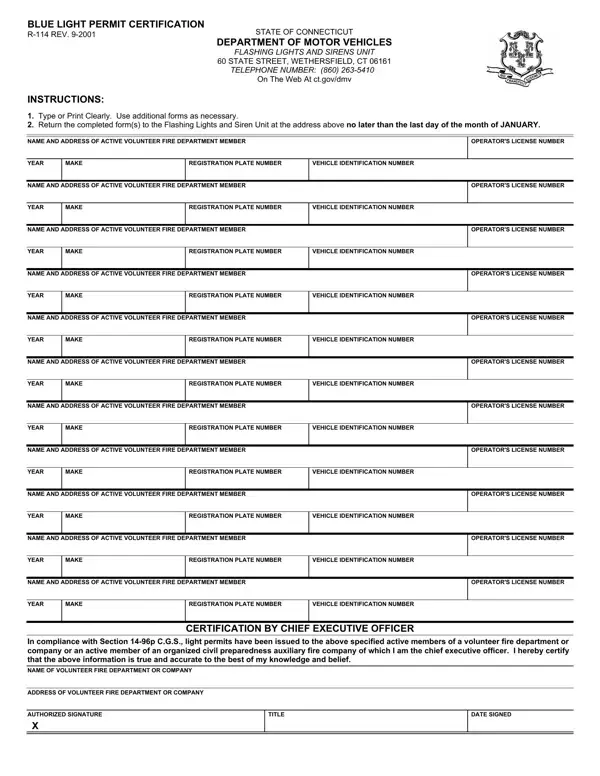
The Blue Light Permit Certification form (R-114), last revised in September 2001, is managed by the Connecticut Department of Motor Vehicles through its Flashing Lights and Sirens Unit in Wethersfield. This document grants eligible volunteer firefighters the legal authority to install and operate revolving blue lights on their personal vehicles when responding to emergency calls.
Each active volunteer must provide their full name, mailing address, and operator's license number. Vehicle details include the year, make, registration plate number, and vehicle identification number. The form accommodates multiple vehicles per member, with additional lines available for those who respond using more than one car or truck.
The fire department's chief executive officer must sign the form to confirm that every listed individual is an active member. This certification also verifies that revolving light permits were issued according to Section 14-96p of the Connecticut General Statutes. Without this signature, the DMV will not process the application, and the volunteer cannot legally display lights or sirens on their vehicle.
All completed forms must reach the DMV by the last day of January each year. Late submissions may result in the loss of revolving light authorization until the next filing period. In Connecticut, only volunteer fire personnel may apply for revolving blue lights. Other states take different approaches to emergency vehicle lighting. Georgia, for example, issues combined red and blue light permits through its Department of Public Safety. New Jersey requires a separate red light permit application for volunteer firefighters. Some jurisdictions also authorize amber or red revolving lights for additional emergency roles beyond firefighting.
| Question | Answer |
|---|---|
| Form Name | Blue Light Permit Certification Form |
| Form Length | 1 pages |
| Fillable? | No |
| Fillable fields | 0 |
| Avg. time to fill out | 15 sec |
| Other names | gov, dmv, ct blue light laws, ct blue light permit |
Blue Light Permit Certification Form isn’t the one you’re looking for?