Please rate Body Beast Workout Sheet

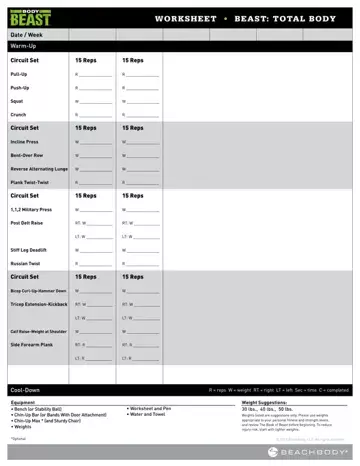
This comprehensive fitness PDF covers every workout block in the Body Beast strength training program: Total Body, Build Back/Bis, Build Chest/Tris, Build Legs, and Build Shoulders. The layout provides space to record dates, exercise names, suggested weights, actual reps completed, and equipment used. Each group of exercises requires equipment such as benches or stability balls, chin-up bars or resistance bands, and EZ curl bars with weighted plates.
The form includes warm-up and cool-down fields to round out each fitness session. The Book of Beast provides guidance on starting weights and proper movement format before you begin training. For more workout tools, explore the fillable workout calendar or the fitness for duty template.
| Question | Answer |
|---|---|
| Form Name | Body Beast Workout Sheet |
| Form Length | 14 pages |
| Fillable? | No |
| Fillable fields | 0 |
| Avg. time to fill out | 3 min 30 sec |
| Other names | beast body workout sheets, body beast workout sheets printable, body beast sheets, the beast workout sheets |
Body Beast Workout Sheet isn’t the one you’re looking for?
Please rate Body Beast Workout Sheet
