
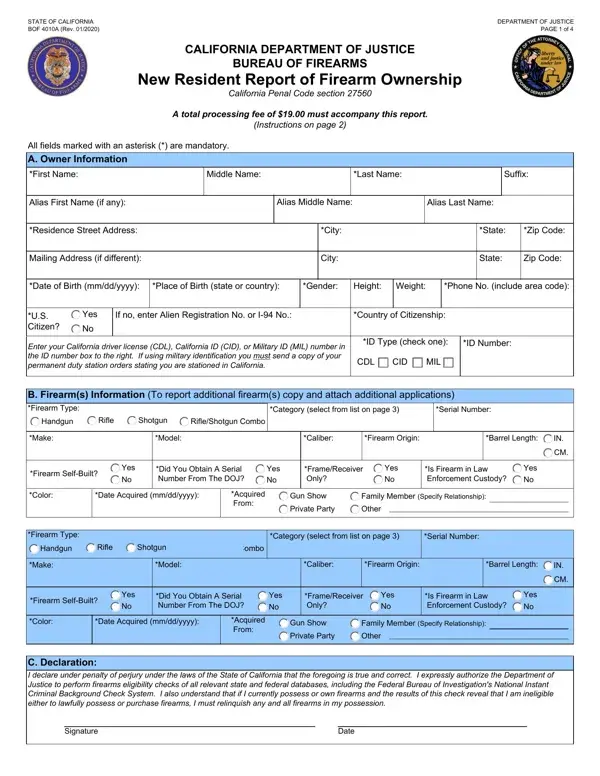
Understanding this New Resident Report of Firearm Ownership is essential for new California residents who move to the state with firearms. California Penal Code section 27560 requires submission to the California Department of Justice within 60 days of establishing residency or bringing a firearm into the state.
Information for new California residents: you must file if you bring any handgun, rifle, or shotgun into California or acquire a firearm after becoming a resident. If you own more than two firearms, attach additional copies of the form to cover each one.
The report captures detailed owner information including aliases and complete firearm details: type, make, model, caliber, barrel length, country of origin, serial number, and date of acquisition. You must also provide a copy of a valid California driver license or identification card. Additional documents verifying lawful presence in the United States may be required in specific circumstances.
A processing fee of $19.00 is required with each submission. The California Department of Justice initiates a firearms eligibility check through the FBI's National Instant Criminal Background Check System (NICS) and California state databases to confirm lawful possession and ownership.
This report cannot be used to register assault weapons. Visit the California Bureau of Firearms website for guidance on assault weapon registration. Failure to report within 60 days of bringing a firearm into California or upon becoming a California resident may result in criminal prosecution.
| Question | Answer |
|---|---|
| Form Name | Bof 4010A Form |
| Form Length | 4 pages |
| Fillable? | No |
| Fillable fields | 0 |
| Avg. time to fill out | 1 min |
| Other names | bof4010a, Ruger, 22A, BOF |
Bof 4010A Form isn’t the one you’re looking for?