

Form BOF 4544A at a glance
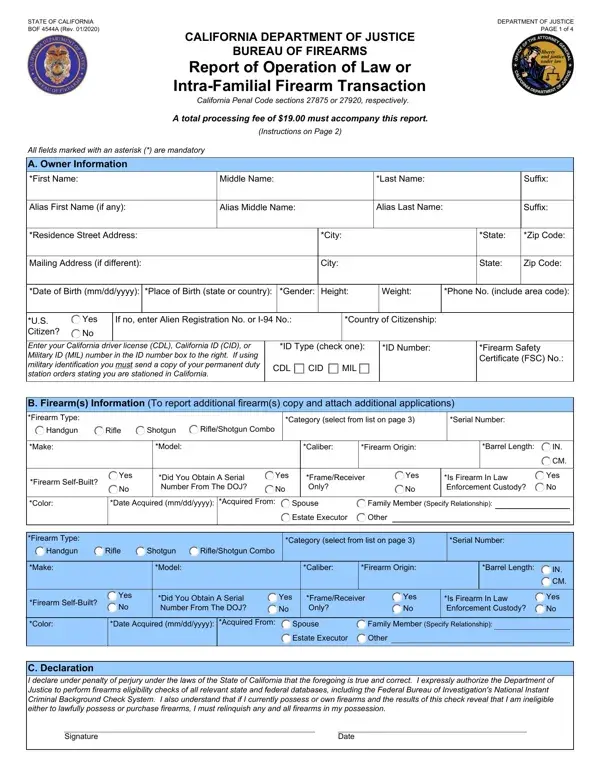
What it is: BOF 4544A is the Report of Operation of Law or Intra-Familial Firearm Transaction of the California Department of Justice Bureau of Firearms.
Who signs: You must sign and date the declaration on this report.
Only one applicant per report.
What to bring and attach to Form BOF 4544A
$19.00 processing fee (check or money order made payable to the Department of Justice) (Pen. Code, § 28230, subdiv. (a)(3)) (checked October 21, 2026)
A copy of your California driver license or identification card. If your driver license or identification card has “FEDERAL LIMITS APPLY” on the front, you shall also submit proof of lawful presence in the United States, in the form of one of the following documents: (1) Valid, unexpired U.S. passport or passport card. (2) Certified copy of U.S. birth certificate (issued by a city, county, or state vital statistics office). "Abbreviated" or "Abstract" certificates are NOT accepted. (3) Certification of Birth Abroad (FS-545), Certification of Report of Birth (DS-1350) or Consular Report of Birth Abroad of a Citizen of the United States of America (FS-240), issued by the U.S. Department of State. (4) Valid, unexpired foreign passport with valid U.S. immigrant visa and approved Record of Arrival/Departure (I-94) form. (5) Certified copy of birth certificate from a U.S. Territory. (6) Certificate of Naturalization or U.S. Citizenship. (7) Valid, unexpired Permanent Resident Card.
If your driver license or identification card has “FEDERAL LIMITS APPLY” on the front, and your name, as it appears on it, differs from the name on the proof of lawful presence document(s), you shall also submit one of the following certified documents: (1) An adoption document that contains your legal name as a result of the adoption. (2) A name change document that contains your legal name both before and, as a result of, the name change. (3) A marriage certificate. (4) A dissolution of marriage document that contains your legal name as a result of the court action. (5) A certificate, declaration or registration document verifying the formation of a domestic partnership. (6) A dissolution of domestic partnership document that contains your legal name as a result of the court action.
Incomplete applications submitted without the proper fees and documentation will be returned without processing.
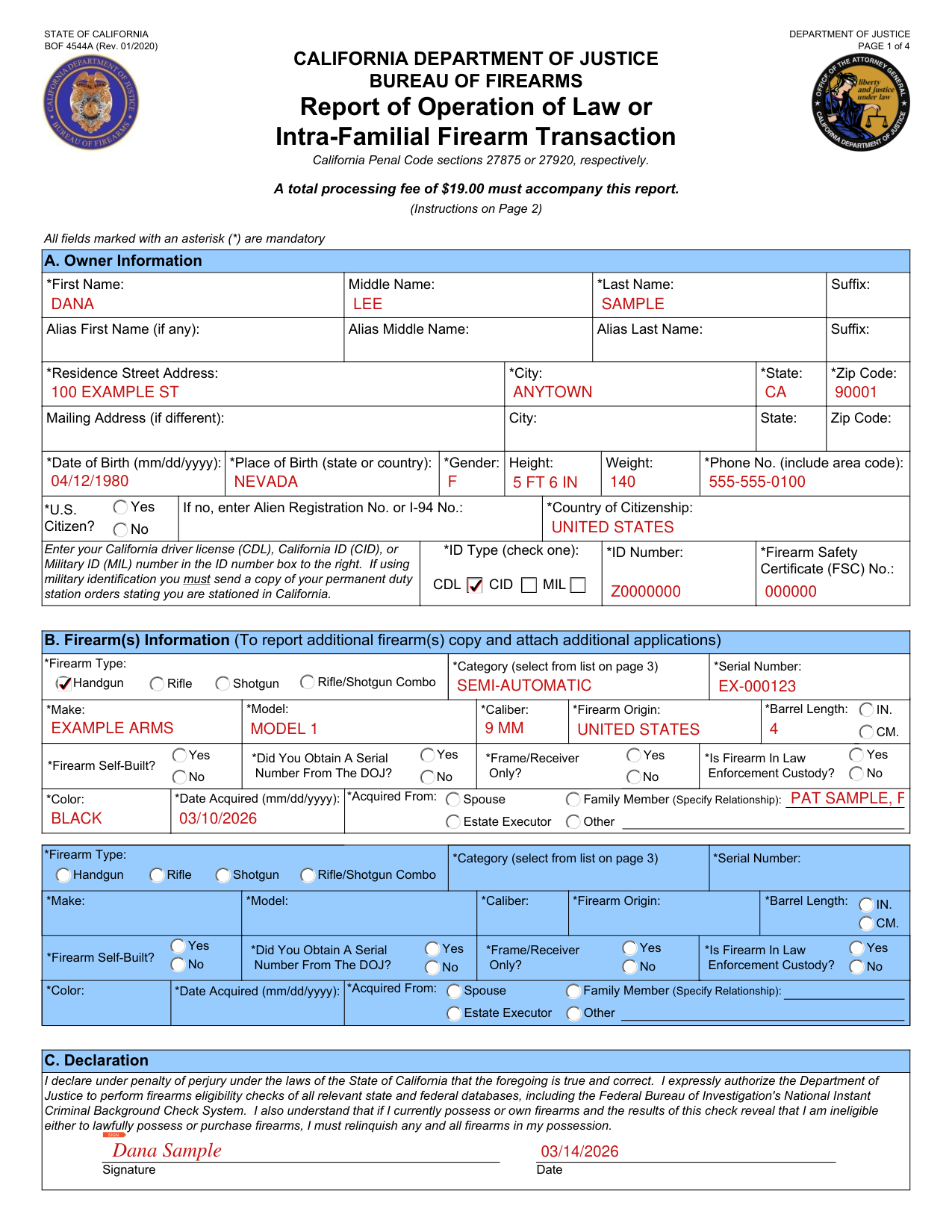
A filled-in Form BOF 4544A example: a parent's handgun reported by a family member
How to fill out Form BOF 4544A, box by box
A. Owner Information
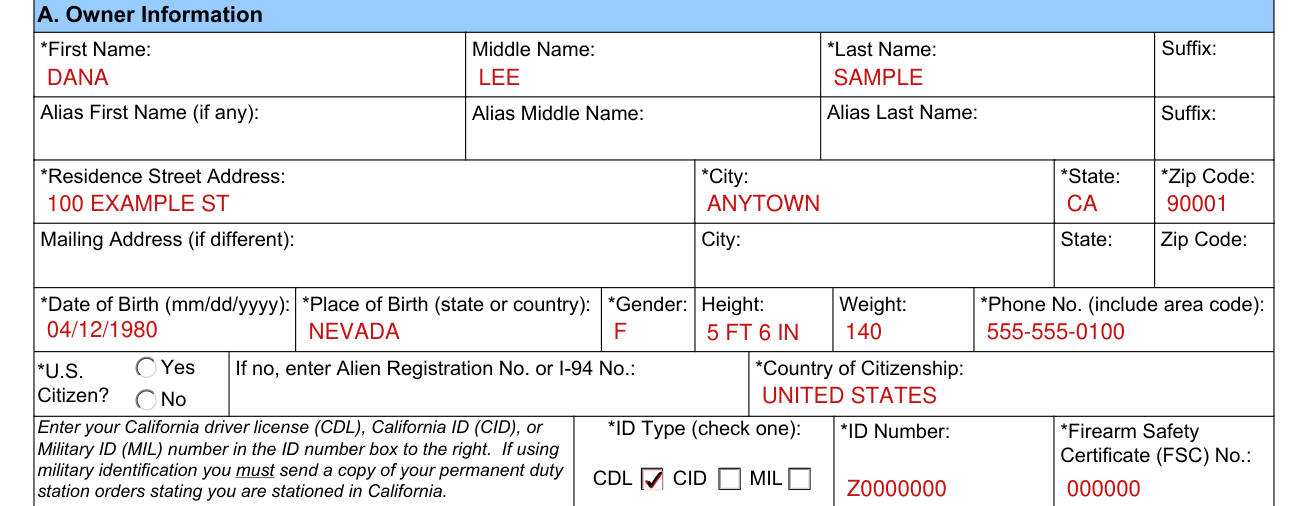
Enter the information as requested.
All fields marked with an asterisk (*) are mandatory: *First Name, Middle Name, *Last Name and Suffix; Alias First Name (if any), Alias Middle Name, Alias Last Name and Suffix; *Residence Street Address, *City, *State and *Zip Code.
Mailing Address (if different): City, State and Zip Code.
Enter *Date of Birth (mm/dd/yyyy), *Place of Birth (state or country), *Gender, Height, Weight and *Phone No. (include area code).
*U.S. Citizen? If no, enter Alien Registration No. or I-94 No.: *Country of Citizenship:
ID Type and ID Number

Enter your California driver license (CDL), California ID (CID), or Military ID (MIL) number in the ID number box to the right. If using military identification you must send a copy of your permanent duty station orders stating you are stationed in California.
If you are not actively stationed in California, pursuant to Penal Code sections 28160, subdivision (a)(22), and 16400, a California driver license or identification card is required in order to have the firearms recorded in your name.
*ID Type (check one): *ID Number: *Firearm Safety Certificate (FSC) No.:
B. Firearm(s) Information
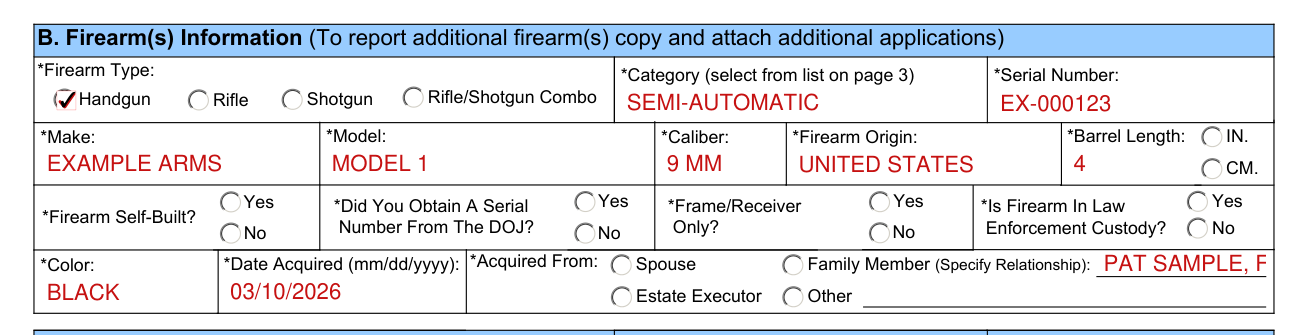
For each firearm, you must provide the identification information requested.
If reporting more than two firearms, attach additional copies of this form as needed.
Firearm Type: Handgun, Rifle, Shotgun or Rifle/Shotgun Combo
Category: Bolt Action, Lever Action, Pump Action, Semi-Automatic, Single Shot, Carbine, Over and Under, Revolver, Derringer, Double Barrel, 3 Barrels, 4 or More Barrels
Serial Number Usually located on the frame of a handgun, or the receiver of a long gun. May be all numeric or a combination of alpha and numeric characters. (e.g., 98765, US54321G)
Make The manufacturer of the firearm. (e.g., Remington, Winchester, Glock, Smith & Wesson). If your firearm is self-built, the Make should be listed as U.S.
Model: The model name of the firearm. (e.g., 870 Express, Model 70, 17C, 29-10)
Caliber The caliber of the firearm. (e.g., 12 gauge, .308 Winchester, 9 mm, .44 Magnum). If your firearm has more than one caliber, please list them all.
Barrel Length Enter the barrel length as stated either in your owner's manual, manufacturer's website, or measure the barrel length by closing the action of the firearm and inserting a wooden dowel down the barrel until it stops. Mark the dowel with a pen at the muzzle. Remove the dowel and measure the distance between the inserted end of the dowel and the pen mark.
Firearm Origin: The country of origin of the firearm. (e.g., United States, Russia, China, Italy)
Date Acquired The date you, the person submitting this report, took possession of the firearm.
Acquired From Intra-Familial: Enter the name and relationship of the person from whom you obtained possession of the firearm. Operation of Law: Enter the condition under which you obtained the firearm (e.g., as an executer of an estate, as a trustee in a bankruptcy; as a secured creditor)
C. Declaration

You must sign and date the declaration on this report.
By signing you declare under penalty of perjury under the laws of the State of California that all of it is true and correct. You expressly authorize the Department of Justice to perform firearms eligibility checks of all relevant state and federal databases, including the Federal Bureau of Investigation's National Instant Criminal Background Check System. You also understand that if you currently possess or own firearms and the results of this check reveal that you are ineligible either to lawfully possess or purchase firearms, you must relinquish any and all firearms in your possession.
Common questions about Form BOF 4544A
Where do I file it?
Mailed to: Department of Justice Bureau of Firearms - OL & IF P.O. Box 820200 Sacramento, CA 94203-0200
Are there fees?
A total processing fee of $19.00 must accompany this report. (checked October 21, 2026)
When is this form not the right one?
This form may not be used to report ownership of assault weapons defined in Penal Code sections 30510 through 30530. It is the responsibility of the applicant to determine if the firearm being reported is an assault weapon.
Sources
[1] Form BOF 4544A (Rev. 01/2020), California Department of Justice Bureau of Firearms (the Official source link on this page).